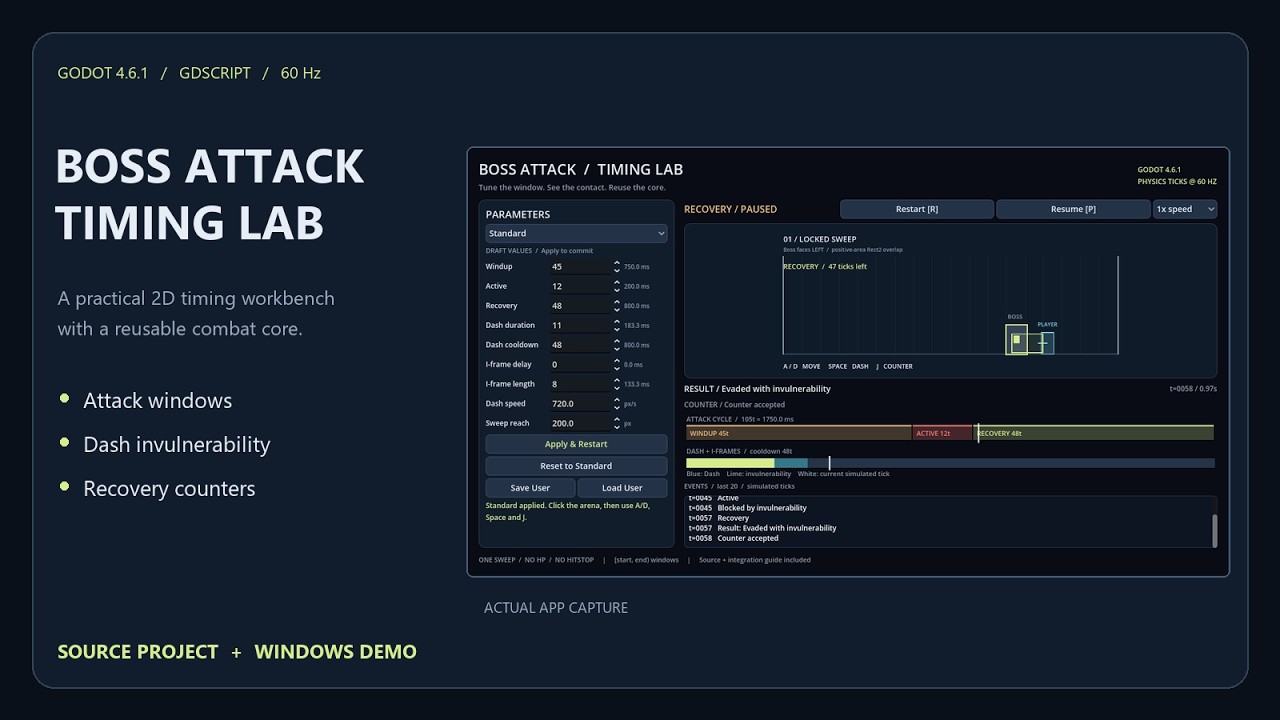
Boss Attack Timing Lab — Visualize attack windows and dash i-frames in Godot 4
Hi everyone!
I’ve been experimenting with boss combat timing in Godot, particularly how attack phases and dash invulnerability affect whether a player gets hit.
One challenge I kept running into was understanding why a particular interaction succeeded or failed. Was the dash too early? Did the invulnerability end before the attack? Was the player still overlapping the hitbox?
So I put together Boss Attack Timing Lab, a small, interactive timing workbench built with Godot 4.6.1.
What does it do?
The tool lets you experiment with:
-
Boss attack phases: Adjust windup, active attack, and recovery timing.
-
Dash invulnerability: Configure invulnerability separately from dash movement.
-
Visual debugging: Observe hitboxes, combat states, and timing timelines.
-
Event logging: See when contacts hit, get blocked, or counters are accepted.
-
Controlled testing: Pause, restart, use presets, or slow the simulation to 0.25× speed.
For example, you can compare a dash with 11 invulnerability frames versus 0, using the same scripted input timing, and observe how the collision outcome changes.
The goal is to make timing behavior easier to inspect before adapting it to a larger combat system.
Free demo and source project
I’ve released a free Windows demo so anyone interested can experiment with the timing controls without installing Godot.
There’s also a $7.99 editable Godot source toolkit, including the GDScript timing engine, integration example, documentation, and automated tests.
Project page (free demo + source):
A short 24-second walkthrough is also available on the project page.
Current limitations
This is a standalone timing workbench, not a complete combat system or Godot editor plugin.
It uses discrete rectangular collision checks rather than swept physics, and integration into an existing project requires some adaptation. The current release targets Godot 4.6.1, with the standalone demo built for Windows x64.
I used AI assistance during code development and documentation. The release also includes automated verification tests.
I’d appreciate your feedback!
I’m particularly interested in two questions:
-
Would a tool like this be useful when prototyping boss fights or tuning dodge mechanics?
-
What’s the biggest obstacle you’d expect when integrating this kind of timing system into your own project?
Even if the tool isn’t something you’d personally use, I’d be interested to hear how you approach timing and hitbox debugging in Godot.
Thanks for taking a look!
YouTube: