Broken interface

Godot Version

Godot Engine v4.5.1.stable.fedora

Question

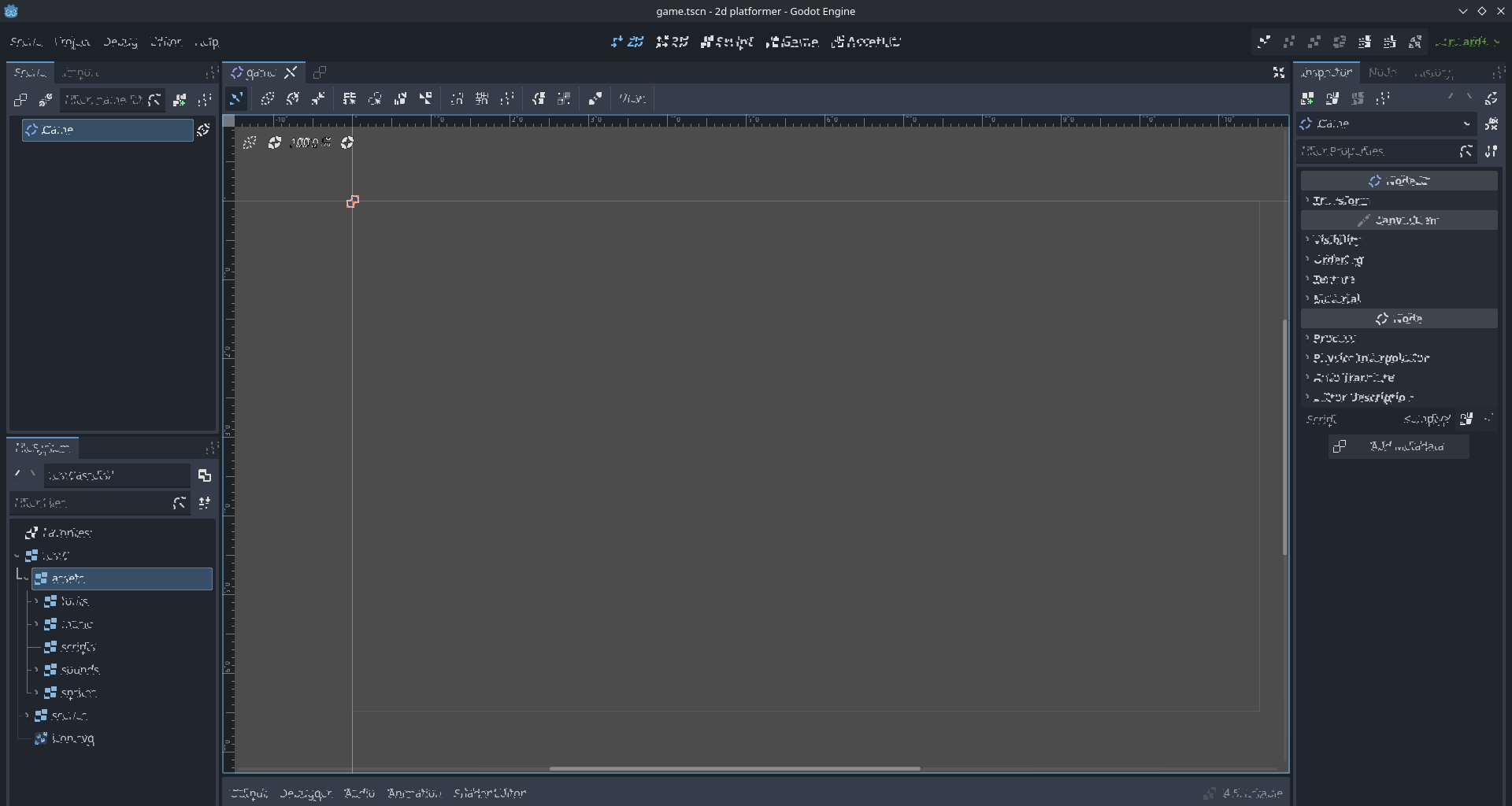
When I’m using Godot, in a minute or so, out of nowhere, the interface changes and all letters, icons and images get scrambled as in the image below.

I’ve tried altering the following configurations on the Editor Settings but so far nothing worked:

  1. Change V-Sync Mode in Interface > Editor
  2. Change Single Window Mode in Interface > Editor
  3. Enabled/Disabled Prefer Wayland in Run > Platforms

My system:

  • CPU: Core i7
  • RAM: 16 GB
  • GPU: nVidia GTX 1060m
  • OS: Fedora Linux 43 with KDE plasma 6.5 as desktop environment

More context about the problem

I’m learning Godot and I followed a tutorial on Youtube and nothing bad happened.

Now I’m following a second tutorial (this one https://www.youtube.com/watch?v=LOhfqjmasi0) and this problem started. If I open the game I developed on the 1st tutorial, this error doesn’t occur. It happens only on the game of the 2nd tutorial.

I’d appreciate if the community could help me solve this, as I’m liking Godot and the idea of making games myself.

Thank you in advance.

It’s really odd…

Looks like someone put a shader on the whole interface.
Have you tried using another version?

That looks to me like memory corruption of some sort. You might consider running memtest86 on your machine, and also (if you have one available) a different GPU. Personally, I tend to lean towards AMD GPUs when working on Linux; they’re a lot more stable/reliable due to having a longer history of actual open source drivers.
1 Like

This is a GPU driver issue. It has come up many times.
Have a look at this reddit thread

1 Like

Hi, guys. I tested your suggestions (or most of them).

Here’s what I’ve done:

  • nVidia drivers were already updated
  • Tried running on older Godot version (Godot 3). Project didn’t open because it was created in Godot 4.
  • Uninstalled and installed via flatpacks
  • Installed via Steam

So far, nothing worked. :frowning:

I’ll try dual-booting to a different Linux distro that doesn’t use Wayland as display server. I’ll keep you guys updated in case I find a solution.

Try a different renderer. From the command line pass either --rendering-method mobile or --rendering-method gl_compatibility.

1 Like

Thank you so much. This actually worked. I’ve been using it for some time and it’s not breaking anymore.

I added --rendering-method gl_compatibility to the command line arguments when opening Godot.

1 Like

This topic was automatically closed 30 days after the last reply. New replies are no longer allowed.