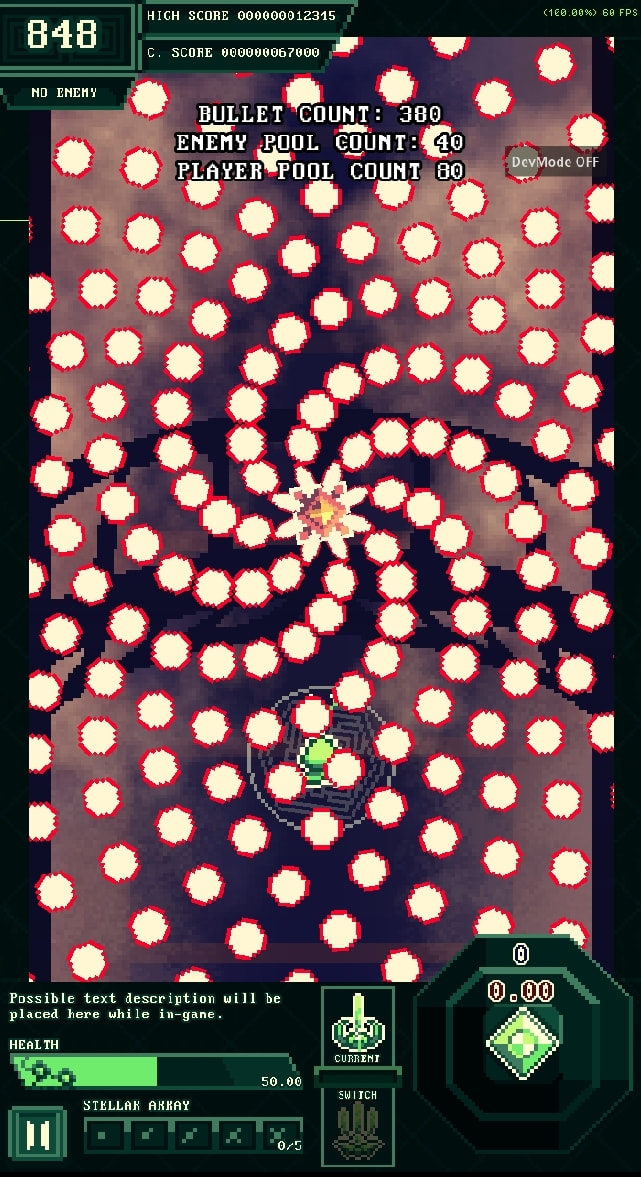
I already tried PhysicsServers… I followed a guide by GDQuest about bullet optimization, and i encountered some bottlenecks…
Sometimes the bullet collides with the player multiple times in one frame
Having just 100 bullets use the PhysicsServers resulted in my FPS tanking
I think the issue is I just am not knowledgeable enough to make this method work. So, this is my current Bullet Manager script instead that checks collisions:
func check_collisions() → void:
if not is_instance_valid(GameManager.player):
return
for b: EnemyBullet in active_enemy_bullet_pool:
	if not is_instance_valid(b):
		continue

	var player_distance: float = GameManager.player.global_position.distance_squared_to(b.global_position)

	var graze_r: float = GRAZE_RADIUS + b.collision_size()
	var inside_graze: bool = player_distance <= graze_r * graze_r
	if inside_graze and not b.has_grazed:
		GameManager.player.graze_increase(1)
		b.has_grazed = true
	elif not inside_graze and b.has_grazed:
		b.has_grazed = false

	var hurt_r: float = HURT_RADIUS + b.collision_size()
	var inside_hurt: bool = player_distance <= hurt_r * hurt_r
	if inside_hurt and not b.has_hit_player:
		GameManager.player.damaged(b.damage_player())
		b.has_hit_player = true
	elif not inside_hurt and b.has_hit_player:
		b.has_hit_player = false

	var broad_r: float = BROAD_RADIUS + b.collision_size()

	if is_instance_valid(GameManager.shield) and GameManager.shield.enabled == true:
		var shield_distance: float = GameManager.shield.global_position.distance_squared_to(b.global_position)

		var shield_r: float = SHIELD_RADIUS + b.collision_size()
		var inside_shield: bool = shield_distance <= shield_r * shield_r
		if inside_shield and not b.has_been_reflected:
			var shield_result: bool = b.shield_reflected(GameManager.shield.global_position)
			if shield_result == false:
				GameManager.shield.destroyed()
			b.has_been_reflected = true
		elif not inside_shield and b.has_been_reflected:
			b.has_been_reflected = false

		if shield_distance > broad_r * broad_r:
			continue

	if player_wave_bullet_pool.size() > 0:
		for pb: PlayerBullet in player_wave_bullet_pool:
			var wave_distance: float = pb.global_position.distance_squared_to(b.global_position)
			var wave_r: float = WAVE_RADIUS + b.collision_size()
			var inside_wave: bool = wave_distance <= wave_r * wave_r
			if inside_wave and not b.has_been_slowed:
				b.movement_slowed(200.0, Vector2.UP)
				b.has_been_slowed = true
			elif not inside_wave and b.has_been_slowed:
				b.has_been_slowed = false

	if player_distance > broad_r * broad_r:
		continue
My current collision script is just distance squared comparisons. Result is 400-500 bullets at 60 fps..
Wow! That is some high quality sprites I would like to admire! The game you’re developing is probably great. Unfortunately, I do not know how to help you. It’s just that I’ve noticed your post and the quality of the screenshot game is really good.
I’ve found quite weird thing in your uh… description.
“Bullet Movement and Logic is done inside each bullet”
and goal is “1000-2000 Bullets”.
Isn’t that would mean there would be 1000 scripts attached to each instantiated bullet?! This is quite hard for the CPU to do all of that… I think. I mean no one does that uh that’s quite weird.
I mean perhaps it is optimized that it is possible to have 300-400 max bullets before any FPS drop but it’s still weird to have something like that.
Have you tried using the Profiler yet? The slowdown may be in a function you haven’t even considered yet, or could be related to memory management (creating/destroying so many bullet nodes + assets).
You can nest some of this; presumably if the player isn’t inside the graze radius they’re also not inside the hurt radius, so you could skip that test.
More importantly, though, I think you could push a lot more of this into native collision, which is way faster than gdscript. Orders of magnitude faster.
You can give each bullet multiple colliders; one for graze range, one for hurt range, one for broad range… most of this logic (including the distance calculations) moves into compiled code, and you only need to check results in gdscript.
yeah that’s my next goal… I’ll transfer Bullet Movement and Logic to the Bullet Manager as well.
And since I transform and modulate the bullets individually too, I was planning to use shaders and multimesh for those and see if there’s any improvement in the performance.
I’m in the Mobile version of Godot… testing the game wouldn’t result in a different window being used, basically I can’t see the Profiler while testing the game unless I use a breakpoint…
yes yes, I’ll try doing those. However… the variable declarations were inside the loop because those variables are meant to be unique for each bullet… and I don’t really know how to do that if the variable is declared outside as they might start sharing the same variable…
How would they be shared if they are initialized/assigned every step of the loop?
You’re also doing other quite wasteful things, like calling the same function with unchanged arguments every step, where a single call before the loop would suffice.
I don’t really know what you mean by native collisions… but if it means node-based Area2D collisions and such, that was my old setup before I used the Bullet Manager…
Also, I’ll try to explain how my mind worked for the different radii…
Player Ranges:
Broad Range is the distance between player and bullet that says “if the bullet is outside this range, don’t calculate anything else anymore”
Graze Range is attached to the player, it’s a Bullet Hell game so this circle is just following the player, and it also says “if outside this range, don’t calculate distance from the player’s hurtbox”
Hurt Range is, well, the distance from the player’s Hit/hurtbox
Ability Ranges
Shield Range shows the distance between the shield ability and the bullets, this shield is instantiated when used and freed after (hence the use of the is_instance_valid() checcker to avoid errors)
Wave Range shows the distance between the enemy bullets and unique player bullets. This ability “slows down” or pushes the bullets back by (push_back_speed, direction). This ability is actually the worst opti,ized in my game… as in 500 bullets, if all 500 are clumped in one small area, all of them gets hit by the wave ability… and that’s bad, because usually it’s 10 Wave Bullets so that’s a lot… 5,000 distance calculations…
to improve some of this, I was also planning to use a somewhat like Hash Grid as I found online… where if enemy bullets are in one spot together (with barely a distance from one another, maybe just 6-12 px), then all of them will have one collision distance check only, and I’ll just loop inside that group to see how many are inside… Like 1,000 bullets as one collision check… if that makes sense and is actually possible…
You really shouldn’t be doing anything in the script code except creating/destroying and moving the bullets. Engine’s collision system will almost always be faster than anything you can do in the script, even if you only do distance checks.
that’s really where I’m confused at… I did realize there’s a lot of redundant checks, but I don’t know how to improve on it… Can you please re-write my current collision code? I really want to improve the readability and performance of this…
but giving each bullet an area2d and collision node was the issue in my old setup… and I really don’t understand how to setup the PhysicsServers if I wanted to use those in my bullet manager
for b: EnemyBullet in active_enemy_bullet_pool:
	var broad_r: float = BROAD_RADIUS + b.collision_size()
	var shield_r: float = SHIELD_RADIUS + b.collision_size()
Do this:
var b_collision_size: float
var broad_r: float
var shield_r: float

for b: EnemyBullet in active_enemy_bullet_pool:
	b_collision_size = b.collision_size()
	broad_r = BROAD_RADIUS + b_collision_size
	shield_r = SHIELD_RADIUS + b_collision_size
Every local var declaration costs you a memory allocation operation and a memory free operation at the end of scope (in you case the loop body). Those operations can get relatively expensive if you do many of them each frame. So better to eliminate them.