As far as I know, you can very much do this and godot won’t care.
However, I’d question if it’s actually necessary. For most games, unless it’s a MASSIVE game (especially multiplayer games with a server component as well), it’s overkill.
But yes, it’s supported to have multiple projects in a signle solution.
You code needs to be in the root directory or one of its sub directories. If it’s not in the root, it will not work when exported.
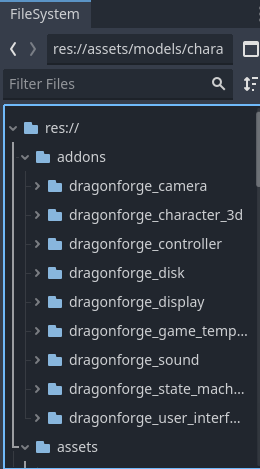
Having said that, if you really want to break it out, the Godot way of doing things is to create plugins and put each sub project in the assets folder. Then you can use all the plugin functionality.
This is what a new project I started today looks like:
I’ve worked on all these addons over time. (They’re all on GitHub open source - see my profile.) It allows me to spin up new projects very quickly.
@tibaverus question is worth considering though. Package management for Godot SUCKS. So it is not trivial to maintain this many packages. For me, it’s worth it. But I do a lot of game jams.
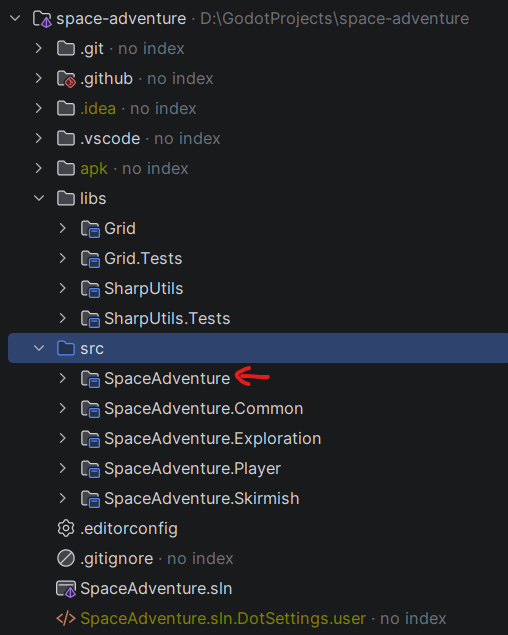
This is how I organize my Godot projects.
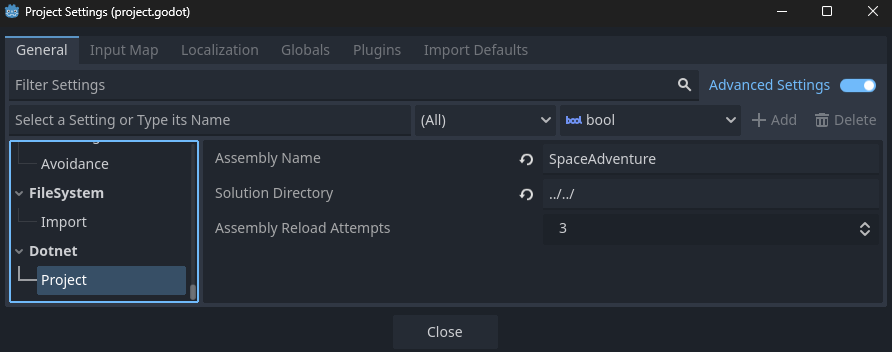
Godot automatically puts the solution file inside the project folder. So, I place Godot project in for example src folder, then I put solution file outside the Godot project folder and src, like this (Solution Directory option):
Space Adventure is the Godot project folder.
Remember: your solution name should match the Godot project’s assembly name.
Otherwise, if you regenerate the C# solution, Godot will create a new solution with the assembly name instead.