Godot Version
Godot Mono 4.7 on Arch Linux
Question
So I’ve just started a new C# project and I’ve only made the main scene, the player scene, and a basic player script attached to the player scene, and now when I try to build & run my project I get ERROR: An EditorPlugin build callback failed. and I don’t know what that means.
The player script itself only has template code that was generated for my player scene (which is a CharacterBody2D) so I don’t understand what it could be that’s causing this. If it’s any relevance, I also get these error messages every time I open my project from godot’s project selector thingy, yet they were appearing even back when my project was able to build & run:
ERROR: Condition “err != VK_SUCCESS” is true. Returning: ERR_CANT_CREATE
ERROR: Condition “err != OK” is true. Returning: err
Any/all help is appreciated 
Do you have dotnet installed properly?
If you open up a terminal window, and type in: dotnet --version do you get any output?
Actually this might be a display driver issue. Does the same thing happen if you run Godot with the compatibility renderer?
Writing dotnet --version gives
You must install or update .NET to run this application.

App: /usr/share/dotnet/sdk/10.0.112/dotnet.dll
Architecture: x64
Framework: ‘Microsoft.NETCore.App’, version ‘10.0.12’ (x64)
.NET location: /usr/share/dotnet/

The following frameworks were found:
6.0.36 at [/usr/share/dotnet/shared/Microsoft.NETCore.App]
8.0.31 at [/usr/share/dotnet/shared/Microsoft.NETCore.App]

Learn more:
https://aka.ms/dotnet/app-launch-failed

To install missing framework, download:
https://aka.ms/dotnet-core-applaunch?framework=Microsoft.NETCore.App&framework_version=10.0.12&arch=x64&rid=arch-x64&os=endeavouros
yet I’m pretty sure I already have .NET installed & updated, running pacman -Ss “dotnet” | grep “installed” gives
extra/dotnet-host 10.0.12.sdk112-1 [installed]
extra/dotnet-runtime-6.0 6.0.36.sdk136-3 [installed]
extra/dotnet-runtime-8.0 8.0.31.sdk131-1 [installed]
extra/dotnet-sdk 10.0.12.sdk112-1 [installed]
extra/dotnet-sdk-6.0 6.0.36.sdk136-3 [installed]
extra/dotnet-sdk-8.0 8.0.31.sdk131-1 [installed]
extra/dotnet-targeting-pack 10.0.12.sdk112-1 [installed]
extra/dotnet-targeting-pack-6.0 6.0.36.sdk136-3 [installed]
extra/dotnet-targeting-pack-8.0 8.0.31.sdk131-1 [installed]
I don’t know what you mean by compatibility renderer…
Based on the error message, it seems like your GPU either doesn’t support Vulkan, or your GPU drivers are broken.
You can launch Godot with OpenGL instead by opening it from your terminal with the following arguments:
--rendering-driver opengl3
Give it a go and see if that fixes the issue.
I tried that but I got the same errors when building, I’m pretty sure vulkan does work on my machine because it was able to build & run up until a certain point, and if I create a blank project I can build/run that too
Can you create a MRP and post it as a bug report on GitHub for Godot?
I’m not entirely sure on this but don’t versions above 4.5 require the dotnet 9 or greater runtime version?
I’m not sure how Arch packages the sdk, but from the listing you provided of installed packages I notice there is a separate package for 8 and 6 runtimes, however none for version 10?
If the runtime stuff is included in the 10 sdk then this is probably not the cause, but if it isn’t you may want to try installing it.
Current version of Godot uses dotnet 8, so that should be fine, and the error messages specifically mention Vulkan.
Sorry didn’t see any error messages posted.
In Arch i believe
ls /usr/share/vulkan/icd.d/
will list Vulkan implementations currently installed. And if vulkan-tools are installed
one can run the following to get relevant system information.
vulkaninfo --summary
Which should print information about the graphics card if Vulkan is working.
So I started recreating my project from scratch as a copy (an ‘MRP’) and the moment that I attach a script with template code for a CharacterBody2D node, that’s when I can no longer build & run.
vulkaninfo –summary gives the following which doesn’t seem good, not sure how to fix this:
ERROR: [Loader Message] Code 0 : setup_loader_term_phys_devs: Failed to detect any valid GPUs in the current config
ERROR at /usr/src/debug/vulkan-tools/Vulkan-Tools/vulkaninfo/./vulkaninfo.h:249:vkEnumeratePhysicalDevices failed with ERROR_INITIALIZATION_FAILED
Do you happen to own another PC where you can test this project on? This looks like an issue with your specific system and its display drivers. What kind of machine is it? Laptop? What GPU?
The error means that the Vulkan loader cannot find a functioning ICD for you graphics card.
I suggest having a look at the Arch wiki for Vulkan it’s likely you’ll find the answer there.
As a quick work around follow tibaverus’ advice to start in compatibility mode.
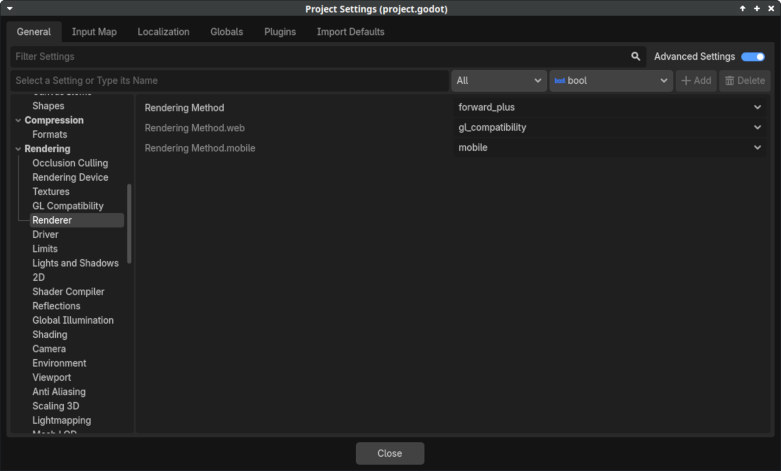
Which will start Godot itself in compatibility mode, but it will switch to Vulkan to run the project if the renderer is not also changed in the project. Change
forward_plus
to
gl_compatability
Save the settings and restart. See if that helps.