Godot Version
Godot 4.4
Question
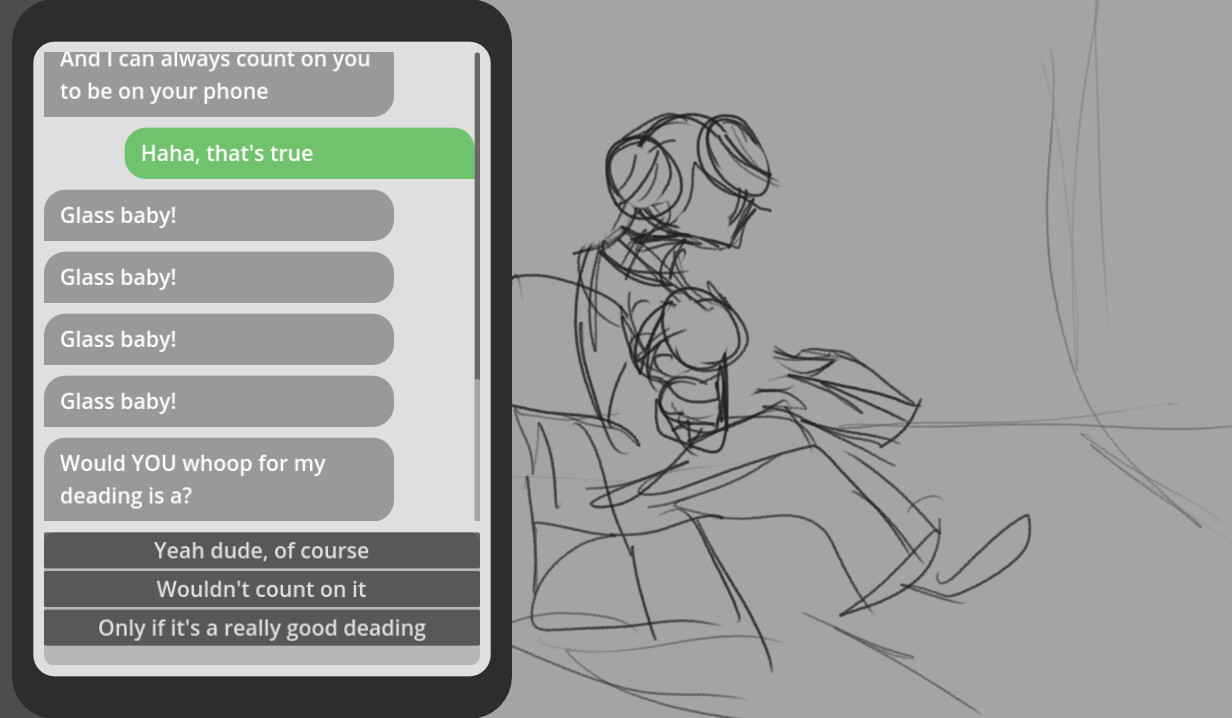
I am trying to make a timer that works with Dialogue Manager that allows a wait period between dialogue options. When the timer is up, I want the next line and accompanying image to automatically display. With the code I currently have, the preceding line gets displayed an extra time, the next line is skipped, and the second-to-next line is displayed.
Here is the code for the timer I have been using:
func wait_forever():
	awaiting_response = true
	await get_tree().create_timer(3).timeout
	get_next_line()
	push_message()
	awaiting_response = false
Here is the code for the “get_next_line” and “push_message” functions:
func get_next_line(start: bool = false) -> void:
	if current_response:
		current_line = await dialogue.get_next_dialogue_line(current_response.next_id)
		current_response = null
		return
	if current_line:
		current_line = await dialogue.get_next_dialogue_line(current_line.next_id)
		return
	if start:
		current_line = await dialogue.get_next_dialogue_line(start_dialogue_title)
func push_message(text: String = "", style: String = "other") -> void:
	if not current_line:
		awaiting_response = false
		return
	if current_line.text or text:
		var bubble = bubble_scene.instantiate()
		bubble.style = style
		bubble.text = text if text != "" else current_line.text
		messages.add_child(bubble)
	if current_line.responses:
		show_options(current_line.responses)
		awaiting_response = true
	await get_tree().process_frame
	messages_scroll.scroll_vertical = 999999999
Here is the script in DialogueManager. Each dash is a separate choice, “Glass Baby” is only coded to display twice:
Midward: And I can always count on you to be on your phone
- Haha, that's true
	do change_to_panel5()
	Midward: Glass baby!
	do change_to_panel6()
	Midward: Glass baby!
- Hey!
	do change_to_panel5()
	Midward: Glass baby!
	do change_to_panel6()
	Midward: Glass baby!

do change_to_panel7_intense()
do wait_forever()
Midward: Hey Grey
do change_to_panel8()
Midward: Would YOU whoop for my deading is a?
- Yeah dude, of course
- Wouldn't count on it
- Only if it's a really good deading
And here is what the result in the project looks like: