Now I’m trying to fix the famous camera jitter issue when rotating, which happens due to a mismatch between FPS and physics ticks. In my project, I have enabled Physics Interpolation and handle camera rotation in _physics_process. But Godot is still complaining that Interpolated Camera3D triggered from outside physics process.
Here are all the scripts related to the camera’s rotation: 1) mouse_capture.gd
class_name MouseCaptureComponent extends Node

@export var debug : bool = false

@export_category(“References”)
@export var camera_controller : CameraController

@export_category(“Mouse Capture Settings”)
@export var current_mouse_mode : Input.MouseMode = Input.MOUSE_MODE_CAPTURED
@export var mouse_sensitivity : float = 0.05

var _accumulated_mouse_input : Vector2 = Vector2.ZERO
var _mouse_input_to_process : Vector2 = Vector2.ZERO


func _unhandled_input(event: InputEvent) → void:
    if event is InputEventMouseMotion and Input.mouse_mode ==    Input.MOUSE_MODE_CAPTURED:
        _accumulated_mouse_input.x += -event.screen_relative.x * mouse_sensitivity
        _accumulated_mouse_input.y += -event.screen_relative.y * mouse_sensitivity


func _physics_process(_delta: float) → void:
    _mouse_input_to_process = _accumulated_mouse_input
    _accumulated_mouse_input = Vector2.ZERO
    if _mouse_input_to_process != Vector2.ZERO:
	    camera_controller.update_camera_rotation(_mouse_input_to_process)


func _ready() → void:
    Input.mouse_mode = current_mouse_mode
camera_controller.gd
class_name CameraController extends Node3D

@export var debug : bool = false

@export_category(“References”)
@export var player_controller : PlayerController
@export var component_mouse_capture : MouseCaptureComponent

@export_category(“Camera Settings”)
@export_group(“Camera Tilt”)
@export_range(-90, -60) var tilt_lower_limit : int = -90
@export_range(60, 90) var tilt_upper_limit : int = 90

var _rotation : Vector3


func update_camera_rotation(input: Vector2) → void:
    _rotation.x += input.y
    _rotation.y += input.x
    _rotation.x = clamp(_rotation.x, deg_to_rad(tilt_lower_limit),   deg_to_rad(tilt_upper_limit))

    var _player_rotation = Vector3(0.0, _rotation.y, 0.0)
    var _camera_rotation = Vector3(_rotation.x, 0.0, 0.0)

    transform.basis = Basis.from_euler(_camera_rotation)
    player_controller.update_rotation(_player_rotation)

    _rotation.z = 0.0
player_controller.gd
class_name PlayerController extends StairsCharacter3D

@export var debug : bool = false

@export_category(“References”)
@export var camera_controller : CameraController
@export var camera_effects : CameraEffects


func update_rotation(rotation_input) → void:
    global_transform.basis = Basis.from_euler(rotation_input)
Some information on how this is famous would be helpful, as I’ve never heard of this problem on these forums, nor had this problem myself.
How come? Was it not working without this on? What were you seeing before you did this?
Copy and paste the exact error message, including any additional debug info like line numbers (if they exist).
Then tell us what Interpolated Camera3D is, because it’s not a default object, and none of your scripts are named that.
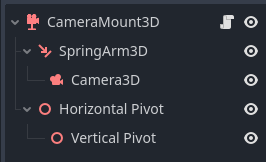
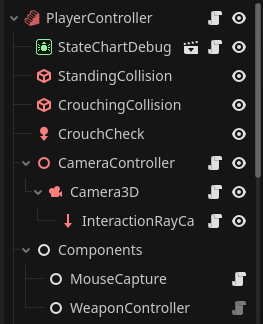
Show us a screenshot of your scene tree. Because CameraController is a Node3D, not a Camera3D. So how are they attached?
What does StairsCharacter3D extend?
Ultimately, it seems to me that you have a somewhat complicated setup. Here’s what my first person camera controller looks like (simplified because it handles mouse and gamepad input for 1st and 3rd person cameras):
class_name CameraMount3D extends Node3D

## How far up the camera will rotate in degrees.
@export var upwards_rotation_limit: float = 0.0
## How far down the camera will rotate in degrees.
@export var downwards_rotation_limit: float = 0.0

@onready var spring_arm_3d: SpringArm3D = $SpringArm3D
@onready var camera_3d: Camera3D = $SpringArm3D/Camera3D
@onready var horizontal_pivot: Node3D = $"Horizontal Pivot"
@onready var vertical_pivot: Node3D = $"Horizontal Pivot/Vertical Pivot"


func _physics_process(delta: float) -> void:
	_update_rotation()


func _update_rotation() -> void:
	horizontal_pivot.rotate_y(Controller.look.x)
	vertical_pivot.rotate_x(Controller.look.y)
	vertical_pivot.rotation.x = clampf(vertical_pivot.rotation.x,
		deg_to_rad(upwards_rotation_limit),
		deg_to_rad(downwards_rotation_limit)
	)
	_apply_rotation()


func _apply_rotation() -> void:
	spring_arm_3d.rotation.y = horizontal_pivot.rotation.y
	camera_3d.rotation.x = vertical_pivot.rotation.x
func _unhandled_input(event: InputEvent) -> void:
	if Controller.enable_3d_look and Input.mouse_mode == Input.MOUSE_MODE_CAPTURED and event is InputEventMouseMotion:
		Controller.look = -event.relative * sensitivity
It works fine. You can see the full code with a working example in my Character3D plugin.
basically anything to do with the camera rotation should be separated from the physics body, and the position of the camera should be updated to match the interpolated position of the physics body. I commented the code in my GitHub pretty well and it’s basically just an extension to the generic 3D controller code so it should be easy to follow. It is dead smooth camera even at 10fps physics tick
If its not famous - my fault, but I saw some comments on YT about this problem in other engines…
If I untick “Physics Interpolation” then I see some jittery movement.
Check this video to see the difference, its about my problem: https://www.youtube.com/watch?v=zfIuaRzNti4
W 0:00:15:008 _notification: [Physics interpolation] Interpolated Camera3D triggered from outside physics process: “/root/MainScene/CurrentLevel/test_map/PlayerController/CameraController/Camera3D” (possibly benign).
<C++ Source> scene/3d/camera_3d.cpp:216 @ _notification()
Interpolated Camera3D is not an additional object or something (atleast I didn’t create it somewhere), it’s just automatically created by the engine (I guess??).
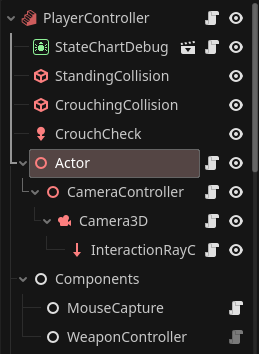
you also need to separate the rotating nodes from your main physics object that controls player movement, and interpolate the position of that node manually like so:
extends CharacterBody3D

const SPEED: float = 5.0
const JUMP_VELOCITY: float = 4.5

@onready var actor: Node3D = $Actor


func _ready() -> void:
	# Separate actor transform to allow manual interpolation
	actor.top_level = true

	# Disable actor physics interpolation as we will manually interpolate
	actor.physics_interpolation_mode = Node.PHYSICS_INTERPOLATION_MODE_OFF


func _process(_delta: float) -> void:
	# Update actor position to follow the FirstPersonController
	if is_physics_interpolated_and_enabled():
		# If the project settings use physics interpolation
		actor.position = get_global_transform_interpolated().origin
	else:
		# If no physics interpolation, no need to use interpolated position
		actor.position = global_transform.origin


func _physics_process(delta: float) -> void:
	# Add the gravity
	if not is_on_floor():
		velocity += get_gravity() * delta

	# Handle jump
	if Input.is_action_just_pressed("jump") and is_on_floor():
		velocity.y = JUMP_VELOCITY

	# Get the input direction and handle the movement/deceleration
	# Use the actor global basis to determine forward direction
	var input_dir: Vector2 = Input.get_vector("move_left", "move_right",
			"move_forward", "move_backward")
	var direction: Vector3 = (actor.global_transform.basis *
			Vector3(input_dir.x, 0.0, input_dir.y)).normalized()

	if direction:
		velocity.x = direction.x * SPEED
		velocity.z = direction.z * SPEED
	else:
		velocity.x = move_toward(velocity.x, 0.0, SPEED)
		velocity.z = move_toward(velocity.z, 0.0, SPEED)
So this is useful, because we can look at the code in the Godot repo that’s throwing the error and potentially get some clues. Looking at line 216, it’s being called when the Camer3D gets the NOTIFICATION_EXIT_WORLD notification. Which means something is exiting the world . . .
		case NOTIFICATION_EXIT_WORLD: {
/*Line 216*/if (!is_part_of_edited_scene()) {
				if (is_current()) {
					clear_current();
					current = true; //keep it true

				} else {
					current = false;
				}
			}
. . . and specifically that line is checking to see if the object that threw the notification is part of the edited scene:
So, based on the error, it looks like the Camera3D is being triggered when something is leaving the scene - most likely through queue_free(), and it’s happening outside the physics process - which it has to because you cannot queue_free something in the middle of a physics tick. (It always runs at the end of the current tick, no matter when it is called.)
Having said all that, I think @wide-context may be correct about your solution. If you look at my code above, and my scene tree, I do the rotation on two Node3D objects - one each for x-axis and y-axis, and the copy those rotations onto the SpringArm3D (horizontal) and Camera3D (vertical). The separate axes are to prevent gimbal lock. And applying the rotation from separate nodes prevents weird rotation issues.
Is it okay to use two parallel _unhandled_input functions? It seems to me it would consume quite a lot of resources. (If we’re talking about the look_left_right and look_up_down functions)
Joining the discussion late and not fully up to speed so sorry if this was already discussed but in the documentation on advanced physics interpolation it says that Camera3D should not use physics and instead should be interpolated manually in _process. See here.
I used @wide-context project and did something…
Overall, everything worked, but I’m afraid I might have misunderstood something and left behind some non-obvious (to me) issues.
mouse_capture.gd
class_name MouseCaptureComponent extends Node

@export var debug : bool = false

@export_category("References")
@export var camera_controller : CameraController
@export var actor : Actor

@export_category("Mouse Capture Settings")
@export var current_mouse_mode : Input.MouseMode = Input.MOUSE_MODE_CAPTURED
@export var mouse_sensitivity : float = 0.002

var look_rotation : Vector2 = Vector2(0.0, 0.0)


func _unhandled_input(event: InputEvent) -> void:
	if event is InputEventMouseMotion and Input.mouse_mode == Input.MOUSE_MODE_CAPTURED:
		look_rotation.x -= event.relative.x * mouse_sensitivity
		look_rotation.y -= event.relative.y * mouse_sensitivity
		camera_controller.update_camera_rotation_up_down(look_rotation.y)
		actor.update_camera_rotation_left_right(look_rotation.x)


func _ready() -> void:
	Input.mouse_mode = current_mouse_mode
It looks like you’ve got everything you need in place for it to work.
A couple of things I noticed in your code:
The Actor and CameraController node scripts don’t need a reference to the MouseCapture node since your calling the update_rotation…() functions from inside the MouseCapture script.
In the update_rotation scripts you don’t need to set rotation.z = 0.0 as transform.basis = Basis() is resetting all rotation and scale to 0.0 already.
Using the input and unhandled_input functions are accessing the same input event so I don’t see how it would be significantly increasing the resources used (I could be wrong though, I’m pretty new here). I did it that way to avoid having to reference other nodes for the mouse input, but if you use mouse input for other functions as well maybe it makes sense to separate its functionality to its own node.