Hello there, I’m currently working on a little godet project and I’d like to add an “highlight” effect on my screen.
What I did was add a marker2d on, animating it with an animation player so that it “runs around” the area I want to highlight. Then i added a line2d to it, and created some code so that it would work like some kind of “trail” effect going.
I would like to add some blooming to that line2d, but I can’t find a way to. I can draw pixel art, I can create music, code in gdscript and all.. but SUCK with shaders so much ^^‘’’
To add some info, I did look around and found out it might be possible with world environment.. but that would add effects on EVERYTHING.. and I only want it on the line2d… so I tought a shader might do it?
Anyway, since I could not finde a solution on my own for the past 3 days, I tought I’d come and ask here
The best way to do this would indeed be to use shaders. You don’t have to write your own. There are two demo projects in the official repo containing shaders. You should check them out:
Hi, have you tried using a gradient texture for Line2D? You can increase the color brightness using RAW >1. Also, play with the Line2D settings material / new_canvasitemmaterial (blend mode = add)
Thanks a real lot for all the links! I’ll be sure to save them all up for future usage
I did go and look at everything, but none of the solution there works on a line2D sadly. at least not with one that dynamically generate its point as in a trail via code.
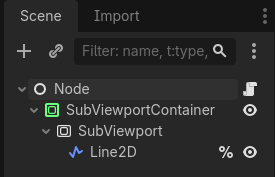
It’s just that it works on textures, and a Line2D is not by itself a texture, so you’d have to make it one by, for example, rendering it to a subviewport:
This is the node structure I’m using above. The Subviewport is the same size as the container, and has transparent_bg enabled. The shader is set on the container.
The code itself simply follows the mouse position to draw a line:
func _input(event: InputEvent) -> void:
	const MAX_POINTS: int = 25
	if event is InputEventMouseMotion:
		if line_2d.get_point_count() < MAX_POINTS:
			line_2d.add_point(event.position)
		else:
			for i: int in line_2d.get_point_count() - 1:
				line_2d.set_point_position(i, line_2d.get_point_position(i + 1))
			line_2d.set_point_position(line_2d.get_point_count() - 1, event.position)
I believe you could also modify the shader to use the screen texture instead, but the entire idea was to not touch shader code.