Is there a (semi-easy) way to generate a level file other than by using the level editor?
My (hidden object) game needs a LOT of files and dragging all those images to buttons is giving me hand cramps.
Specifics
Given a level (.tscn file) and 50 images, i want to modify the file to have 50 Texture2D objects.
In a perfect world, there’s a Godot API or library or something to do it. In theory the code exists but the thought of finding the C++ source for Godot and look for the level generator and then converting it to C# or Java to make my own level auto-generator is daunting.
If that’s not an option i can write my own hacky code generator. i’ve already done a few experiments and so far it works but i have concerns. Specifically, the resource ID.
The UID is from the image .import file so i can grab that. That part is fine. The issue is the other one, id. All i know is:
The ID is specific to the level (unlike the UUID which is global throughout the project)
i have no idea what the rules are
It’s not optional; if i leave it off, Godot says the file is corrupt
If i make a fake one (i’m testing with things like “5_12345”) Godot takes it
So far so good but i worry this will bite me down the road. Maybe the ID requires a certain format because of a check i haven’t hit yet but might happen in during runtime.
You can autogenrate the level in code and then save it as a packedscene, godot will create the .tscn file for you and then you can store it on disk somewhere
I would suggest learning about editor plugins and tool scripts. Instead of generating scene files, create a button (or as complex UI as you want) to the Godot editor that creates the level scene for you to edit further and then save.
You’re digging way too deep in the code. But I have no idea what you’re actually trying to do. Can you show some screenshots of a level you have created and some examples of some of the 50 textures? Because I think I might have some ideas for you.
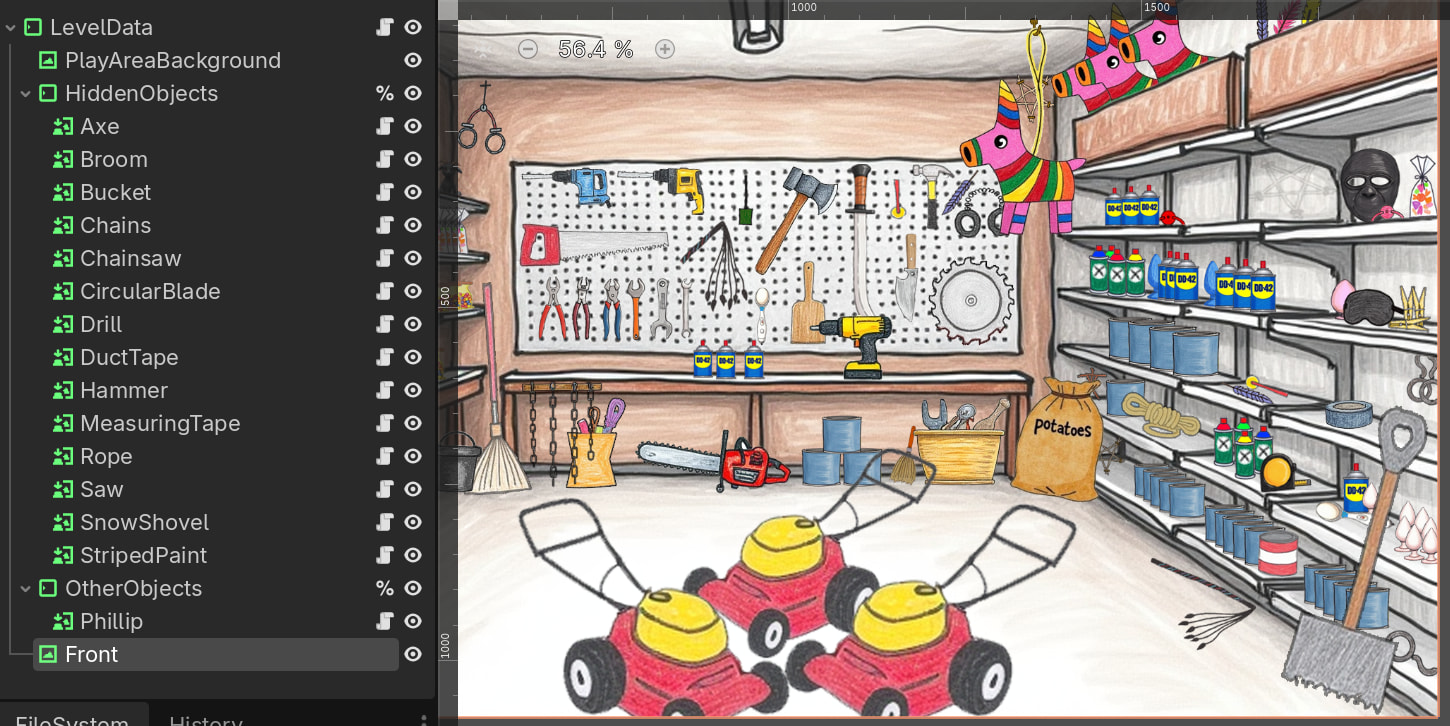
This is a hidden object game. The level is a TextureRectbackground and a bunch of TextureButton. In Photoshop i have an image with bunches of layers. Each layer is exported to a PNG. In Godot i create a new folder, copy a level template to that folder and create a directory to hold those images. In Windows i copy over the images. So now i have a scene that looks like:
Background (TextureRect)
HiddenObjects (MarginContainer)
HiddenObject1 (TextureButton)
i then duplicate the one TextureButton a bunch of times (~6 for the tutorial level, ~100 for advanced levels) and start dragging my images onto the buttons Texture Normal. Which is fine for a few images but annoying for large levels.
Other details:
The TextureButtonand image have the same name
Technically it’s my custom HiddenObject which inherits from TextureButton
The TextureButton is the same size as the screen so you don’t have to specify the size or location
i have 2-4 directories: 1 holds the hidden objects to find, the others are other things such as trees to hide behind, bonus/secret objects to find, etc.
In addition to creating buttons and assigning the image, i also want to create a text file and set a property on the object pointing to it (e.g., for the object cat i create the file cat_foundand set the object’s DialogName to cat_found); later i’ll edit that file manually (it’s the text to display when you find the object)
My goal is to automate the boring, repetitive stuff, which is mostly
Ok so what’s the size of each object? Are you exporting each image as the size of the background? If so, this is pretty easy.
You can basically make your HiddenObjectsMarginContainer into its own class. Export a variable to the folder that contains all the pieces, and have it iterate over them and create a button from each image it finds.
My ChibiAnimatedSprite2D Plugin does the same thing, except it assigns each subfolder of images to a sprite frame in an AnimatedSprite2D. It has two pieces. The first is an @export variable:
@export_dir var sprite_root_folder:
	set(value):
		sprite_root_folder = value
		if sprite_frames:
			sprite_frames = SpriteFrames.new()
			sprite_frames = null
		if value:
			if Engine.is_editor_hint():
				var scan_time: float = 0.0
				scan_time = _rename_directories()
				if scan_time > 0.0:
					print("SCAN TIME: %s" % [scan_time])
					await get_tree().create_timer(scan_time).timeout
					print("DIRECTORY SCAN COMPLETE")
				_remove_import_files()
				scan_time = _rename_files()
				if scan_time > 0.0:
					print("SCAN TIME: %s" % [scan_time])
					await get_tree().create_timer(scan_time).timeout
					print("FILE RELOAD COMPLETE")
			_load_sprite_frames()
			print_rich("[color=cornflower_blue][b]%s[/b][/color]: [b]SpriteFrames[/b] Loading Complete!" % [name])
The second is the code that loads the sprite frames:
func _load_sprite_frames() ->void:
	#if sprite_frames is null, create a new instance
	if not sprite_frames:
		sprite_frames = SpriteFrames.new()
	#delete default if it exists
	sprite_frames.remove_animation(&"default")
	#iterate through folders
	var dir = DirAccess.open(sprite_root_folder)
	if not dir:
		return
	var animation_list = dir.get_directories()
	for animation_dir in animation_list:
		# Get the animation name
		var animation_name = animation_dir.get_file().to_snake_case()
		sprite_frames.add_animation(animation_name)
		#Set it to 24 frames a second
		sprite_frames.set_animation_speed(animation_name, 24.0)
		#Set looping for looping animations
		if animation_name.contains(IDLE_ANIMATION) or \
				animation_name.contains("falling") or \
				animation_name.contains("loop") or \
				animation_name.contains("running") or \
				animation_name.contains("sliding") or \
				animation_name.contains("walking"):
			sprite_frames.set_animation_loop(animation_name, true)
		else:
			sprite_frames.set_animation_loop(animation_name, false)
		#change to the specific animation directory
		dir.change_dir(animation_dir)
		var file_list = dir.get_files()
		var path = dir.get_current_dir() + "/"

		#skip over .import files and uids and add the animation frames
		for file in file_list:
			if file.ends_with(".png"):
				sprite_frames.add_frame(animation_name, load(path + file))
		#drop back down a directory for the next loop
		dir.change_dir("..")
	#set the default animations
	set_autoplay(IDLE_ANIMATION)
	animation = IDLE_ANIMATION
Thanks everyone for the help. Using the info on EditorScript and file loading code from DragonForge i wrote my very first Godot EditorScript.
There probably better ways to do this but i’m really happy with how well the code is working. Below is the code, edited for brevity (removed error checking, stuff specific to my game, etc.)
@tool
extends EditorScript

var scene_root : Node

func _run() -> void:
	scene_root = EditorInterface.get_edited_scene_root()
	var scene_path := scene_root.scene_file_path
	var scene_directory := scene_path.get_base_dir()

	#--- Find the Containers that hold the hidden objects
	var object_containers = []
	for child in scene_root.get_children():
		if is_instance_of(child, MarginContainer):
			object_containers.append(child)
	for container : Node in object_containers:
		var path = scene_directory + "/" + container.name
		fill_container(path, container)

func fill_container(target_directory: String, container : Node):
	var dir := DirAccess.open(target_directory)
	for file_name in dir.get_files():
		if !is_valid_image(file_name): # this method checks the file extension
			continue
		var file_path := target_directory + "/" + file_name
		var texture := load(file_path) as Texture2D
		var new_button := HiddenObject.new()
		new_button.texture_normal = texture
		new_button.name = file_name.get_basename()
		new_button.ignore_texture_size = true
		new_button.stretch_mode = TextureButton.STRETCH_SCALE

		container.add_child(new_button)
		# For EditorScript only, must do this.
		# Otherwise new objects won't appear in the scene tree window.
		new_button.owner = scene_root
It is weird. But if you don’t do that, then setting it to null leaves you with a null SpriteFrames object but a default animation named “default” which cannot be removed and causes the game to error out.