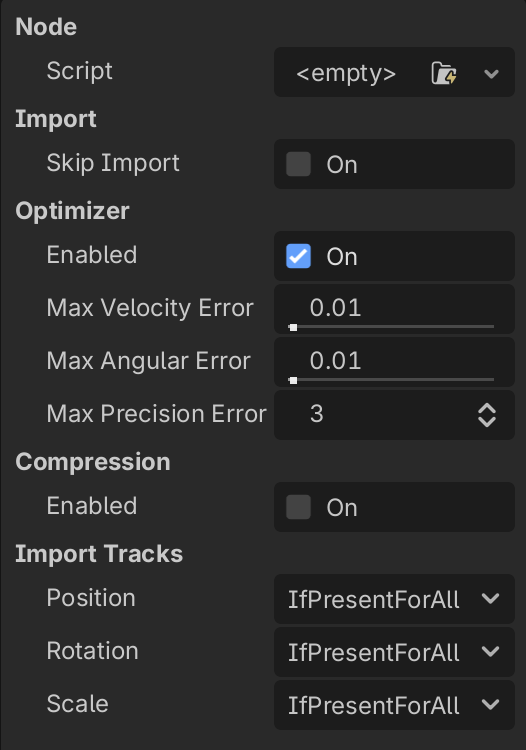
I’m trying to set up a pipeline where my FBX scenes get automatically configured on import. Is there a way to adjust the Import Settings of an imported FBX via the “Import Script”?
It seems like that’s more designed for editing the nodes within the scene rather than the actual import settings? Is that right?
Basically I’m trying to set the “Advanced Import Settings” for an imported FBX scenes through a script. I realise you can set that stuff manually. I’m trying to avoid that step and save some time/sanity.
Depending on what you’re doing, you can do that in an import script. You can add physics collision shapes, you can rotate models, rename nodes, remove or add nodes, and modify the settings of any node that is imported.
Those are the settings for an FBX AnimationPlayer. You’d change them using an Import Script. Just change the property you want to change.
This is the script I use for KayKit models.
@tool
extends EditorScenePostImport
#import_kay_kit_character_as_skin.gd

enum LoopMode { LOOP_NONE, LOOP_LINEAR, LOOP_PINGPONG }
const LOOPMODE = ["LOOP_NONE", "[b][color=green]LOOP_LINEAR[/color][/b]", "[b][color=orange]LOOP_PINGPONG[/color][/b]"]
var scene_name: StringName
var owner_scene


# Import script for rig to set up everything so little editing is needed once the character is
# instantiated.
func _post_import(scene):
	owner_scene = scene
	scene_name = scene.name
	print_rich("\n[b][color=red]Begin Post-import[/color] -> [color=purple]%s[/color] as [color=green]%s[/color][/b]" % [scene_name, scene.get_class()])
	print_rich("[b]Time/Date Stamp: %s[/b]\n" % [Time.get_datetime_string_from_system(false, true)])
	prepare(scene)
	enhance(scene)
	scene.name = scene_name + "Skin"
	return scene


func prepare(node: Node) -> void:
	if node is AnimationPlayer:
		for animation_name in node.get_animation_list():
			if animation_name.contains("Idle") or animation_name.contains("ing"):
				node.get_animation(animation_name).set_loop_mode(LoopMode.LOOP_LINEAR)
			print_rich("Post-import: [b]%s[/b] -> [b]%s[/b]" % [animation_name, LOOPMODE[node.get_animation(animation_name).get_loop_mode()]])
	# DeleteBoneAttachment3D nodes because we are going to make our own.
	if node is BoneAttachment3D:
		for item in node.get_children():
			item.owner = null
			item.reparent(owner_scene, false)
			item.owner = owner_scene
			print_rich("Post-import: [b]Moved [color=green]%s[/color] -> Root: [color=yellow]%s[/color][/b]" % [item.get_class(), item.name])
		print_rich("Post-import: [b]Deleted [color=red]%s[/color] -> Slot: [color=yellow]%s[/color][/b]" % [node.get_class(), node.name])
		node.queue_free()
	# We want to rename all the meshes to have more generic names.
	if node is MeshInstance3D:
		node.name = node.name.trim_prefix(scene_name + "_")
		#print_rich("Post-import: [b]Visibile [color=green]%s[/color] [color=yellow]%s[/color][/b] -> [color=yellow][b]%s[/b][/color]" % [node.get_class(), node.name, get_color_string(node.visible)])
	# Rotating the model to face the other direction so it moves in the correct direction when animated.
	if node is Skeleton3D:
		node.rotate_y(deg_to_rad(-180.0))
		print_rich("Post-import: [b]Rotated [color=green]%s[/color] [color=yellow]-180 degrees[/color][/b] on the [b][color=green]y-axis[/color][/b]" % [node.get_class()])
	# Recursively call this function on any subnodes that exist.
	for subnode in node.get_children():
		prepare(subnode)


func enhance(node: Node) -> void:
	#Add slots for head, hands and chest (which is where the capes go).
	var slots: Dictionary = {
		"HeadSlot" : "head",
		"RightHandSlot": "handslot.r",
		"LeftHandSlot": "handslot.l",
		"BackSlot": "chest"
	}
	if node is Skeleton3D:
		for slot in slots:
			var bone_attachment_3d: BoneAttachment3D = BoneAttachment3D.new()
			node.add_child(bone_attachment_3d)
			bone_attachment_3d.owner = owner_scene
			bone_attachment_3d.name = slot
			bone_attachment_3d.bone_name = slots[slot]
			print(bone_attachment_3d)
			print_rich("Post-import: [b]Added [color=green]%s[/color] -> Slot: [color=yellow]%s[/color][/b]" % [slot, slots[slot]])
	# Recursively call this function on any subnodes that exist.
	for subnode in node.get_children():
		enhance(subnode)


# Return rich text color string for true (green)/red (false).
func get_color_string(value: bool):
	if value:
		return "[color=green]true[/color]"
	else:
		return "[color=red]false[/color]"