Can you use a .tres file as a template to create variations?

Godot Version

4.6 stable

Question

This might be a silly question. But I’m wondering if you can save a .tres file from a custom Resource and then… instantiate it(?) in multiple places to serve as a template for creating variations. Or something like that. Let me explain what I’m trying to do. Maybe my question isn’t even the right direction and I need to do something totally different.

I’m creating items. I have made an ItemData resource that looks like this so far:
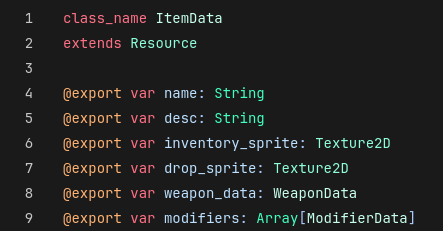
ModifierData is another Resource. My question has to do with that. Here are the export variables it has:
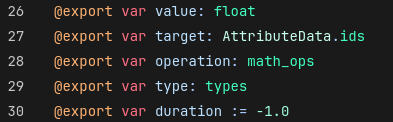
Let’s just focus on target and operation. These are used for telling a Modifier (a RefCounted) what attribute to apply to and how to modify it.

When making a new ItemData, the idea is that I can export an array of ModifierData as seen above, which gets turned into an Item (RefCounted) with an array of Modifier. For example, when equipping an item, a Character can just do:

func equip(item: Item):
    for mod in item.modifiers:
    attributes[mod.target].apply_modifier(mod)

Now here’s where my question comes in. In ItemData above, you can see a WeaponData component. If I’m making a weapon, I’ll fill that in (it’s optional).

I want my game to have a rule: all weapons have a few predetermined modifiers. For example, they all modify attack and range when equipped.

So, one option is to just… trust myself to do that for every weapon. For every weapon, I could manually add an attack and range modifier, set their attribute targets and operations (and all the other fields) the same way every time while only varying the value field… and this game is going to basically completely revolve around items, meaning I’m hoping for a very large amount of them.

That feels like a lot of unnecessary work and easy to mess up. Or is that just how it goes? Can I give myself a template inside WeaponData using some premade ModifierData somehow, or could I force it to be correct programmatically in a totally different way? Or if you’ve ever done something like this, what did you do? Maybe I just need to rethink everything here.
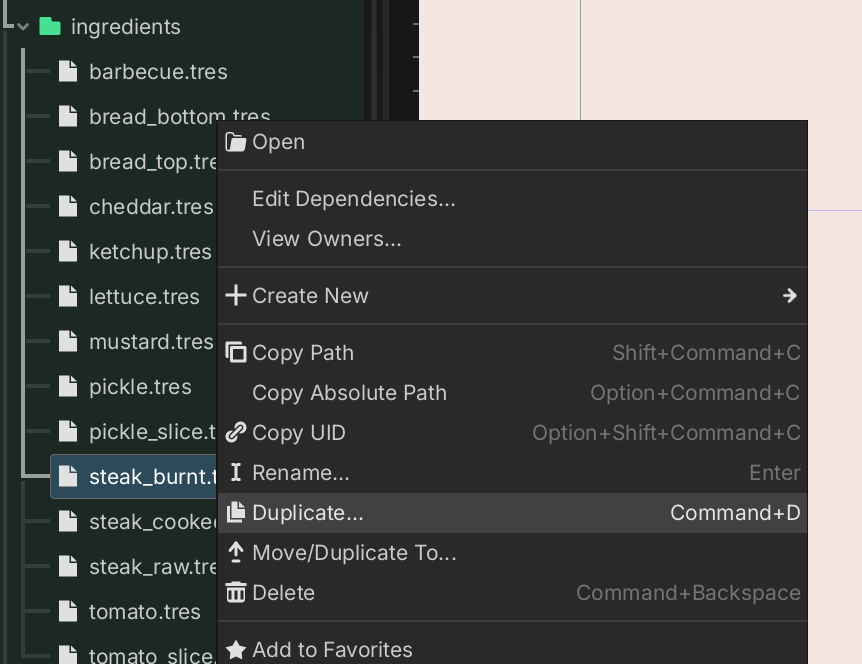
Why not just duplicate the weapon .tres file? And making sure subresources are unique when appropriate.

EDIT: you could even have a weapon_template.tres file which is never instanciated, but which is used in the Editor to duplicate into real weapon resources.

Ohhhh… so something like this?

class_name ItemData
extends Resource

const WEAPON_DATA = preload("uid")

@export var weapon_data: WeaponData = WEAPON_DATA.duplicate()

And then I guess whenever you create a new Item resource, it would auto-populate a duplicated WeaponData in the editor?

I was more leaning into a weapon_template.tres that you duplicate directly in the FileSystem dock.

If you peeked inside, it would look something like this:

[gd_resource type="Resource" script_class="ItemData" format=3 uid="uid://c8g8p02n3xos0"]

[ext_resource type="Script" uid="uid://cfrxleyr1eapt" path="res://.../item_data.gd" id="1_ubnu6"]
[ext_resource type="Script" uid="uid://ebcotn7nwwdb" path="res://.../weapon_data.gd" id="2_o4i8e"]
[ext_resource type="Script" uid="uid://dp7r3m2k1xf5" path="res://.../modifier_data.gd" id="3_ip5i3"]
[ext_resource type="Texture2D" uid="uid://cs62lpo5t7dbd" path="res://..." id="4_k3imh"]

[sub_resource type="Resource" id="Resource_a0kn9"]
script = ExtResource("3_ip5i3")
target = "attack"
operation = "add"
value = 0
metadata/_custom_type_script = "uid://dp7r3m2k1xf5"

[sub_resource type="Resource" id="Resource_87ia1"]
script = ExtResource("3_ip5i3")
target = "range"
operation = "add"
value = 0
metadata/_custom_type_script = "uid://dp7r3m2k1xf5"

[sub_resource type="Resource" id="Resource_w5ni"]
script = ExtResource("2_o4i8e")
weapons_property_1 = "blabla"
weapons_property_2 = "blabla"
metadata/_custom_type_script = "uid://ebcotn7nwwdb"

[resource]
script = ExtResource("1_ubnu6")
name = "Weapon Template"
desc = "WEAPON TEMPLATE. DUPLICATE IN THE EDITOR FILESYSTEM EXPLORER."
inventory_sprite = ExtResource("4_k3imh")
weapon_data = SubResource("Resource_w5ni")
modifiers = [SubResource("Resource_a0kn9"), SubResource("Resource_87ia1")]

That way every duplicate already comes with attack and range modifiers baked in. You just tweak the value fields and fill in the rest. No code needed, no risk of forgetting a modifier. You just need to make sure to make the subresources unique

Oh, I see what you mean! I think this could work. To make the subresources unique, you would just click the little link icon, right…? Thank you!
image

To be honest, I’ve never done this sort of “template” thing before. I’m a little scared of making a bunch of items and then deciding to change something about them later, and then… well, maybe that’s a problem whether you have templates or not. I’ve never made a bunch of content for a game before. So I’m working out for the first time how to make something scalable.