Godot Version
v4.6.3.stable.arch_linux.35e80b3a8
Question
Hi, i am using the following setup to have two camera outputs, the ExplorationCanvas is the background, while Arena canvas has transparent background and is layered on top (whenever there is a need for an Arena to appear, it gets instantiated and created temporarily).
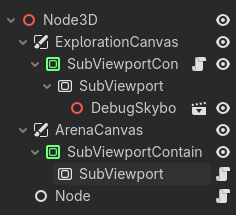
Currently I’m having issues with my character controller inside the scene under the ExplorationCanvas Subviewport node. In that scene I’ve tried adding mouse controls, so I could rotate the view inside that scene, however it just does not work. I am unable to neither use left mouse button, nor to rotate the view with mouse controls that I’ve already used in previous projects.
Example left click code that does not work at all
func _input(event: InputEvent) -> void:
	if event.is_action_pressed("Left_Click"):
		Input.mouse_mode = Input.MOUSE_MODE_CAPTURED
I’ve tried searching for solutions and found some posts mentioning that the SubViewport eats up mouse inputs, however none of the fixes work.
I’ve tried the following:
-
Changing Handle Input Locally to both true and false for the SubViewport node (I’ve also tried attaching a script that changes it manually):

-
Changing Physics Object Picking to true for the SubViewport node:

-
Setting Mouse Filter to ignore for the SubViewportContainer node:
