control shift f if you have not already done so, and type in ate_food. how many results appear?
Yes, it does print before the error.
Now print after the suspected error line as well. Post the exact code you’re using and the exact printout.
10 matches in 3 files.

I don’t think you’ve shown us the hunger_component. Can you show that as well?
1 Like
Exact code in character selection script:
extends Control
@onready var characer_selection_box: Control = $Container

func _on_choose_rabbit_pressed() -> void:
	Global.selected_character = 1

func _on_choose_fox_pressed() -> void:
	Global.selected_character = 2

func _on_start_button_pressed() -> void:
	print("loading")
	get_tree().change_scene_to_file("res://testmap.tscn")
	print("loaded")
Here’s the printout:
loading
loaded
strawberry loaded.
Rabbit selected~
ready!
strawberry loaded - from _ready on strawberry
rabbit selected - from testmap’s script confirming that rabbit character was selected
ready! - from player’s ready function
this is hunger_component.gd?
Here’s a video of me running the game, first outputs shown, then the errors.
No that was a reply to someone else, sorry. Here’s the hunger component script:
class_name HungerComponent extends Node

var data : AnimalData = load("res://resources/RabbitData.tres")


func _ready(): # loss of state/hunger
	$Timer.start() #deplete_hunger
	signal_check()

func deplete_hunger():
	data.hunger -= 1

func _on_timer_timeout() -> void:
	deplete_hunger()

func _physics_process(_delta: float) -> void:
	if data.hunger > 100: # so hunger doesn't go over 100
		data.hunger = 100
	if data.hunger < 0: #if hunger drops to zero, is is zero and also take damage
		data.hunger = 0
	#print(data.hunger)

func add_hunger(food_amount):
	data.hunger += food_amount

func signal_check():
	if Messenger.connect("ate_food", add_hunger): #if Messenger.ate_food.connect(add_hunger):
		return
	else:
		return
Now put breakpoints on both print lines and check if the error appears after you continue the first breakpoint or after you continue the second one.
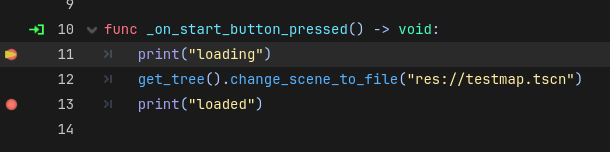
Post the Messenger code
Here’s the Messenger (it’s a global script, basically signalbus) code:
extends Node

signal ate_food(amount:int) #signal established
signal player_interaction(bool)
Here are the errors tied to it:
W 0:00:00:407   GDScript::reload: The signal "ate_food" is declared but never explicitly used in the class.
  <GDScript Error>UNUSED_SIGNAL
  <GDScript Source>messenger.gd:3 @ GDScript::reload()
W 0:00:00:407   GDScript::reload: The signal "player_interaction" is declared but never explicitly used in the class.
  <GDScript Error>UNUSED_SIGNAL
  <GDScript Source>messenger.gd:4 @ GDScript::reload()
Messenger is just a normal Autoload Singleton right?
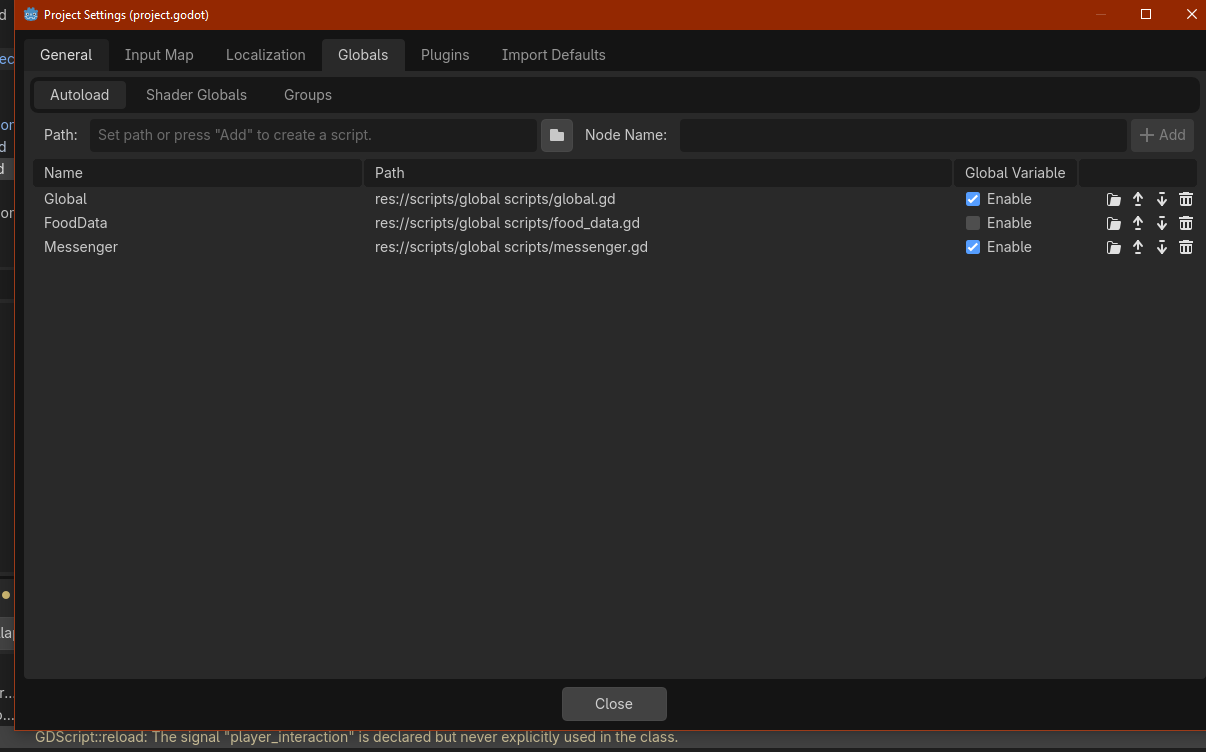

Can you make a minimal reproduction project and post it?
#signal_check()
If you comment out signal_check() in HungerComponent, the red error goes away?
No, sadly. I was wondering if it was due to anything from the Hunger Component so I checked by commenting it out - nothing happened rip
Like try to recreate it in a diff project? Yes, I will try.
Either re create from scratch or duplicate the project and remove everything that’s not needed to reproduce the error.
1 Like