Hi, I need help in a godot project, I need to know how to create a small AI to make a vehiclebody3D, which is the enemy, collide and follow the player, which is also a vehiclebody3D, and I can’t find tutorials to help me, can anyone pass me links or tell me what I can do?
Something I forgot to mention, is that I also want the player to be able to collide with the enemy. In short, a car combat game, if someone could help me, I would be very grateful.``
Well, a VehicleBody3D should already be capable of colliding with another physics object so… collision done. If you have issues with this, please provide more detailed information about your project.
To create an AI that is capable of following another object (e.g. your player), you have to first define what following means in terms of data.
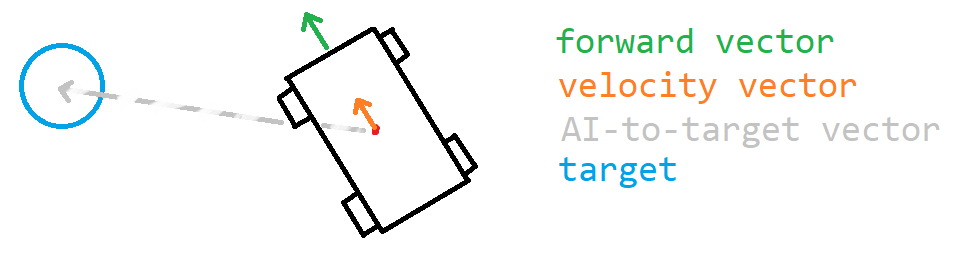
One way of defining following is: to move towards the target. Using available data, this means that your enemy should be looking towards your player, and be moving closer to them. To define it more explicitly:
Target enemy state
The forward vector (Z-basis vector) should align with the vector pointing to the target.
The velocity vector should align with the vector pointing to the target.
The forward vector and velocity vector may be nearly identical, but it is important to distinguish the two in case you intend for the enemy’s vehicle configuration to allow sliding/drifting.
With the target state defined, you can now start designing and implementing the behaviour that attempts to achieve this state. You can start off with steering the vehicle in the correct direction by turning the wheels and accelerating the car.
There are other things to consider, such as collision avoidance, but this should get you started. Let me know if you have any further questions.
The solution I proposed is high-level, meaning you don’t need to use any particular class to achieve the effect – only understand the concept that I described. Perhaps the post was a little brief.
Ordinarily, I’d recommend that you create your own post since this post is really old. Perhaps you could answer a few questions so I can better understand what you’re going for.
Is there something from my original post you would like me to clarify?
What are you currently trying to achieve?
How/why are the currently available answers not helping you?