Godot Version
4.4.1.stable
Question
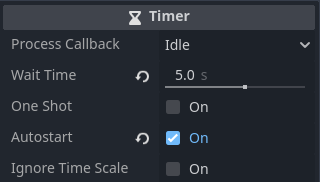
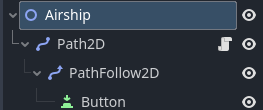
I did some re-designing of my current game, in order to simplify things. Made some progress, but I hit another roadblock. I don’t see the button move on the world map, despite having code lines making a tween. Additionally, the “if” statement under the _on_timer_timeout()" method doesn’t seem to trigger. I do sometimes see the cargo amount be subtracted in the output, but not always. I suppose it is possible I am not seeing the button moving on screen because of the possibility the “create_airship_icon” is not being triggered because of this. I have the “World_Map” image in z-index 0, with the “TileMapLayer” z-index as 1. Below is a screenshot of my node tree, as well as my code, any feedback that would help solve this would be greatly appreciated:
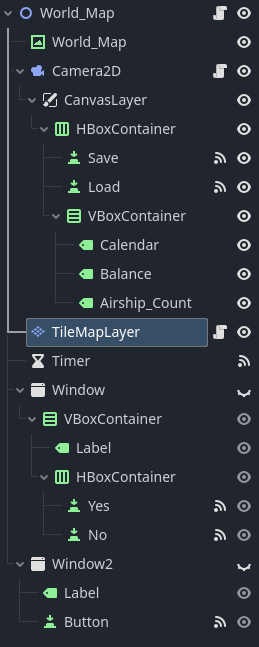
Code for World_Map node:
extends Node2D

var balance: int

#Dictionary that stores city name and its tile coordinates
#City name as key, then city location, then population, then cargo to be delivered, then airship count
var cities = {
	"Los Angeles": [Vector2(78, 165), 1000000, 1000000, 1],
	"San Fransisco": [Vector2(73, 161), 1000000, 0, 0],
	"San Diego": [Vector2(80, 166), 1000000, 0, 0],
	"Chicago": [Vector2(123, 152), 1000000, 0, 0],
	"Houston": [Vector2(113, 169), 1000000, 0, 0],
	"San Antonio": [Vector2(108, 170), 1000000, 0, 0],
	"Dallas": [Vector2(110, 166), 1000000, 0, 0],
	"New York": [Vector2(142, 156), 1000000, 0, 0],
	"Seattle": [Vector2(73, 143), 1000000, 0, 0],
	"Vancouver": [Vector2(71, 139), 1000000, 0, 0],
	"Anchorage": [Vector2(31, 113), 1000000, 0, 0]
}

var active_cities = [
	"Los Angeles",
	"San Fransisco",
	"San Diego"
]
Code for TileMapLayer node:
extends TileMapLayer

const CITY = preload("res://sprites/city.png")

@onready var world_map: Node2D = $".."
@onready var canvas_layer: CanvasLayer = $"../Camera2D/CanvasLayer"
@onready var window: Window = $"../Window"
@onready var window_2: Window = $"../Window2"
@onready var camera_2d: Camera2D = $"../Camera2D"
@onready var balance_label: Label = $"../Camera2D/CanvasLayer/HBoxContainer/VBoxContainer/Balance"
@onready var calendar: Label = $"../Camera2D/CanvasLayer/HBoxContainer/VBoxContainer/Calendar"

var button_status: bool = false
var travel_time_multiplier: int = 3
var timer_counter: int = 1
var year: int = 2025

# Called when the node enters the scene tree for the first time.
func _ready():
	calendar.text = str("Week " + str(timer_counter) + ", " + str(year))
	camera_2d.global_position = map_to_local(Vector2(78, 165))
	balance_label.text = "$ " + str(world_map.balance)
	populate_cities()

func populate_cities():
	for key in world_map.cities:
		var btn = Button.new()
		btn.icon = CITY
		btn.text = str(key)
		btn.flat = true
		btn.alignment = HORIZONTAL_ALIGNMENT_LEFT
		btn.position = map_to_local(world_map.cities[key][0])
		btn.pressed.connect(self.purchase_city_access.bind(btn.text))
		add_child(btn)
		#Makes the button transparent if it is not an accessible city
		if world_map.active_cities.has(key) == false:
			btn.modulate.a = 0.5

#Purpose of this method is to allow the purchase of access to selected city
func purchase_city_access(city_name: String):
	if world_map.active_cities.has(city_name) == false:
		window.show()
		_on_yes_pressed.bind(city_name)

#Used to purchase access to a city
func _on_yes_pressed(city_name: String):
	world_map.active_cities[city_name] = 0
	populate_cities()
	window.hide()

func _on_no_pressed():
	window.hide()

func _on_button_pressed():
	window_2.hide()

func create_airship_icon(cargo_amount: int, city_origin: String):
	var airship = Button.new()
	#Spawns new airship button in World Map
	airship.icon = load("res://sprites/Airship_icon.png")
	airship.position = world_map.cities[city_origin][0]
	self.add_child(airship)

	var origin_vector = world_map.cities[city_origin][0]
	var destination = world_map.active_cities.pick_random()
	var destination_vector = world_map.cities[destination][0]
	var distance = origin_vector.distance_to(destination_vector)

	#Moves the spawned airship button from the origin to the destination cities
	var tween = airship.create_tween()
	tween.tween_property(airship, "position", destination_vector, distance * travel_time_multiplier).from_current()
	tween.tween_callback(airship.queue_free)
	world_map.cities[destination][2] = world_map.cities[destination][2] + cargo_amount

func _on_timer_timeout():
	for key in world_map.cities:
		#Population growth
		world_map.cities[key][1] = world_map.cities[key][1] + 10000
		#Cargo growth
		world_map.cities[key][2] = world_map.cities[key][2] + 10000
		print(str(key) + ": " + str(world_map.cities[key][1]) + ": "  + str(world_map.cities[key][2]))

		if world_map.cities[key][2] > 1000000 and world_map.cities[key][3] > 0:
			var city_origin = key
			var cargo_amount = randi_range(5, 10) * 100000
			world_map.cities[key][2] = world_map.cities[key][2] - cargo_amount
			world_map.cities[key][3] = world_map.cities[key][3] - 1
			create_airship_icon.bind(cargo_amount, city_origin)
			create_airship_icon(cargo_amount, city_origin)
			print("cargo loaded")

	timer_counter += 1
	calendar.text = str("Week " + str(timer_counter) + ", " + str(year))