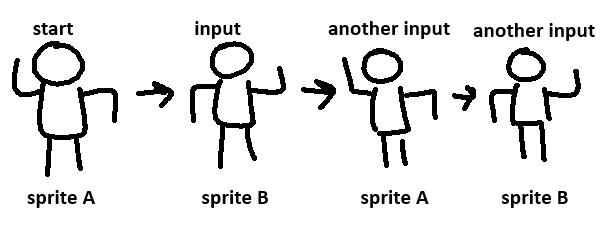
hi, this is kind of dumb. i’m trying to switch between two different sprites on (any WASD/arrow) input, and stay on whatever the last one was when idle. like this:
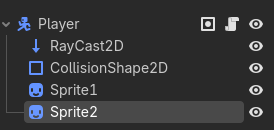
but i’m struggling with actually switching between the two on input. i’ve managed to get as far as hiding sprite A with hide() and showing sprite B with show() on the first press and knowing that i probably need a function where the previous sprite state is saved, but that’s as far as i’ve managed to get. here’s the relevant scene in case it’s necessary:
this is for a project that was supposed to be quick, and will be small and browser-playable, so i wanted to avoid anything more complex than like an AnimatedSprite2D and don’t care much for refinement in this case, but if it needs anything of the sort i’ll be fine with changing things. thank you for reading!
Create a timer and then on each timeout signal switch the frame if some input is held. Switch frame and restart timer whenever you start moving again. If there are only two frames it would probably be ok with a janky solution like this.
unfortunately this is a little too jank: if you are constantly holding a movement key then every time the timer runs out it will rapidly flip between the two frames
var input: bool = true
var sprite: bool
var time: float

func _input(event):
	if event.is_action_pressed(&"ui_accept"):
		input = false

func _process(delta):
	if input:
		time += delta
		if time >= 1:
			time -= 1
			if sprite:
				sprite = false
				region_rect.size = Vector2.ONE * 64
			else:
				sprite = true
				region_rect.size = Vector2.ONE * 128
it changes sprite’s region every second, you can make time like 0.05 of a second and it will work but faster, tho replace region change with your code to change sprites