Godot Version
v4.5.stable.mono.official [876b29033]
Question
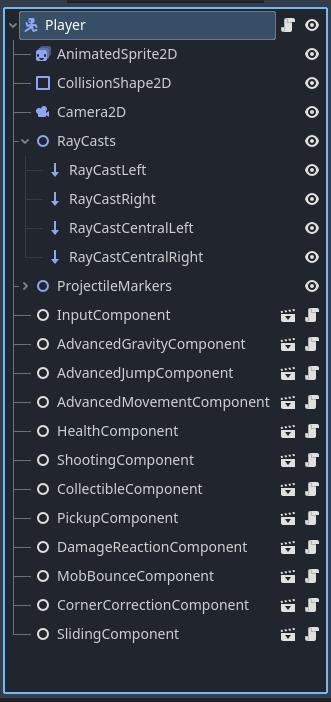
Context - I’m implementing that mechanic where player hits ceiling with corner of the head, game adjusts for that small error and pushes player into proper direction, so player will jump instead of hitting the ceiling. It sounds easy enough to implement, and this is my code:
public partial class CornerCorrectionComponent : Node
{
    [ExportSubgroup("Nodes")]
    [Export] private RayCast2D raycastRight;
    [Export] private RayCast2D raycastCentralRight;
    [Export] private RayCast2D raycastCentralLeft;
    [Export] private RayCast2D raycastLeft;
    [ExportSubgroup("Settings")]
    [Export] private int correctionValuePixels;

    public void CorrectCorner(CharacterBody2D body, bool isGoingUp)
    {
        GD.Print($"{isGoingUp} {CorrectRight()} {CorrectLeft()}");
        if (isGoingUp)
        {
            if (CorrectRight())
            {
                body.GlobalPosition += new Vector2(correctionValuePixels, 0);
            }
            else if(CorrectLeft())
            {
                body.GlobalPosition += new Vector2(-correctionValuePixels, 0);
            }
        }
    }

    private bool CorrectRight()
    {
        return !raycastRight.IsColliding() && !raycastCentralRight.IsColliding() && !raycastCentralLeft.IsColliding() && raycastLeft.IsColliding();
    }

    private bool CorrectLeft()
    {
        return raycastRight.IsColliding() && !raycastCentralRight.IsColliding() && !raycastCentralLeft.IsColliding() && !raycastLeft.IsColliding();
    }
}
It’s called in _PhysicsProcess:
    public override void _PhysicsProcess(double delta)
    {
        //handle gravity, movement, jumping, etc
        cornerCorrectionComponent.CorrectCorner(this, jumpComponent.IsGoingUp);

        MoveAndSlide();
    }
The issue is that despite everything being set up correctly, lines where GlobalPosition is changed are never triggered. Conditions are fine and code goes through those if, but nothing happens. I’ve tested it on huge correctionValuePixels to be sure, but player remains in their position.
It’s so weird that it strikes me as the glitch in the engine, but I’ve been programming long enough to know that odds of that happening are very rare, meaning I had to make a goof somewhere.
GlobalPosition change is ignored both before and after MoveAndSlide().
Enable Debug > Visible Collision Shapes to see what your raycasts are doing.
1 Like
They behave properly, I also have set up GD.Print to make sure the conditions are ok.
Post your scene structure as well
1 Like
I have noticed that it works when an obstacle is encountered higher above the ground. If there is an obstacle right above player (while player is on the ground), then nothing happens. I suppose I’m again dealing with physics delay. But I believe there must be a way to bypass it.
Are some of those other “components” running per frame code that alters the position?
1 Like
PhysicsProcess is only in main Player script, but it calls gravity, movement, and jump component. There is also sliding, but I’ve just added it now, I wanted to get something actually done today. So it is not a suspect.
I’ve tried making raycasts shorter, but it makes no difference.
First, are raycast properly colliding i.e. are the arrows red when you expect them to be?
Second, is body.GlobalPosition += ... executed as expected according to raycasts state? Put prints in there to confirm they run whenever the raycasts are in wanted state.
1 Like
I have figured this out. Raycasts are not a problem. They behave as expected and conditions with them behave as expected. The issue was IsGoingUp. IsGoingUp is true when body Velocity.Y < 0 and body is not on floor. Player character has 30 pixel height. And those obstacles are at 32 pixel height. Meaning that when player jumps under them, player will visually jump, but basically instantly hit the ceiling, and for some reason IsGoingUp has no time to be set to true. And this is why GlobalPosition change was never triggered on low obstacles.
This is a problem, but also not a problem depending how you look at it. Because in levels that are meant to be in final product you will not place tiles so low. So user will never experience the bug. I will leave the topic up in case someone has ideas if it actually can be fixed.
Who and when sets IsGoingUp ?
1 Like
If you have only 2 pixels until hitting the ceiling, at 60 physics ticks per second and jump velocity > 120(+gravity) you will immediatly hit the ceiling after leaving the floor.
Though you could think about setting IsGoingUp to true upon jumping or something like that.
1 Like
JumpComponent. It is only being set once the player jumps, there are no checks for it if player stays on the floor.
I will think if I can somehow switch it earlier. I’m building separate components so once they are finished and tested I don’t have to touch them and risk breaking everything though.
Imo, compartmentalizing player functionality into that many “components” just complicates things. Components are something reusable and player is typically a unique thing in a game. Not much sense in componentizing it. It just chops up your code so you need to click around more when following its execution flow.
Anyway, if those components are running their processing functions, try putting them before raycasts in the tree order.
1 Like
Imo, compartmentalizing player functionality into that many “components” just complicates things. Components are something reusable and player is typically a unique thing in a game.
True, but I also use this because it’s easier to work on smaller classes than one huge monolith with 2000 lines of code. Some of these components are unique, for example in my case mobs don’t need such advanced movement options as player.
I have just tried putting all of them at the top of the player scene, but it made no difference. None of them have separate _PhysicsProcess (it would make debugging harder, so I keep only single one in the main player script).
2000 lines is not that much and you can pack enormous amount of functionality into mere 1000 lines. But it’s one thing to split code and another to semantically chop it into tiny pieces like this. All those components are controlling the state of the same object and with this granularity it’s very easy to end up with components doing mutually contradictory things to the entity object, causing precisely the types of bugs you’re currently experiencing.
Also why slapping the “Component” suffix on every component? It just makes names needlessly long and repetitive. If you must use this word because it’s fashionable, parent all those nodes under a dummy node called “Components”. Ditto for actual class names of those scripts.
1 Like
Here is the code, this is the largest component right now:
public partial class AdvancedJumpComponent : Node
{
    [ExportSubgroup("Nodes")]
    [Export] Timer jumpBufferTimer;
    [Export] Timer coyoteTimer;

    [ExportSubgroup("Settings")]
    [Export] private float jumpHeight = 0f;
    [Export] private float jumpTimeToPeak = 0f;
    [Export] private float jumpTimeToDescent = 0f;
    private float jumpVelocity => 2.0f * jumpHeight / jumpTimeToPeak * -1f;

    public float JumpHeight { get { return jumpHeight; } private set { jumpHeight = value; } }
    public float JumpTimeToPeak { get { return jumpTimeToPeak; } private set { jumpTimeToPeak = value; } }
    public float JumpTimeToDescent { get { return jumpTimeToDescent; } private set { jumpTimeToDescent = value; } }

    public bool IsGoingUp = false;
    private bool isJumping = false;
    private bool lastFrameOnFloor = false;

    private bool HasJustLanded(CharacterBody2D body)
    {
        return body.IsOnFloor() && !lastFrameOnFloor && isJumping;
    }

    private bool IsAllowedToJump(CharacterBody2D body, bool wantToJump, bool enforceJumpOverride)
    {
        return wantToJump && (body.IsOnFloor() || !coyoteTimer.IsStopped() || enforceJumpOverride);
    }

    public void HandleJump(CharacterBody2D body, bool wantToJump, bool jumpReleased, bool enforceJumpOverride)
    {
        if (HasJustLanded(body))
            isJumping = false;

        if (IsAllowedToJump(body, wantToJump, enforceJumpOverride))
            Jump(body);

        HandleCoyoteTime(body);
        HandleJumpBuffer(body, wantToJump);
        HandleVariableJumpHeight(body, jumpReleased);

        IsGoingUp = body.Velocity.Y < 0 && !body.IsOnFloor();
        lastFrameOnFloor = body.IsOnFloor();
    }

    private bool HasJustSteppedOffLedge(CharacterBody2D body)
    {
        return !body.IsOnFloor() && lastFrameOnFloor && !isJumping;
    }

    private void HandleCoyoteTime(CharacterBody2D body)
    {
        if (HasJustSteppedOffLedge(body))
            coyoteTimer.Start();

        if (!coyoteTimer.IsStopped() && !isJumping)
            body.Velocity = new Vector2(body.Velocity.X, 0);
    }

    private void HandleVariableJumpHeight(CharacterBody2D body, bool jumpReleased)
    {
        if (jumpReleased && IsGoingUp)
            body.Velocity = new Vector2(body.Velocity.X, 0);
    }

    private void Jump(CharacterBody2D body)
    {
        body.Velocity = new Vector2(body.Velocity.X, jumpVelocity);
        jumpBufferTimer.Stop();
        isJumping = true;
        coyoteTimer.Stop();
    }

    private void HandleJumpBuffer(CharacterBody2D body, bool wantToJump)
    {
        if (wantToJump && !body.IsOnFloor())
            jumpBufferTimer.Start();

        if (body.IsOnFloor() && !jumpBufferTimer.IsStopped())
            Jump(body);
    }
}
Source:
Base is from here https://youtu.be/yzbxoZFsU2Y?si=3957LEjIugCF9Yvw
Improved physics from here https://youtu.be/IOe1aGY6hXA?si=Lwlg1DjjCxxDY7QT
2000 lines is not that much and you can pack enormous amount of functionality into mere 1000 lines. But it’s one thing to split code and another to semantically chop it into tiny pieces like this. All those components are controlling the state of the same object and with this granularity it’s very easy to end up with components doing mutually contradictory things to the entity object, causing precisely the types of bugs you’re currently experiencing.
I know that lines of code alone don’t mean anything, for example if you have some extremely advanced jump physics you probably don’t have to split it and totally can use one large class. But having all those independent systems in one class is not really nice to me, in my first project I had single player script and adding new functionalities was starting to be a nightmare at some point. This also allows me to reuse player code in cases where I would want NPCs/mobs to have the same abilities.
In business programming I’ve never really relied on components and composition, mostly on inheritance and interfaces, but in case of game development I find it very convenient.
Also why slapping the “Component” suffix on every component? It just makes names needlessly long and repetitive. If you must use this word because it’s fashionable, parent all those nodes under a dummy node called “Components”. Ditto for actual class names of those scripts.
.NET naming convention, and I like my names self-descriptive. Still better naming convention than in Java.