Godot Version
v4.2
Question
Hi guys, I wanted to know if there is any video showing how to set up a 2D character via CharacterBody2D. Thanks in advance
Godot Version
v4.2
Question
Hi guys, I wanted to know if there is any video showing how to set up a 2D character via CharacterBody2D. Thanks in advance
There is a template script for basic movement when you attach a script to a CharacterBody2D.
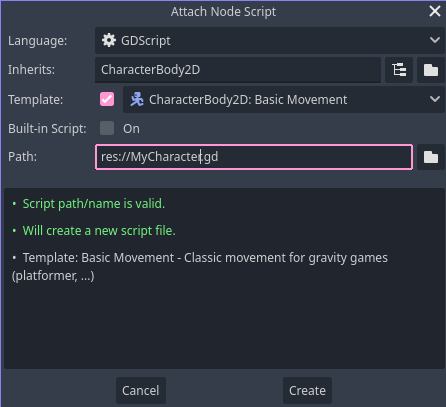
This is what it creates, good for side scroller movement.
extends CharacterBody2D


const SPEED = 300.0
const JUMP_VELOCITY = -400.0

# Get the gravity from the project settings to be synced with RigidBody nodes.
var gravity: int = ProjectSettings.get_setting("physics/2d/default_gravity")


func _physics_process(delta: float) -> void:
	# Add the gravity.
	if not is_on_floor():
		velocity.y += gravity * delta

	# Handle jump.
	if Input.is_action_just_pressed("ui_accept") and is_on_floor():
		velocity.y = JUMP_VELOCITY

	# Get the input direction and handle the movement/deceleration.
	# As good practice, you should replace UI actions with custom gameplay actions.
	var direction := Input.get_axis("ui_left", "ui_right")
	if direction:
		velocity.x = direction * SPEED
	else:
		velocity.x = move_toward(velocity.x, 0, SPEED)

	move_and_slide()
You can check the new video from Brackeys to setup a complete project:

You can see how to modify the default script shared by @gertkeno skiping to this section if you want:
thank you very much, I wanted to ask one more thing, I would like to add a double jump
I would start by adding a variable to track mid-air jumps. The jump condition checks if the button was pressed and the player must be on the floor, so let’s alter that to on the floor or has jumps. Then we have to subtract a mid air jump, and give one back when on land.
extends CharacterBody2D


const SPEED = 300.0
const JUMP_VELOCITY = -400.0

var gravity: int = ProjectSettings.get_setting("physics/2d/default_gravity")

# new variable to track double jumps
var air_jumps: int

func _physics_process(delta: float) -> void:
	if not is_on_floor():
		velocity.y += gravity * delta
	else:
		# on floor, reset double jumps
		air_jumps = 1

	# Handle jump or double jump
	if Input.is_action_just_pressed("ui_accept") and (is_on_floor() or air_jumps > 0):
		velocity.y = JUMP_VELOCITY
		# only subtract from air_jumps if in the air, up to you for game-feel
		if not is_on_floor():
			air_jumps -= 1


	var direction := Input.get_axis("ui_left", "ui_right")
	if direction:
		velocity.x = direction * SPEED
	else:
		velocity.x = move_toward(velocity.x, 0, SPEED)

	move_and_slide()
The motion in y direction has delta factored in, but I don’t see motion in x direction being normalized by delta so wouldn’t the speed in x axis be dependent on frame rate of the particular computer running the game?
The velocity.x is being set everytime with a new value, the velocity.y on the other hand increases over time += and therefore you should multiply it by delta.
And _physics_process runs every 60 frames (or whatever value you set in project settings) and therefore you don’t need to multiply velocity.x by delta.
I hope this explanation is correct and understandable. 