I’m trying to check if an ally is in range of an enemy attack, to see whether or not the enemy can target them.
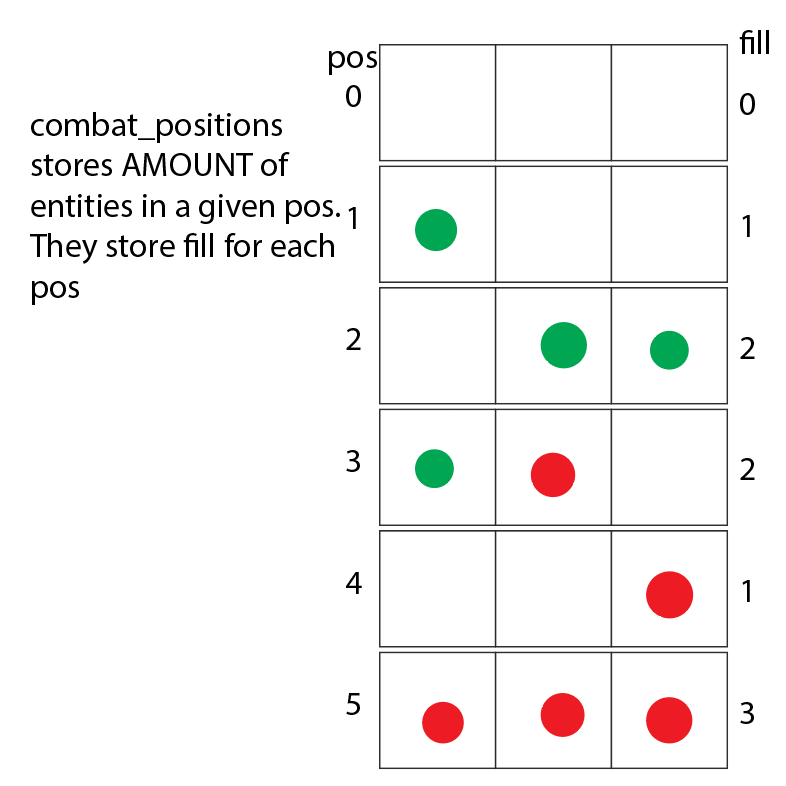
Specifically, the game’s combat board is a sort of column, where range covers a certain number of units in the column. Because of this, every entity in combat has their position stored in a global array combat_positions. However, this can’t check every entity’s “allegiance” (ally or enemy) within the array. Is there a better method in order to differentiate between allies and enemies within the combat_positions array? My current solution is making another array called combat_position_fill_type that contains 18 points that record what each of the 3 slots, in each of the 6 positions contains, this solution is extremely difficult to work with, and I was hoping there would be something that would work better.
Secondly, I’m unsure of how to check if a given entity is within range of an enemy attack. How would I check proximity between two entities if their data is stored within an array?
Basically, how would I check what is contained within each position, rather than just how full they are. Secondly, how would I check if a given enemy wanted to use an attack, and wanted to check for allies in range?
Is there a reason you’re trying to go old-school and store all this in an array of arrays? Godot offers lots of awesome visual tools and this would be much easier to handle IMO in 2D with RayCasts or Area2Ds. Then you could just use different collision masks for allies/enemies.
Aren’t raycasts and Area2Ds more of a thing for light and collision? This is a card game, with specific rules for range. Unfortunately I cant rely on the actual distance between objects for a card game.
Sorry, I’m quite new to programming in general. How would this help as compared to using a scene? Also, how do I relay this information to the enemy using an attack so they can choose what to attack based on appropriate range? Sorry if these are dumb questions, I’m just trying to figure out how this solution helps.
It might not. I assumed since you were using an Array instead of a Vector to store this, you were concerned about memory size, or something else of which I was unaware, so I was trying to follow your design decision.
TBH, as far as I can tell, you seem to be making this a lot more difficult than it needs to be. I don’t have a lot of information about what you’re trying to do because you’ve been kind of vague on details.
It might help and stepped back to describe the game play you are envisioning. It’s really hard at this point to give you advice if you don’t know enough about programming to convey why you are making certain design decisions.
Alright, I’ll try to explain it from a gameplay perspective.
I’m attempting to make a card game, with turn based combat, and a board, with multiple “positions” within it. Frontline, Midline, and Backline (there are two of each position, one where players can start, and one where enemies can start). Attacks have range, and therefore can only attack positions within that range (e.g.: A range 1 attack in frontline can only hit the other frontline, or the midline behind them). Only three entities can be in a given position, and opposing entities cannot enter the same position (enemies can’t enter positions that players are already in and vice versa)
I’ll stress now that the different positions are NOT a grid, there’s no “horizontal” movement.
The reason I’m storing all the information in arrays is because its what I’m most familiar with. They might not be the best solution though, so if you have a better one for what I’m doing I’d love to hear it.
Also each position is a different scene, so they can each individually store information (like if they’re disabled, have some sort of field effect, or are full).
Last thing, I’m trying to avoid anything that requires 2D, as not only am I unfamiliar with it, but I don’t really want to do anything in viewport until I have sprites, and until I’m ready to do all the 2D code (position in viewport, animation, etc etc)
I’d appreciate any advice you can provide for how to move forward.
Ok, well avoiding 2D until the end is going to cause you extra work. Godot is at its essence, and Object-Oriented Design framework. It’s intended to let you think it terms of objects. So if you’re using an array, you should be using an array of objects. But here’s the thing: Most of what you want to do visually can be managed by Control nodes.
I would recommend that you design a Card as a Control node. Design the look, and the features. Then put them into three HBoxContainers. No Array needed. It’ll be easier to visualize, and you can enhance the card as you go, allowing new and different types.
As for range, you should easily be able to tell which row it’s in from the HBoxContainers.
Sorry, you may have to explain some of the concepts you’ve brought up, I’m coming to godot from python, where everything was script based (I didn’t use any graphical addons, I used console and print for whatever I was making).
How would I make an array of objects? Script wise, I don’t see how I would include scenes like that.
What’s a control node? How does it differ from…not a control node?
What do HBoxcontainers do? Compared to storing information using script in a scene.
I’m not entirely sure what you mean by “Easier to visualise”, could you expand upon that?
I’m sorry for asking so many questions, I just really want to make sure I have a comprehensive understanding of these concepts if I’m going to use them in my game
If you don’t know what I’m talking about, you would benefit from some tutorials. You cannot plan how to make something in a language you haven’t used. Here’s a couple of tutorials that6 should answer all the questions you just asked.
alright, I’ve looked into how control nodes work, I still have a couple questions though.
How would I switch which Hboxcontainer the cards are apart of?
How am I going to determine range? Would I use some sort of different scene object that detects whats inside it?
The cards would be child nodes of the HBoxContainers. You can just move them using the reparent() function.
I’d name the HBoxContainer nodes 1,2,3, then you can just get the absolute value of the difference between any two based on the last number in the name and that’s the range. Alternately, you could add a custom script to all three giving them an int value for the same.
Not old fashioned, you’re just used to using python, which is a great scripting language and has lots of uses - but it’s not Godot. When you’re learning anything new, it’s best to learn the way that things are intended to be done, and then once you know “the right way”, add in knowledge from other areas. This goes for scripting languages, jobs, or learning a new skill like a sport.
There are lots of things you can carry over from python, but I strongly suggest you learn the basics first. There are lots of free YouTube videos online. There are also pretty good paid courses from GameDev.tv and Zenva.
If you haven’t yet, I recommend you start with the two tutorials in the Godot documentation.