physics_update(): Index p_bounce = 1 is out of bounds (motion_results.size() = 0).
<Stack Trace> p_move.gd:35 @ physics_update()
state_machine.gd:29 @ _physics_process()
And here’s the relevant codestack:
for i in owner.get_slide_collision_count():

var collision = owner.get_slide_collision(i)
var collider = collision.get_collider()
If I add this line:
if collision!=null:
It doesn’t crash, but still produces that error, so I feel its a velocity issue related to the diagonal
I am manually doing it to allow for detection of what type of collision:
if(collider is Enemy):
	if collider.current_state != "Stun":
		finished.emit("Battle")
#Check for room transition collision
elif collider is TileMapLayer:
	var tile_position =collider.local_to_map(collision.get_position() + owner.velocity.normalized())
    var tile = collider.get_cell_tile_data(tile_position)
	#Checks if the tile is a transition tile
	if (tile.get_custom_data("transition"))!=0:
	owner.transition_room.emit(tile.get_custom_data("transition"), tile.get_custom_data("spawn_point"))
In a state from a state_machine, which is ultimately called within _physics_process
7/8. All movement for the object is handled within the player move state, which all the code shown is contained in. Here’s what it looks like:
func get_input():
	var input_direction = Input.get_vector("left", "right", "up", "down")
	owner.velocity = input_direction * owner.stats.speed
	if input_direction==Vector2.ZERO:
		finished.emit("Idle")
	else:
		eye.set_target_position(input_direction)

func physics_update(_delta:float):
	get_input()
	owner.move_and_slide()
       (...rest omitted for brevity)
^The rest omitted is the collision code shown above
Could anything inside the for loop cause another move_and_slide() call? Maybe one of the signals?
Another thought: collision.get_position() + owner.velocity.normalized() seems pretty unreliable, especially on corners when moving diagonal. Assuming all your collision shapes in the tilemap are unrotated rectangles, I would suspect this is what’s causing the error to only happen when moving diagonal.
Aha! We come to the root of your problem. You do not need to do this.
You are not using collision layers and masks as effectively as you could.
You can delete all that code.
Instead, let’s talk about how using Godot features you can better design then implement your code.
Design
Godot has a node Area2D that if perfect for telling you when something collided with it and what it is. It in fact triggers a number of methods - including one we can use here - body_entered.
But before we go and add that to the Player, let’s think about what we have. We have a TransitionTile that is called by the Player when the collision happens. We have an Enemy that triggers a battle.
Neither of those things are really need to be controlled by the Player. As an object, the Player doesn’t need to know it has hit a Transition to be teleported to a new destination. Neither does the Player have to trigger the battle. The Enemy could do that.
If we were to give the responsibility to the enemy of triggering the battle, the Player object wouldn’t need to know if the Enemy is stunned. In fact, it wouldn’t need to know anything about the Enemy. This in object oriented programming is known as encapsulation. We make our best effort to only have the Player object need to know about itself.
In the same way, the Player object doesn’t really need to know anything about the TileMapLayer object. We encapsulate the knowledge of each object inside itself, and then create interfaces through public functions and signals to allow the objects to interact.
We can achieve this independence by using Collision Layers and Collision Masks.
Collision Layers & Masks
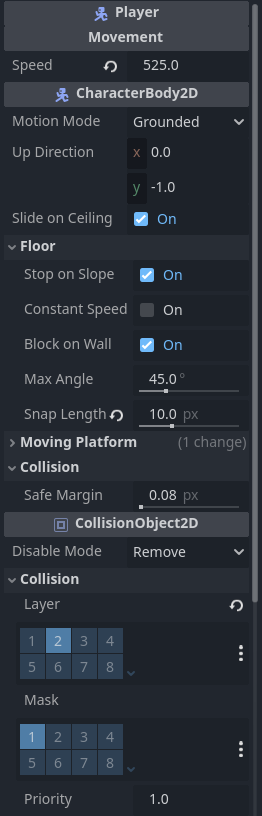
There are 32 available Collision Layers and Masks in a game. Here’s an example from a characterBody2D in a game I’m currently working on.
Every object starts out on layer 1 (physically being on it) and with a mask for layer one (being able to see/detect/interact with layer 1) Since the default is layer one, I usually use this as my Environment layer. Tiles that collide, walls, floors, ceilings, etc go on this layer. Because that way there’s less to change and if I forget to update something objects don’t typically fall through the map. The Player needs to be able to interact (run into) Layer 1, but it doesn’t need to BE on Layer 1. So we turn that layer off, and leave the mask on.
When something runs into the Player (as the center of our game universe) we want everything to know that it’s the player. (More on that later.) So we place it on Layer 2 and call it the Player layer. But it doesn’t need to see or interact with itself, so we do not need to turn on the Mask.
So now Enemy setup. Enemies should also have their own layer. So we’ll make Layer 3 the Enemy layer. The enemy object should be on that layer, and it should see the Environment layer, so we will turn on Mask 1 and turn off Layer 1.
You’ll note that right now Player and Enemy objects cannot detect one another. That’s ok. In fact, because they are different layers, they can walk through each other. If you don’t want that, you can allow them to just detect one another by enabling their Masks for each other. Turn Mask 3 on for the Player and Mask 2 on for the Enemy.
Enemy
So first, let’s fix the Enemy up.
Add an Area2D to the Enemy object.
In the Inspector, under CollisionObject2D → Collision turn off Layer 1 and Mask 1 and turn on Mask 2.
Add a CollisionShape2D to the Area2D object.
In the Inspector, add a Circle Collision Shape.
Make the circle encompass the Enemy. (You can adjust the size later for the effect you want.)
Add this code to the Area2D:
func _ready() -> void:
	body_entered.connect(_on_body_entered)


#Note because we know that only a Player object can trigger this, we can accept only a Player object which helps with our autocomplete when writing code.
func _on_body_entered(player: Player) -> void:
	if current_state != "Stun":
		#You can just leave it like this, or put the signal somewhere else like an Autoload.
		player.finished.emit("Battle")
That’s it!
Transition
Create a new scene with an Area2D as the root node.
In the Inspector, under CollisionObject2D → Collision turn off Layer 1 and Mask 1 and turn on Mask 2.
Add a CollisionShape2D to the Area2D object.
In the Inspector, add a Rectangle Collision Shape.
Make the rectangle encompass the a single Tile. (You can adjust the size later for the effect you want.)
Rename the Area2D node to Transition.
Save the scene.
Attach a script to your new Transition scene with the following code.
@export var transition: int #guessing based on your code this is an int
@export var spawn_point: Vector2 #Again a guess of this data type based on your code

func _ready() -> void:
	body_entered.connect(_on_body_entered)


#Note because we know that only a Player object can trigger this, we can accept only a Player object which helps with our autocomplete when writing code.
func _on_body_entered(player: Player) -> void:
	#You can again put this signal in an autoload
	player.owner.transition_room.emit(transition, spawn_point)
Add a new Transition object to your map and set the two values.
Again, that’s it!
(If you want to incorporate all this functionality into the TileMapLayer, you can. I leave that exercise up to you. While I don’t suggest you do that, if you want to what you’ll want to do is create a scene that contains a sprite with the one tile using an AtlasTexture, then add that specific scene to the Tileset in the TileMapLayer.)
Conclusion
Once you’ve implemented those two things, all of your custom collision detection code in your Player object can go away. It will be a lot easier to read that code and you will no longer have issues with diagonal collisions.
As a further exercise, I recommend looking into Autoloads and creating one for the finished and transition_room signals.