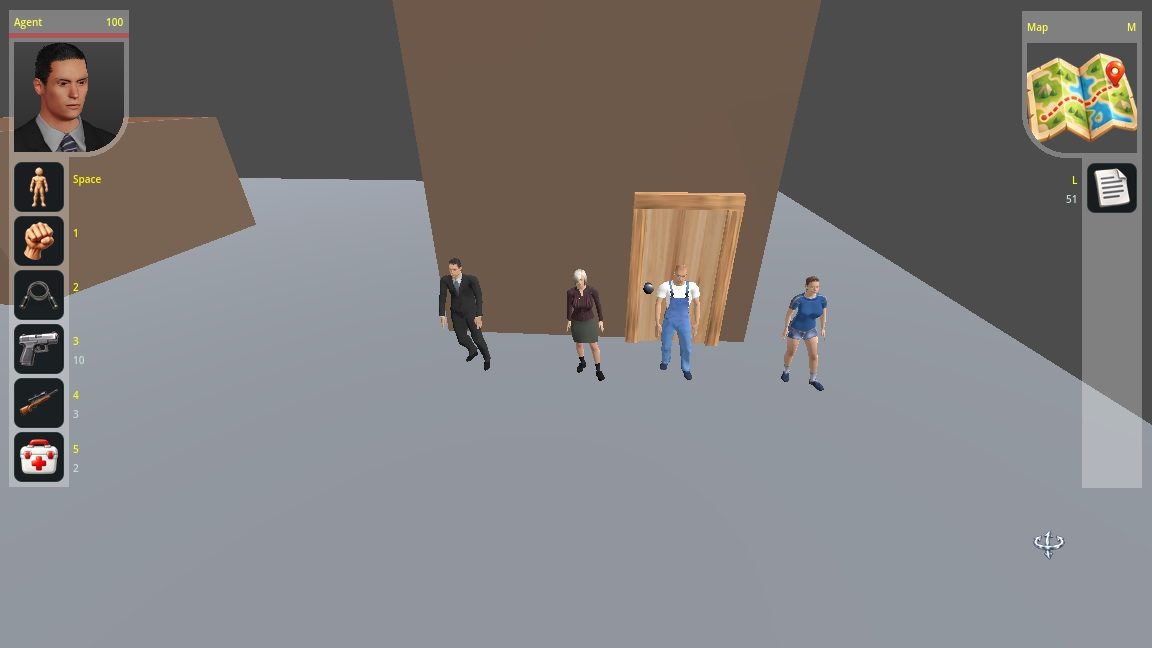
Commandos Style - Top-down stealth prototype in Godot 4 – navigation, guard vision, interactions and camera system [Full Source Code on GitHub]

Hi everyone,

I’m currently working on a top-down stealth game prototype in Godot 4.

This is a personal project that I’m building from scratch, mainly to experiment with reusable gameplay systems, navigation, interaction mechanics, NPC behavior, and stealth-related systems.

Current features include:

  • Click-to-move player navigation
  • Improved movement and stuck recovery
  • Navigation-aware doors and detour handling
  • Object interaction system
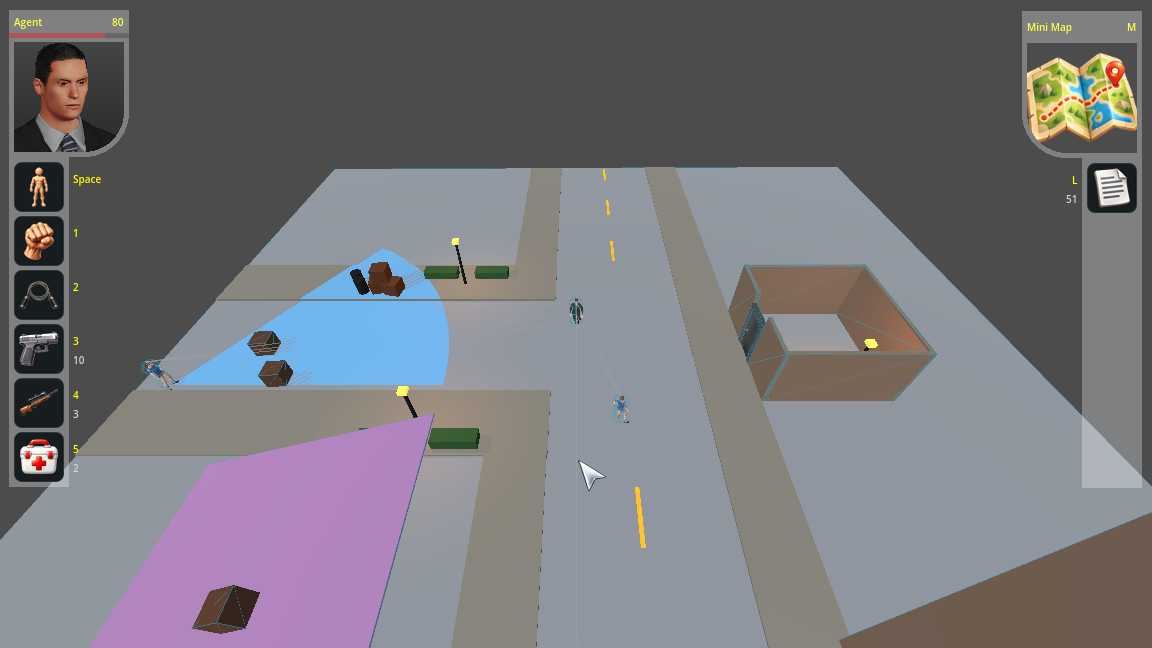
  • Guard field-of-view visualization
  • Obstacle-based vision occlusion
  • Standing / crouching visibility classification
  • Basic NPC physics and interaction
  • Camera rotation, vertical tilt and zoom
  • Hover highlighting and contextual cursors
  • Localization and basic UI systems

The guard vision system has been the main focus recently. The visible FOV is generated on the environment surfaces and takes world geometry into account, including walls, ramps and other obstacles.

There are currently some debug rays between guards and the player that I intentionally left enabled while testing the vision system.

The project is still in an early prototype stage, so the visuals and assets are not final. Right now I’m mainly focusing on gameplay systems and architecture.

Source code:

I’d really appreciate feedback, especially on:

  • Guard vision behavior
  • Navigation and movement
  • Detour handling
  • Camera controls
  • Overall project structure

Thanks!

2 Likes

I’m adding a short video here to show you what has been done so far

2 Likes

Looks like there is a lot to it already. The video certainly shows some capability.

Can you speak a little more about your high level goals and how you are approaching them? For e.g. when you say “clean architecture”, what exactly are the goals around this, and how is it reflected in your approach?

Similarly, with the reusable systems, what / how are you hoping to reuse them? Are you going to make multiple games, or …?

1 Like

Thanks! I’ve always been a big fan of games in the Commandos style, and that’s really the kind of game I’m aiming for here: a small top-down tactical stealth game where movement, visibility, guard behavior, interactions and planning are the main focus. I should also mention that this is my first time working with Godot, so I’m sure I haven’t done everything the “right” way, but I’ve been doing my best and learning as I go.

I’m also using the project as a way to learn how to structure a game so it can grow without turning into a pile of tightly coupled scripts.

When I say “clean architecture”, I mostly mean keeping responsibilities reasonably separated, avoiding unnecessary dependencies, and trying not to hard-code one system around one specific level or object. I’m not trying to build some huge abstract framework, though — I actually want to avoid over-engineering as much as possible.

A good example of what I mean by reusable systems is the door system. A single door scene, with its own script, can support open, closed and locked states, use different textures, and then be instanced many times throughout a level. Each door keeps its own state and behavior, so opening or locking one doesn’t affect the others. That’s the kind of reuse I’m aiming for: build the behavior once, then use the same scene in different places with different configuration.

The same general idea applies to interactions, cursor states, dialogs, movement states, and eventually the guard AI.

I’m also trying to keep input handling centralized through Godot’s InputMap, instead of having hard-coded keys scattered through different scripts. That should make things easier to maintain and eventually makes key remapping much simpler too.

For reuse, I mainly mean reuse within this game — across different levels, doors, guards and interactions. I’m not really trying to make a general-purpose framework for several unrelated games. If some systems are useful in another project later, that’s a nice bonus, but it’s not the main goal.

I’m also trying to only generalize things when I actually have a reason to. I’d rather have something simple and understandable than create a complicated abstraction just because it might be useful someday.

The guard AI will probably be the next big test of this approach. I’m planning states like idle, patrol, suspicious, investigate, chase and search, while trying to keep perception, navigation and decision-making separated enough that they can be extended without rewriting everything.

So I guess the short version is: I want to make a Commandos-style stealth game, but I also want the project to stay easy to extend. If I add another level, door, guard or interaction, ideally I should be able to reuse what’s already there instead of copying code or creating special-case logic every time.
2 Likes

I’ve also finished the first pass of the HUD. It now has the player portrait and health, action slots with dynamic shortcuts/counts, and the map/log area on the right. I’ve tried to keep the UI modular as well, so I can add or change actions later without having to rebuild the whole HUD.

1 Like

HUD looks good. I like the semi-rounded motif.

1 Like

Thanks! Yeah, the semi-rounded look is actually done with a very simple shader. It just lets me control which lower corner is rounded, so I can mirror the same style between the portrait and the map area.

If you want, you can grab it from the GitHub repo here:
data/shaders/hud.gdshader

Feel free to use or modify it in your own projects.

1 Like

Progress Update – Key Remapping and Tactical Map Completed

Hi everyone,

It has been a while since my last progress update, and two fairly large systems are now complete in my top-down tactical stealth project: the key remapping system and the tactical map.

The key mapping system is now fully integrated into the game settings. It supports keyboard and mouse bindings, detects binding conflicts, allows resetting controls to their defaults, saves custom bindings between sessions, and can be accessed from both the main menu and the pause menu.

HUD shortcut labels also update immediately when a binding changes.

After that, I moved on to the tactical map, which turned out to be a much larger task than I initially expected.

Instead of creating a separate simplified version of the level, the map uses another Camera3D to render the actual game world from above. A shader is then applied to give the result a more stylized paper-map appearance.

The current tactical map includes:

  • Resizable map panel
  • Independent map zoom
  • Live synchronization with the main camera position and rotation
  • Smooth main-camera movement by clicking a location on the map
  • A frame showing the main camera’s visible area
  • Directional markers for the player and NPCs
  • Markers for doors and other gameplay objects
  • Scene-based marker definitions, so each object can define its own map appearance
  • A shared game color palette for consistent marker and gameplay colors
  • Filtering of character meshes, vision cones, movement paths, debug visuals, and other elements that should not appear on the map
  • Persistent map panel size
  • Proper interaction with the HUD, pause menu, custom cursor, and camera controls
  • Localized HUD text and tooltips

One design decision I made is that guards are visible on the tactical map from the beginning. I want the map to work as a tactical planning tool rather than as a fog-of-war or discovery system.

I am intentionally leaving AI-state-dependent marker behavior for later. Once knockout, death, body carrying/hiding, alert states, and the guard AI are implemented, the markers can react to those states as well. For example, an unconscious or dead guard may eventually use a different color or even a different marker shape.

At this point I consider the first version of the tactical map complete, so I can finally move on to the next gameplay systems.

I’m still learning Godot while building this project, so feedback and suggestions are always welcome.

Quick development update:

I’ve finished the first version of the NPC patrol system.

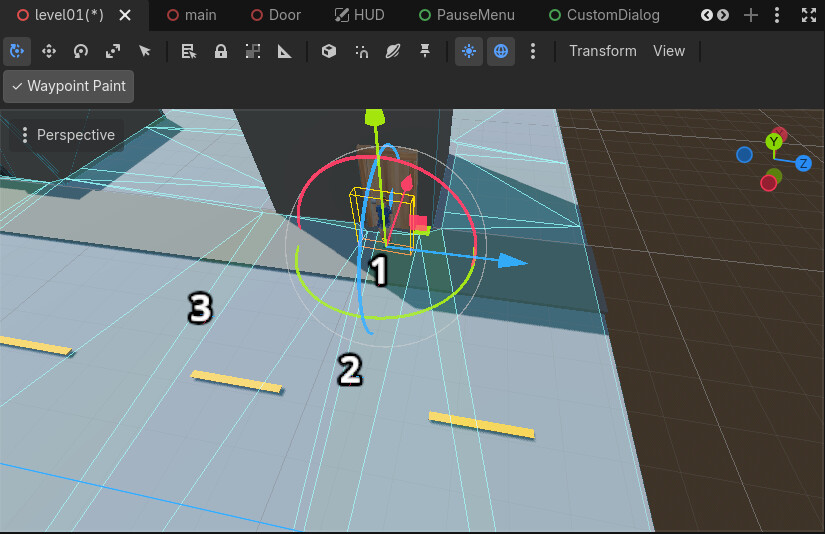
NPCs can now move along waypoint-based patrol routes, and I also made a small waypoint-painting tool so I can place patrol points directly in the editor instead of doing it all manually.

I’m adding a short video here to show the patrol movement, plus a screenshot of how the waypoint points are set up.

I also did some cleanup on movement/animation syncing, so the locomotion looks better now.

If anyone wants to see the full source code, it’s linked in the first post.

Waypoints editing

Progress Update – Stealth Takedowns and Physics-Based NPC Ragdolls

Hi everyone,

Another progress update on my Commandos-style top-down stealth project!

Since my last update on NPC patrols, I’ve been working on two new player actions: knockout punches and garrote takedowns.

What started as an attempt to improve how NPCs fall after a takedown ended up becoming a much larger task. I initially used animations for the falling sequences, but the characters could pass through nearby objects because their movement was predefined.

To solve this, I implemented a physics-based ragdoll system using Godot’s PhysicalBone3D and PhysicalBoneSimulator3D.

Here’s what’s new:

  • Knockout punches: NPCs react to the direction of the hit and fall using ragdoll physics.

  • Garrote takedowns: The player and victim animations are synchronized. After the victim struggles and drops to their knees, the rest of the fall is handled by physics.

  • Joint constraints: Knee and elbow limits help prevent unnatural bending.

  • Body settling: Once the ragdoll settles, its final pose is preserved instead of continuously simulating physics.

  • NPC recovery: Unconscious NPCs can get back up using different animations depending on whether they landed face-up or face-down.

  • Smoother animation transitions: Added blending and configurable playback speeds to reduce abrupt transitions.

  • Shared animation controller: Refactored animation handling into a reusable component for both the player and NPCs, supporting separate male and female animation sets.

  • NPC cleanup: Integrated the ragdoll implementation into the main NPC system and removed the experimental versions.

The most challenging part was getting the transitions between animation and physics to work naturally, especially preserving the fallen pose and then smoothly returning to an animated character.

This is still an early prototype, and there are plenty of things to improve, but I’m happy with how these interactions are coming together.

I’m including a short video showing the knockout, garrote takedown, ragdoll falls, and NPC recovery.

The full source code is available on GitHub, linked in the first post.

As always, feedback and suggestions are welcome, especially from anyone who has worked with ragdolls and animation transitions in Godot!

Devlog Update — Character Appearance System & Asset Optimization

I’ve reached another milestone in the development of my top-down stealth game!

The character appearance system now supports four different character variants, available for both the player and NPCs:

  • Male Suit

  • Male Worker

  • Female Casual

  • Female Elegant

Characters can use different appearances while sharing the existing animation and gameplay systems. I’ve also implemented an editor preview workflow, making it easier to select and preview appearances directly in Godot.

Asset cleanup and optimization

I reorganized the character assets, separated shared textures from appearance-specific ones, and optimized texture sizes and formats to reduce unnecessary storage.

I also removed the obsolete FBX source folders and their old dependencies. After rebuilding Godot’s import cache and reopening the project, the character appearances loaded correctly in both the editor and the game.

Animation update

I added a few more animationsr.

This gives me a much cleaner foundation for expanding the character system.

What’s next?

I’m planning to introduce customizable clothing and hair colors. By using recolorable textures and material variations, I should be able to create many more unique-looking characters from the four existing models without adding a large number of new assets.

Here’s a screenshot showing the different character appearances together in the game!

Feedback and suggestions are always welcome.

Development Update – Pistol Combat & Procedural Aiming

Another gameplay milestone is complete!

I’ve implemented a pistol combat system with mouse-based aiming, target highlighting, range visualization, limited ammunition, and directional NPC ragdoll reactions when shot.

The player can now aim and shoot while standing or crouching. I also added procedural recoil and upper-body aiming adjustments, allowing the character to aim more naturally at nearby targets and different elevations.

I also fixed a few collision and visibility issues involving ragdolls, detours and guard vision cones.

There’s still more polish to do, but the core shooting mechanics are now working well.

I’ll share a short gameplay video showing the new features.

The full source code is available on GitHub through the link in the first post.

Development Update — Scoped Rifle Combat and Improved Interaction Navigation

Hi everyone!

I’ve made another round of progress on my Commandos-style top-down stealth prototype in Godot 4.

This update focuses on adding a second firearm and improving how the player approaches doors and NPCs.

1. Scoped Rifle Combat

The prototype now supports a scoped rifle alongside the Glock pistol.

  • Rifle aiming and firing are restricted to the crouched stance.

  • Male and female rifle animations are handled through the existing CharacterAnimationController.

  • A procedural upper-body recoil system replaces the rifle firing animation, keeping the weapon better aligned with the character’s hands.

  • Rifle impacts produce a stronger, configurable ragdoll response than pistol impacts.

2. Shared Weapon Preview and Hit Detection

I also refactored the original pistol aiming preview into a reusable WeaponPreview component.

Both firearms now share the aiming trajectory, range and sound-radius visualization, target detection, and bullet collision logic, while retaining their own range and recoil settings.

This should make adding more weapons easier later.

3. Improved Door Interactions

I fixed an issue where a swinging door could push the player through the doorway during interaction.

Doors now use separate interaction points on both sides, and interactions can execute as soon as the player reaches the required distance instead of waiting for navigation to finish completely.

4. Improved NPC Approach Navigation

I also refined how the player approaches NPCs for conversations, knockouts, and garrote takedowns.

Previously, the navigation system could shift the destination to a nearby safe point, producing awkward approach paths. NPC interactions now preserve the actual NPC destination, while the interaction system stops the player at the appropriate range.

The obstacle-avoidance and detour logic remains available for ordinary navigation.

Next Steps

I’m planning to continue with firearm audio, guard reactions to gunshots, and further NPC AI improvements.

The project source code and updated documentation are available on GitHub:

Feedback and suggestions are always welcome!