Hello, I am finally tackling Godot 3d after quite a few hesitations !
I’m just trying to get familiar with the engine on the 3d side, how physics work, … but I quickly stumbled upon something :
With a non-uniform scale, this node will likely not behave as expected. It is advised to keep its scale the same on all axes and adjust its collision shape(s) instead.
Now I do know, to properly “resize” a 3d physics object in your scene, you need to both modify the CollisionShape3d object & the MeshInstance3d (or any derived one) so that the different scales match.
I am a bit surprised it works that way, usually engines do treat well scale changes dynamically.
I wanted to know more in details why such limitation exists, and if there are ways to ease this process (aka not having to go into the inspector on different sibling instances).
Maybe a similar topic already exists, honestly I tried to search for it already but, either my search terms are quite bad (which is a strong possibility), or it is not questioned that much.
I don’t have any good answer for you as to “why” it is like that, I never questioned it, nor did it cause me any issues.
If you need something that makes the rescaling easier, you could add something like this into your script that’s attached to the PhysicsBody3D node. I haven’t tested it, I’m on mobile, so take it with a grain of salt please.
@tool
extends PhysicsBody3D

@export var children_scale: Vector3:
	set(value):
		 children_scale = value
		 for child: Node in get_children():
			if child is CollisionShape3D or child is MeshInstance3D:
				child.scale = children_scale
When changing this parameter in the inspector, it will update all the shapes and meshes’ scales instead.
You have to resize them both because one isn’t the child of the other. If you scale their parent (whatever they are both hanging off of), then their scale (and respective size) will automatically inherit that scaling.
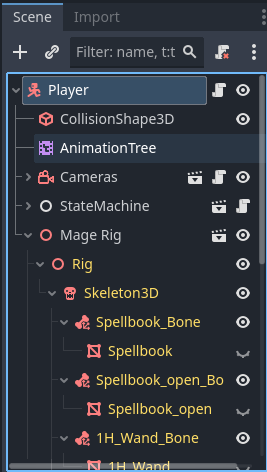
If I change the scale of Player then my CollisionShape3D and my Mage Rig (which contains a ton of MeshInstance3Ds) all scale immediately and appropriately.
As a side note, this is what I would expect. I do not want a sibling modifying itself without me telling it to.
If for some reason you want to modify a sibling without affecting the parent, add some code and link the objects. However in that case I’d recommend you just put them both under a plain Node3D and modify that. Of course, that won’t work in this case because the CollsionShape3D needs to be a child of whatever it’s providing a collision shape for . . .
Godot Physics supports scaling the transform of collision shapes, shape queries, as well as static and kinematic bodies, meaning StaticBody3D, CharacterBody3D, AnimatableBody3D and frozen RigidBody3D. It does not however support scaling simulated/dynamic bodies, such as a non-frozen RigidBody3D, and will effectively discard any such scaling, instead treating it as (1, 1, 1).
Jolt does however support scaling everywhere, and I’ve tried my best to utilize that, which means that RigidBody3D will support scaling when using Jolt, despite the warning shown on the node currently.
Jolt also supports non-uniform scaling, so long as the inherent primitive shape is preserved. For example, you can scale a cylinder along its height axis but not along its other axes. You will however currently see warnings on the shape node when doing this, due to Godot Physics not supporting this.
Since invalid scaling can cause a number of weird artifacts, and sometimes outright crash the simulation, there are runtime error checks that “sanitize” all scaling to be valid for that particular shape arrangement, and then reports an error if the difference is above an arbitrary threshold. These errors have however proven to be a bit frustrating for some users, who might not care about the sometimes minor corrections that this error-checking applies, so this likely needs a different approach.
This doesn’t really explain why Godot Physics didn’t support non-uniform scaling. Godot Physics was known to be buggy, hence why many people wanted Jolt added directly to the engine. So my guess is not supporting (and hence the warning in the docs) just made things simpler/less buggy