Connect a signal to a script in a different scene

Godot Version

4.5

Question

How can I link a signal between different scenes/using code?

I need to send various signals between scenes. In each case, the signal is emitted by a scene which is instantiated in the scene that the signal needs to reach. Here is an example of one approach that I tried:

@player.gd:

if event.is_action_pressed("pause"):
		paused.emit()

@pause_screen.gd:

@onready var player = get_node("/root/Level1/Player")

func _ready() -> void:
	player.connect("paused", _on_pause)

func _on_pause():
	Globals.paused = true
	visible = true

When trying to run this, the following error occurs (the program still launches though):

E 0:00:01:034 pause_screen.gd:6 @ _ready(): In Object of type ‘CharacterBody2D’: Attempt to connect nonexistent signal ‘paused’ to callable ‘Control(PauseScreen)::_on_pause’.
<C++ Error> Condition “!signal_is_valid” is true. Returning: ERR_INVALID_PARAMETER
<C++ Source> core/object/object.cpp:1526 @ connect()
pause_screen.gd:6 @ _ready()

An alternative syntax I have tried:

@player.gd

# same as above
if event.is_action_pressed("pause"):
		paused.emit()

@pause_screen:

func _ready() -> void:
	player.paused.connect("paused", _on_pause)

This returns a separate error which I believe I’ve encountered before but never know how to deal with.

E 0:00:01:106 PauseScreen._ready: Invalid access to property or key ‘paused’ on a base object of type ‘CharacterBody2D’.
pause_screen.gd:6 @ PauseScreen._ready()
pause_screen.gd:6 @ _ready()

Please help. There is no documentation on this that I can find.
Is the script with the paused signal attached to the player node? I would have expected the second error message to be something like “… base object of type ‘CharacterBody2D (player.gd)’.”

1 Like

So three things.

First, you didn’t give us enough information to help you. Or you didn’t set up player.gd correctly. Here’s the way you call one signal from another object.

#player.gd

signal paused

func _input(event: InputEvent) -> void:
	if event.is_action_pressed("pause"):
		paused.emit()

Second, you are connecting to the signal incorrectly. You’re using an old way. This is not causing your bug. (I suspect the first thing is.) The correct way is:

#pause_screen.gd
@onready var player = get_node("/root/Level1/Player")

func _ready() -> void:
	player.paused.connect(_on_pause)

func _on_pause():
	Globals.paused = true
	visible = true

Third, there’s a much easier way to deal with pausing the game and detecting it. Put this code in an Autoload called Game. (Alternately you could put it in Globals if it’s an Autoload.)

#game.gd Autoload

## Pauses or unpauses the game based on the boolean sent. Defaults to pausing the game.
## [br]Convenience method.
func pause(pause: bool = true) -> void:
	get_tree().paused = pause

Then you can use notifications to detect pausing.

#player.gd

func _input(event: InputEvent) -> void:
	if event.is_action_pressed("pause"):
		Game.pause() #Or Globals.pause()
#pause_screen.gd

func _notification(what: int) -> void:
	match what:
		NOTIFICATION_PAUSED:
			show()
		NOTIFICATION_UNPAUSED:
			hide()

A lot less, code, no need to have a reference to the player, and you can now implement the Escape keyboard key and Start controller buttons as pause buttons.

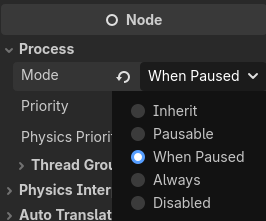
To make this work, you will need to change your pause screen’s process mode to When Paused or Always in the Inspector.

Also, there’s no real need to put the pause key code with the player. You can also do this:

#game.gd Autoload

## Pauses or unpauses the game based on the boolean sent. Defaults to pausing the game.
## [br]Convenience method.
func pause(pause: bool = true) -> void:
	get_tree().paused = pause


## Unpauses the game.
## [br]Convenience method.
func unpause() -> void:
	pause(false)


## Returns whether or not the game is paused.
## [br]Convenience method.
func is_paused() -> bool:
	return get_tree().paused


func _input(event: InputEvent) -> void:
	if event.is_action_pressed("pause"):
		if is_paused():
			Game.unpause()
		else:
			Game.pause()

You don’t need all the convenience functions, but they are there so that when you want to pause, unpause, or check pausing from anywhere in the game, you start typing “Game.” and then you can autocomplete to a function that’ll do exactly what you need and makes your code much more readbale.