Godot Version
v4.5.stable.mono.official [876b29033]
Question
Sorry this is a long one.
In Godot, there are two kinds of collision shapes: Collision shapes that collide only on the surface of the mesh that defines the collision, and collision shapes that collide within the volume of the mesh.
Obviously a collision shape that collides within the volume of it’s mesh is far more effective at pushing physics objects out of it in the event they get inside. Because a single plane only pushes if the object has not gone all the way through.
As I understand it, the only way to create a volumed collision shape is by either using the primitive shapes within Godot or by importing a mesh from a 3D modelling program (in my case, blender) that is specifically tagged as convex. But this means if I have a more complex mesh that has any concavity to it like this cube with a cutout:
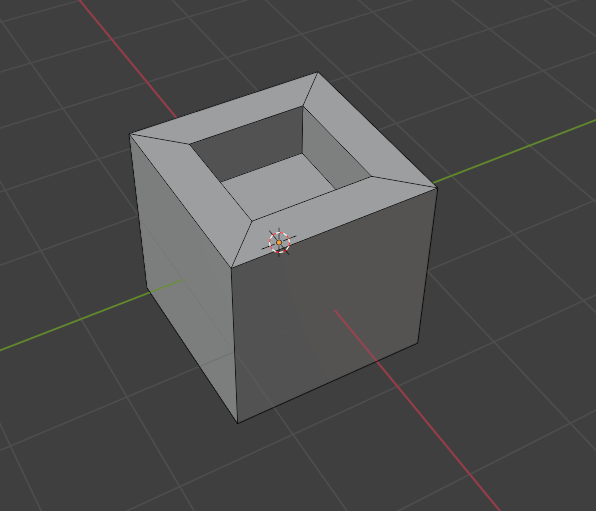
those cavities are flattened out by Godot to create a convex shape.
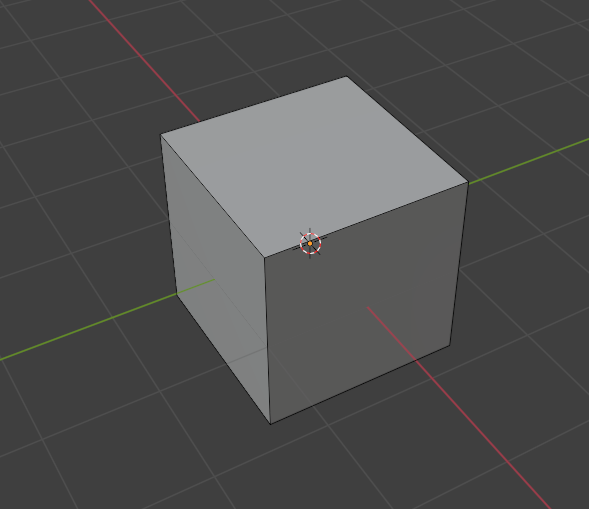
So the only way to create a collision shape that is both volumed and retains the cavities in the original shape is by creating multiple meshes that combine together to make that shape.
This is all well and good but is there a way to do this with less tedium than making the shape I want and then painstakingly going through and breaking it up into pieces specifically for a large map mesh. The initial creation of the shape is okay but if I want to make changes to that shape it becomes a big hassle and it doesn’t seem impossible for there to be a better way to make this whether that is by using a different 3D modelling program or if there’s a tool in Godot that can help with this.
Our game involves picking up and moving objects around and something that is very important to the game is that these objects collide with the world as you are moving them. This means due to player agency it is not very hard to push objects through the collider with the single layer collision shapes. Through testing I’ve found volumed collision shapes make it virtually impossible (although I’m sure someone could find a way) to do this.
I’m just trying to get an understanding of any options I have before committing to doing anything. This seems like it would be a common issue for a lot of games so I would think there is a nicer way to do this than the options I have explored already.
I should clarify my terrain map has a very low poly count as we are creating a game with a ps1 style to it so I am not too worried about resources when it comes to collisions.
Things I’ve tried
I found a plugin to blender that kind of does this called CoACD GitHub - SarahWeiii/CoACD: [SIGGRAPH2022] Approximate Convex Decomposition for 3D Meshes with Collision-Aware Concavity and Tree Search
This does kind of do what I want but it works better for objects in the world like vehicles or physics items. When running this on a map itself, it loses a lot of detail which means there are large areas where you would seemingly be floating above the terrain. The terrain collision needs to be very close to the actual mesh to prevent this. At this stage I am going to try using this tool to break the pieces up and then tinker with it but that has it’s own set of issues.
The other option I have found is apparently there is a way to import maps made in TrenchBroom or Hammer, which are the map creators for Quake and Source respectively. These programs do this automatically but are far more difficult to use than blender and will be a huge learning curve.
And finally just going through my mesh and manually breaking it up into pieces. This does allow me to make sure the collision perfectly matches my visible mesh but means that if I want to alter my mesh it becomes quite tedious to change it, along with the initial time sink of doing it in the first place.
Any suggestions are appreciated, thank you.