[CRope2D] Enforce max rope length / tension

Godot Version

v4.7.1.stable.steam.a13da4feb

Question

I’m trying to make a game where the player swings around a heavy ball using a rope with the other end controlled with their mouse. I’m using Cuberact’s CRope2D extension for the rope. However, if the player continues to swing the ball faster and faster, it can get infinitely far away from the center. I want to have a way where the rope has a maximum length / tension (or very high one past a certain point), or the ball cannot go past a certain threshold, such as the Area2D shown in the attached video (google drive link because I can’t post attachments yet). I would like the correction to feel as natural as possible, like a real rope becoming as tense as it possibly can and changing the velocity of the ball. I would like to avoid limiting the mouse’s movement or use a static line2d for the rope if possible.

I have already tried increasing the substeps, solver iterations, stiffness, and anchor pull strength as high as they can go in the inspector, and while it helped a little, the problem still remains.

Demonstration video

Ideally, a distance constraint should already be part of such a rope extension. Materials with high stiffness values, such as tightened rope, are hard to accurately simulate in real-time because the sudden increase in force can’t be accurately approximated unless a very high amount of substeps is used.

I don’t know the extension you’re using, but if it doesn’t have a distance constraint built in, you can try adding one yourself. Here’s a quick example:

extends Node
class_name DistanceConstraint2D

@export var anchor_point: Node2D
@export var ball: RigidBody2D
@export var max_length = 100.0

func _physics_process(delta):

	var anchor_pos = anchor_point.global_position
	var ball_pos = ball.global_position
	var anchor_to_ball = ball_pos - anchor_pos

	if anchor_to_ball.length >= max_length:
		# Compute constraint (position)
		var constrained_pos = anchor_pos + anchor_to_ball.limit_length(max_length)
		# Compute constraint (velocity)
		var proj_vel = ball.linear_velocity.project(anchor_to_ball)
		var constrained_vel = vel - proj_vel

		# Apply constraint
		ball.global_position = constrained_pos
		ball.linear_velocity = constrained_vel

This might work for your use case. However, bear in mind that you generally shouldn’t modify the state of a RigidBody2D in the way it’s being done here. You should, instead, get a reference to the RigidBody2D’s state from the PhysicsServer2D, or use RigidBody2D._integrate_forces() to manipulate its state. It’s just an example.

Alternatively, you could try reducing the mass of your ball to see if that improves your results.


I hope that works for you. Let me know if you have any other questions.

The idea seems to have worked. The only major thing I had to change was to use the distance from the rope’s origin to the anchor to see if the ball had strayed too far, since I learned while debugging your example that the anchor actually moves with the ball and keeps a constant distance from it.

There’s two things that seem unnatural, but I’m not sure if they’re errors.

1.) The ball’s max speed seems less than expected. If you start rotating it too fast, it seems to go towards the mouse instead of further increasing its speed. I don’t know that much physics though, so maybe it’s supposed to work that way?

2.) The ball seems to jitter more than expected when the ball is moved from side to side.

Demonstration video

I’d be nice if these were problems with solutions, but the current state of the ball is good enough.

Here’s the updated code:

class_name DistanceConstraint2D extends Node

@export var rope: CRope2D
@export var origin: Area2D
@export var anchor: CRopeAnchor
@export var ball: RigidBody2D
@export var max_additional_length = 250.0

func _physics_process(delta: float):
	rope.simulate(delta)
	var rope_origin_position = origin.global_position
	var rope_length = rope.data.segment_length * rope.data.points.size() #segment length * segment count
	var anchor_position = rope.data.get_global_points()[anchor.index] #position of the anchor's point
	var rope_to_anchor = anchor_position - rope_origin_position

	if rope_length + max_additional_length < rope_to_anchor.length():
		var constrained_position = rope_origin_position + rope_to_anchor.limit_length(rope_length + max_additional_length)
		var projected_velocity = ball.linear_velocity.project(rope_to_anchor.limit_length(rope_length + max_additional_length))
		var constrained_velocity = ball.linear_velocity - projected_velocity

		# Apply constraint
		ball.global_position = constrained_position
		ball.linear_velocity = constrained_velocity

Also, I tried to port the code to use PhysicsServer2D and integrate_forces(), but it made the ball keep pausing during the swing. Do you know how to fix that?

Demonstration video

Ported code:

class_name ConstrainedBody2D extends RigidBody2D

@export var rope: CRope2D
@export var origin: Area2D
@export var anchor: CRopeAnchor
@export var max_additional_length = 250.0

func _physics_process(delta: float) -> void:
	rope.simulate(delta)

func _integrate_forces(state: PhysicsDirectBodyState2D) -> void:
	var rope_origin_position = origin.global_position
	var rope_length = rope.data.segment_length * rope.data.points.size() #segment length * segment count
	var anchor_position = rope.data.get_global_points()[anchor.index] #position of the anchor's point
	var rope_to_anchor = anchor_position - rope_origin_position

	if rope_length + max_additional_length < rope_to_anchor.length():
		var constrained_position = rope_origin_position + rope_to_anchor.limit_length(rope_length + max_additional_length)
		var projected_velocity = state.linear_velocity.project(rope_to_anchor.limit_length(rope_length + max_additional_length))
		var constrained_velocity = state.linear_velocity - projected_velocity

		# Apply constraint
		self.global_position = constrained_position
		state.linear_velocity = constrained_velocity

Nicely done, trying to convert the code! However, there are a few mistakes that you’ve made when converting the code. Well… maybe not mistakes. It looks like you tried to convert the code to constrain the body with the data from the rope, but I don’t think that will work as you intend.

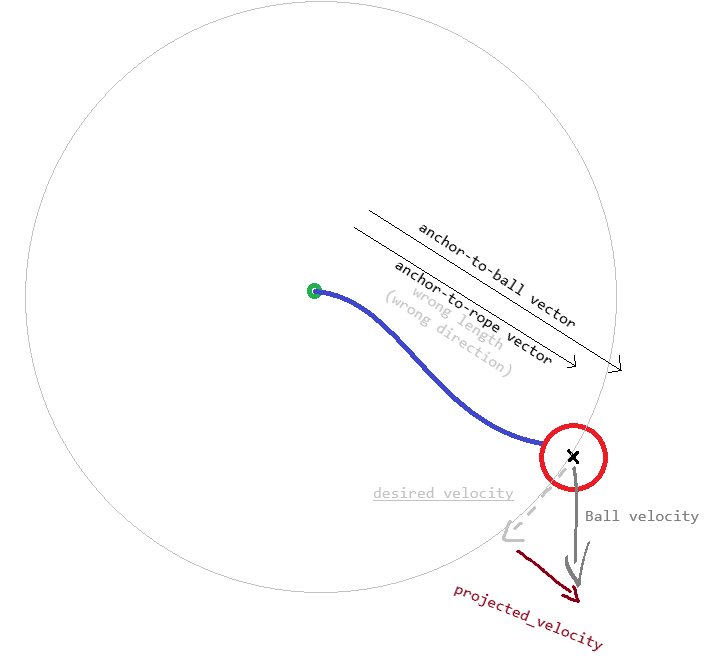
Moreover, I want to clarify that when I say anchor, I am referring to the base of the rope which follows the mouse around – not the attachment point on the ball.

How the constraint works

The constraint isn’t, and shouldn’t, be concerned with the rope you’re using to move the body around. It’s only trying to constrain the body’s distance to a specific point.

Mistake: using the rope’s attachment point instead

var rope_to_anchor = anchor_position - rope_origin_position 

Your new definition of the vector that originally went from the anchor to the ball now goes from the anchor to the end of the rope. This might be fine if the end of the rope is attached to the body’s origin – but it’s not. The effect of this is a vector that doesn’t always point to the body’s origin, and which can’t represent the distance from the origin.

Remember that the vector is being used to project the velocity onto such that the constrained_velocity – which should be tangent to the constraint circle – can be derived.

This is probably the reason for:

Mistake: not using the body’s state

self.global_position = constrained_position

Change to:

state.transform.origin = constrained_position
# Transform might be an immutable struct (I can't remember).
# In that case, use code below instead:
# var newTx = state.transform
# newTx.origin = constrained_position
# state.transform = newTx

Because you are working with physics, it’s best to work with the body’s state directly.

Correction: vector projection

var projected_velocity = state.linear_velocity.project(rope_to_anchor.limit_length(rope_length + max_additional_length))

Remove the rope_to_anchor.limit_length() part. It is unnecessary. Change to:

var projected_velocity = state.linear_velocity.project(rope_to_anchor)

With all this said, I do want to emphasize that you’re working with someone else’s extension. I have no idea how CRope2D works under the hood, and so I can’t confidently recommend any solutions that will solve your current issues. That jitter sure looks annoying though.

Sorry I can’t be of any more help. Please update the post if you figure out the issue.