I have a mechanic where if player falls on mob’s head, they get launched into the air. And it works. But I also have a constant gravity applied on the player (as long as they are not on the ground), which means before player is actually launched, they visually fall 20-30% into the mob, which doesn’t look very good. I’m positive it happens because 60 physics updates per second is not really that much, so before player state is updated, player will fall lower than they are supposed to.
Is there any way of dealing with it that doesn’t include changing physics settings?
Enabling physics interpolation reduces the issue by around 40%
Increasing physics tick rate from 60 to 90 reduces the issue by roughly the same %
Increasing physics tick rate from 60 to 120 fixes the issue
Some code for context. The Area2D that handles detecting if player landed on mob’s head.
public partial class BounceZone : Area2D
{
    //properties and ready override, not important right now
    private void OnBodyEntered(Node2D body)
    {
        if (body is CharacterBody2D characterBody && characterBody.Velocity.Y > 0)
        {
            var jumpComponent = body.GetNodeOrNull<AdvancedJumpComponent>("AdvancedJumpComponent");
            if (jumpComponent != null)
            {
                jumpComponent.Launch(characterBody, -launchStrength);
                if(hitbox != null)
                    hitbox.Monitoring = false;
            }
        }
    }

    private void OnBodyExited(Node2D body)
    {
        if (body is CharacterBody2D && hitbox != null)
        {
            hitbox.Monitoring = true;
        }
    }
}
And player script - the only place where physics process override is used on player:
    public override void _PhysicsProcess(double delta)
    {
        //gravity constantly pulls the player down as long as they are not on the ground
        gravityComponent.HandleGravity(
            this,
            (float)delta,
            jumpComponent.JumpHeight,
            jumpComponent.JumpTimeToPeak,
            jumpComponent.JumpTimeToDescent);
        advancedMovementComponent.HandleHorizontalMovement(this, inputComponent.InputHorizontal, (float)delta, swimmingComponent.IsSwimming, false);
        //there is more stuff here but it doesn't matter in this context, I don't want to make code too hard to read here
        MoveAndSlide();
    }
Area2D naturally only reports you when the bodies have already overlapped, and the Launch() changes velocity for the next iteration but does nothing to undo overlap in the current iteration. By making iterations shorter you can decrease overlap, but not get rid of it.
Moving rigidbodies for example would overlap too, but the physics calculations include them pushing one another so they attempt to escape the overlap. Since you are controlling the position of the characterbodies it is your job to calculate where each one needs to be placed. Check out the PhysicsBody2D — Godot Engine (stable) documentation in English
Do I get this right - instead of colliding with detection zone and applying the new velocity, I should use TestMove/test_move to check for collision one physics iteration before, which will remove the delay?
Yes, using test_move it should be possible to detect oncoming collision and then move the player to just the point of contact. But it is also possible to move the player back some after you have detected the overlap. I think it’s safe to say Super Mario Bros got away with very simple physics, probably just placing the player above the stomped enemies as it is easy to find where their top edge is. There are different ways.
Super Mario made me ask this question, because while increasing physics process frequency does fix the issue (or at least makes it not noticeable), there is no way they had physics this advanced back then.
Now I’m trying to implement it, but there is one more issue - how do I tell test_move to only look for Area2D BounceZone? I can’t just check for every collision, I need some kind of reference point.
Edit
It looks like you can pass KinematicBody2D to the test_move and use get_collider(). The issue is that it doesn’t know what Area2D is, so you can’t detect it.
I had to use object metadata to define what CharacterBody2D can be jumped on. It seems to work, and there is definitely no delay. But this implementation has some issues:
Since this is detected on the player’s side, if I want to have different launch speeds for different characters and objects, I need to define them all on player’s end and detect what kind of object player interacts with. With Area2D it was very clean since I was relying on single exported field.
No access to the object player interacts with, so I can’t animate the object/character.
Player needs to be able to physically interact with the characters, so if I don’t want it in some cases I need to dynamically change masks.
No reference point, player jumps on any flat surface on the character.
So by solving one issue, I’ve created 4 new ones. I will try to figure this out, but if I can detect Area2D with test_move, it would be just perfect.
Are these really the issues with the collider specifically? Surely you’d have to deal with them with the Area2D too. All the difference is that one detects a surface contact, and another when an object is inside the area.
You should be able to just access the enemy via collider object with get_parent, for example.
GetParent/get_parent doesn’t exist on collider object. But I think it can be bypassed with signals, send signal to every character, and then resolve which one should react based on runtime ID (you should be able to get that with GetInstanceId).
I have managed to bypass every problem but there is one thing that I still don’t know how to solve - no reference point. The only reference point I have is flat surface, but what if a mob or an object that player can bounce on is completely flat, and I only want specific point to be interactable? The only way I can think of is to make sure only the interactable part has completely flat collider, but I don’t know if it will be possible to achieve all the time without some side effects.
Of course it does. The collider object (the one you get out of the KinematicCollision2D with get_collider) is the CharacterBody2D, or whatever it is there in your players path.
I don’t know what you mean by a “reference point”. At any rate it might be better to start another topic for it as this one is already marked as solved.
var collision = new KinematicCollision2D();
var collider = collision.GetCollider();
collider.GetParent();
collider.GetOwner();
'GodotObject' does not contain a definition for 'GetParent' and no accessible extension method 'GetParent' accepting a first argument of type 'GodotObject' could be found There is no GetOwner either.
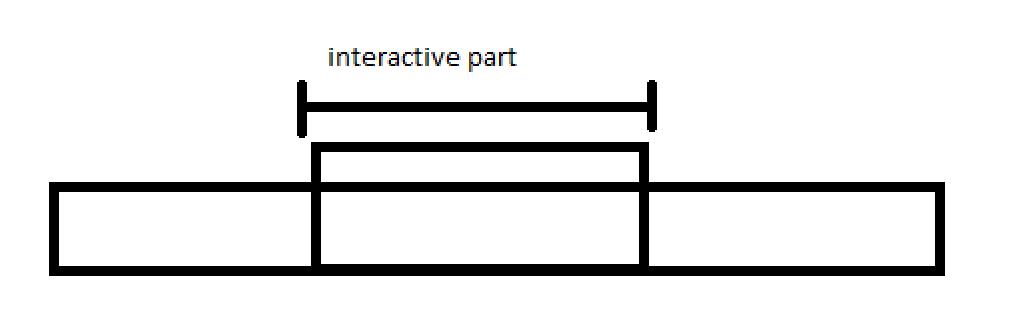
Let’s say I only want the marked part to be “interactive”, meaning player can bounce on it. But with current implementation every flat surface is interactive (as long as object has collider and bouncable metadata).
This is related to the topic at hand so I think it’s worth solving it here.
AFAIK, you have to manually cast the type of the collider in C#. Otherwise var will interpret the return value of GetCollider() just as Object, which does not contain the methods of a Node.
Right. You may cast the object with is/as, or use HasMethod/Call of Godot.
What to the interactive part, the theme of this topic was the player sinking into the stomped enemy, which you have reported as fixed. How to have an active area is a new separate question, so it is a good idea to ask it in a new topic with a relevant title and no “has a solution” mark on it. Having separate topics is also helpful for anyone searching the forum afterward. But basically, you might check which way the player is moving when it comes in contact with the stompable part. Maybe look up and read on how this is done in mario and other older games.