Godot Version
4.6 stable
Question
So as the name suggests I would like to implement handles that pop up when you hover over the building (ref pic). But of course I wouldn’t want them all to pop out the moment I hover over a building, it should work based on proximity, so if my mouse is hitting a wall I want that wall’s handle to pop out so I can modify it and also disappear when I hover over another important area.
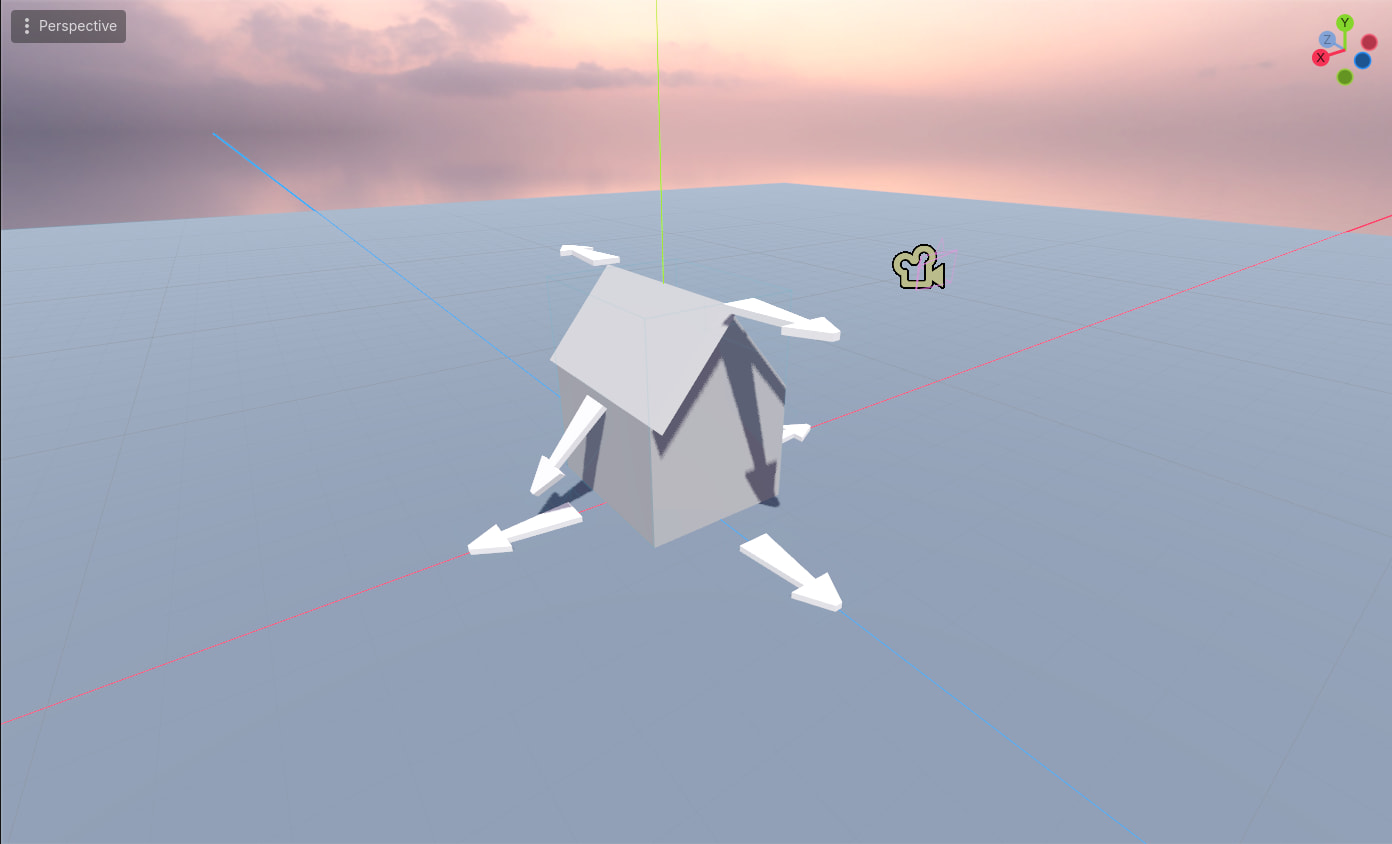
First Idea
First thing that came to mind is to have a lot of special collision boxes in these areas that I would basically just move and/or resize them as the house gets the same treatment, but seeing how this house will probably need to be spawned about 100-200 times since it is a city builder, it seems like excessive amounts of collision shapes for this scenario, I am also not sure if collision shapes count towards draw calls but either way it seems too much.
I could modify this so the collisions only appear after hovering over a house and then sneakily shooting another ray right after to see what I am actually hitting but that also seems a bit too much.
Second Idea
Since I can retrieve what is hit, its position, size, roof overhangs all the custom and non-custom properties, I could retrieve the ray position relative to my house and based on that and defining some rules I could know that for example I am hitting a front wall of the house or the roof overhang and with that I can spawn the arrow in the correct position.
Third Idea
I can probably retrieve UVs of the hit face and based on that and a small texture data I can figure out what I am actually hitting.
I hope some of these don’t sound too overcomplicated it is just something that I have come up with, I would love to hear anyone’s opinion on how they think something like this can be handled, literally any ideas are welcome.
PS. Here is my ray setup, nothing fancy but does the job:
func _physics_process(_delta: float) -> void:
	'''
	Ray Info
	'''
	var mouse_pos := get_viewport().get_mouse_position()
	var ray_start := camera.project_ray_origin(mouse_pos)
	var direction := camera.project_ray_normal(mouse_pos)
	var space_state := get_world_3d().direct_space_state
	var ray := PhysicsRayQueryParameters3D.create(
		ray_start,
		ray_start + direction * 1000.0,
		)
	var ray_result := space_state.intersect_ray(ray)

