Hello everyone!
I’ve been working on a project where I found my input logic was getting scattered across too many nodes, leading to some unpredictable behaviour and overall a messy structure. To solve this, I built a modular input handler system that makes input handling order predictable and modular.
I thought it might be useful for others who want a cleaner way to handle inputs without their input handling scripts becoming spaghetti.
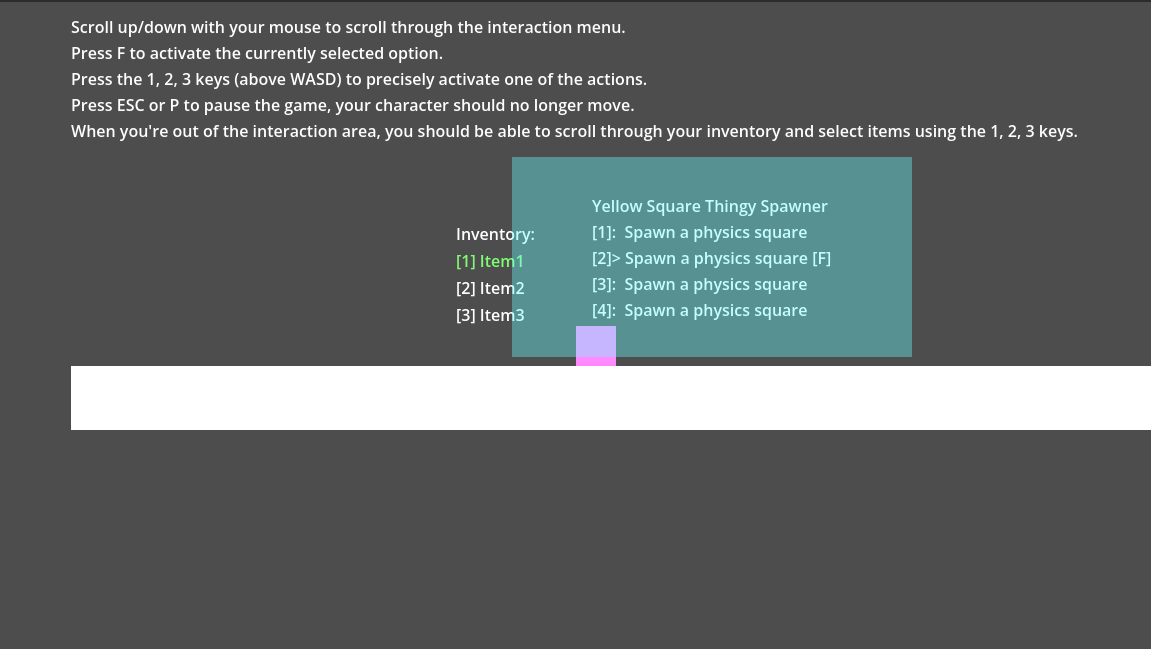
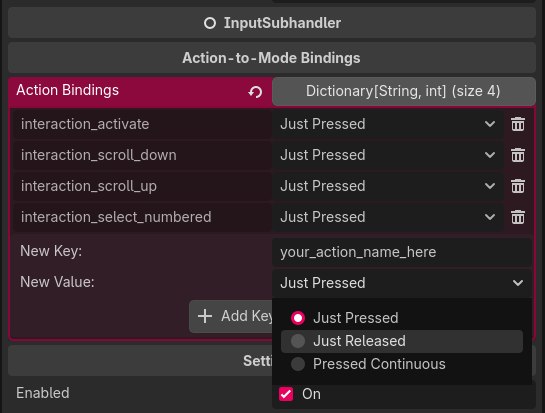
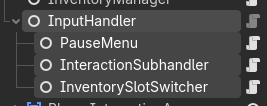
Some images:
Deterministic - inputs are always handled in the order of the Scene Tree.
Modular - you use “subhandlers” for specific tasks (Interaction, UI, Combat). Every subhandler (and even the handler itself) can be paused.
Short-circuiting - Subhandlers decide whether to pass the input down the chain or “consume” it.
It’s open-source, licensed under the MIT license, and available on Github and Itch.io.
Links
(Pending approval at the time of writing)
I’d love to hear any feedback on the scripts, architecture, even the posts! I’m very new to all of this.
Thanks for checking it out! :3
Hey i see this .. are you using input action by exporting on inspector or it’s something else.
I don’t remember if i hd seen this type of input in my good wondo. .. and i do like to ask.. how these inputs get effected by nodes ? Is your project is too complex?? You are using input separately as node or just to keep track??
Hey Thanks for the questions
I use an exported property to tell the InputHandler which actions activate the individual subhandler.
I’m not quite sure I understand what you’re asking though, what do you mean affected by nodes?
If you’re asking about the example project in the downloads on itch, it’s pretty simple, it showcases how it makes it easy to stop multiple scripts from acting on a single input, e.g. selecting an interaction via number keys always takes precedence over selecting an inventory slot. I believe it can easily scale to more complex projects, it shouldn’t be very heavy on the performance side.
Again I’m not sure what you mean, how this works is you create a new InputSubhandler for each action you want to performs, I have input handlers for activating the pause menu, opening the inventory, switching inventory slots, and interacting with real world objects. For example: when your subhandler for world interactions handles a number key input, it can tell the input handler to not pass that input to other subhandlers, for example the inventory subhandler, which would otherwise lead to two actions being performed at once.
This is the benefit that comes from this system, otherwise you’d have to manually communicate between scripts and create checks to make sure no input is handled twice and also you have control over which subhandler is activated first, so the order of operations is always predictable, unlike if you’d have multiple scripts just listening for _input(…).
Also thanks for checking out my project!
Hmmm .. ok.. i understand. So using input handler in inspector give much abilities.. ..
And yea you understand correctly.. sorry for spelling mistake or any other confusion .
In my project aka walking tank.. input handler do everything. Like moving backword, forward, turning left and right. Reload, repair, shoot. Gear increase/ decrease and engine on off, cannon rotation left and right.
Each input is attached to a different key.. and yea some are like open shop and manuals Also. Attached to input. But i never get any problem with this.
Btw thanks for replying….
Hey umm i just noticed a problem. In my project when i click 2 input buttons.. ( on mobile it doesn’t work.) Only One of them work.. like for shooting while waking. I can’t shoot while waking. I can do shoot or Walk at One Time..
But on pc it’s possible to perform 2 actions at a Time.. any solution??
Heya
If you’re handling both walking and shooting, etc. in one big script, it can become quite complicated and buggy.
I don’t have much experience with mobile UI, but I’d say you should make sure that you’re using Godot’s TouchScreenButton and that it has the correct Action assigned, then you should be able to independetnly handle it in your scripts. I’d really recommend not handling all of the game’s inputs in one script, because there might be an issue where you accidentally stop the script too early. In my system different actions are handled independently so that shouldn’t be a problem.
But maybe it’s a problem somewhere else, if it’s working just fine on keyboard but breaks on mobile, then the problem could be with the mobile UI, like the buttons being very close together, so when you click the shoot button while you’re holding the move button, it could not register that click because it thinks it’s just part of holding that move button. Since I don’t really understand moblie UI, I asked AI and it suggested trying to turn on the Passby property on the TouchScreenButton, it should activate whenever it detects a finger placed on it, not just when you start holding down, so for example pressing down on a different area of the screen and moving your finger over the button should activate it.
I hope you’re able to solve this issue.
yes, so far I have only ever made projects for PC, some of them with controller support, but it seems that Godot makes it surprisingly easy to implement mobile controls as well, which is awesome.
I’m not sure really, probably not yet. All I’ve ever made was very simple and then I’ve either hit a roadblock or burnt out. Also I don’t really have as much time on my hands as I’d like because of school, but I guess that’s what everyone has to deal with.
School ?? You studying??.. I thought you are a professional type something… wel it’s ok I had Also just started 7 months ago. But in actual Only 2 months ago
No, just an IT student, my main passion isn’t even game dev, it’s cybersecurity, I do have years of experience with game dev though, but I never managed to make anything that got any attention. I started on Roblox, which is very limiting in a ton of ways, so I’d burn out all the time… I have a long history with game dev and I decided to move away from it, now I’m just making my little passion project and trying to help the community by releasing my own tools that I’ve found useful :3
Okay.. ok. Well i am also studying in software development. Just different is learning gaming Also on my own. In begining i feels burnout. But now never. Even feels like i don’t need rest.. and i can work easily.. …



 .. are you using input action by exporting on inspector or it’s something else.
 Thanks for the questions
 .. ok.. i understand. So using input handler in inspector give much abilities..
  .
.
 . So can you handle complex projects?… I just need some guide to improve my work
 ?? You studying??
 .. I thought you are a professional type something… wel it’s ok I had Also just started 7 months ago. But in actual Only 2 months ago