I’m dynamically creating a font size override in order to increase the size of a button as the user continues to mouse over it.
Upon mouse over, the button is moved elsewhere on the viewport and resized, and I want it to remain fully on viewport, regardless of size. The problem is it seems the size property does not behave well as the font size override is modified, and so the button frequently draws from old size data and overflows at larger sizes.
Oddly, it seems y data is properly updated, but not x data, as can be observed here:
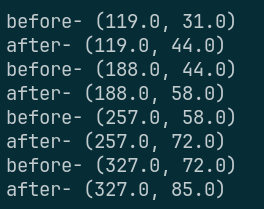
Here’s what’s currently running on mouse_entered:
func get_rand_button_pos(iter: int = 0):
	if (iter > 10):
		# Likely, no space for the button exists, so just return Vector(-1, -1)
		# No I am not solving a proof for button location
		return Vector2(-1, -1)

	var vsize = get_viewport().size
	var bsize = %Button.size
	if (bsize.x >= vsize.x || bsize.y >= vsize.y):
		# ITS TOO BIG GET OUTTA HEREEEE
		return Vector2(-1, -1)


	var newx = randi_range(0, vsize.x-bsize.x)
	var newy = randi_range(0, vsize.y-bsize.y)
	var mousepos = get_viewport().get_mouse_position()

	# regenerate if mouse over new loc
	if (newx < mousepos.x && mousepos.x < newx + bsize.x && newy < mousepos.y && mousepos.y < newy + bsize.y ):
		return get_rand_button_pos(iter + 1)
	return Vector2(newx, newy)

func _on_mouse_entered() -> void:
	if (Gamestate.gameover):
		return
	print("before- " + str(%Button.get_size()))
	%Button.add_theme_font_size_override("font_size", %Button.get_theme_font_size("font_size") + 10)
	print("after- " + str(%Button.get_size()))

	var newloc = get_rand_button_pos()
	if (newloc == Vector2(-1, -1)):
		Gamestate.gameover = true;
		return

	set_position(newloc)
Does anyone know how to get the size to accurately reflect the object size post font override? Or perhaps just some way of querying the same value?