Godot Version
v4.7.1.stable.mono.official [a13da4feb]
Question
I have a bunch of labels placed in front of progress bar. Progress bar and the label share color. To avoid blending, I’m using shader that dynamically changes the label color to background color (only the part that is on the progress bar).
shader_type canvas_item;

uniform sampler2D SCREEN_TEXTURE : hint_screen_texture, filter_linear;

uniform vec4 background_color : source_color = vec4(0.0, 0.0, 0.0, 1.0); // color when over the fill
uniform float fill_threshold : hint_range(0.0, 1.0) = 0.3;

void fragment() {
    vec4 original = COLOR;
    vec4 behind = texture(SCREEN_TEXTURE, SCREEN_UV);

    bool onFill = behind.g > fill_threshold
        && behind.g > behind.r
        && behind.g > behind.b;

    vec3 col = onFill ? background_color.rgb : original.rgb;
    COLOR = vec4(col, original.a);
}
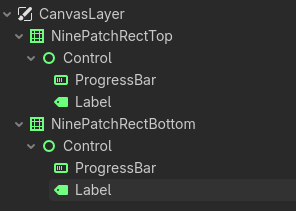
It works, but for some reason only for finite count of labels. I have a container on top of the screen, and second container on bottom of the screen. Top has 2 labels, bottom 3 labels. Shader remains inactive for the bottom labels as long as the top labels are visible. Hiding or removing them enables bottom labels.
Containers are in different parts of the screen and do not intersect.
Screen texture is captured only once per frame, at the moment the first shader that runs uses it. All subsequent shaders that use it will use that snapshot. So the second shader won’t “see” the things that were drawn between the first shader execution and its execution.
Insert a BackBufferCopy node at the place where you want to make another capture.
I have added BackBufferCopy between progress bar and label (so 5 copies, one for each label). The bottom ones now no longer blend with the progress bars (as they should), but now all labels are no longer black, but have color that looks to be between black (background) and the assigned color of the label. And all of them violently flash.
Only add BackBufferCopy node immediately before the node that runs the shader that reads the screen texture. For more specific suggestions you’ll have to show your scene structure and some screenshots/videos of what is happening.
I can show you scene tree right now:
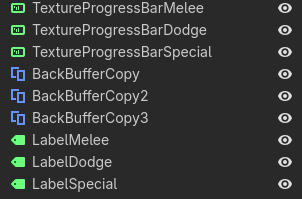
- ProgressBar1
- ProgressBar2
- ProgressBar3
- BackBufferCopy1
- BackBufferCopy2
- BackBufferCopy3
- Label1
- Label2
- Label3
This is the bottom container, top container is the same but has 2 labels and progress bars instead of 3. I can prepare a video too, but it will take a moment.
Not like that. Post the screenshot.
What’s the point of having multiple consecutive back buffer copies?
You said that each shader uses single snapshot, so I’ve assumed you need one for each label. I can try with one for each group.
Edit
Results are the same.
A shader will use as a screen texture captured by the last BackBufferCopy that appears in the tree before the node that runs the shader.
So firstly, if you have 3 consecutive BackBufferCopy nodes, they’ll all capture the same thing. And secondly all 3 labels in your current setup will use what BackBufferCopy3 captured.
So, does it mean it’s impossible to do what I want? Since I can’t use single BackBufferCopy node to capture everything, since I have those labels in different containers in different parts of the screen. Also, I’m using copy mode Rect, with precise placement, but the behavior is as I described above.
I’m not sure I understand what you’re trying to do. Post a visual mockup.
You can use a single capture, but then you’ll need to do all post processing in a single shader execution that overlays everything.
This is progress bar with label on top of it, from the top container (the one that works). Probably worth adding - I have single BackBufferCopy active at all times over everything, I need it for CRT shader. If that is a problem (meaning the only allowed BackBufferCopy already used), then I will essentially have to redesign entire UI so labels never overlap progress bars.
Edit
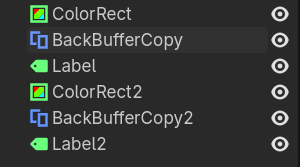
Minimalized version of the scene tree that I’m doing. I can’t have one BackBufferCopy behind all labels and in front of all progress bars, or in front of containers.
So you want to invert the number?
If labels run the shader then you need to place a BackBufferCopy node before each label.
Note that you need to properly set BackBufferCopy node’s rects or switch their modes to Viewport. Keep in mind that rect is in screen space, not in world or local space.
I have updated my scene tree to use one BackBufferCopy per label group (container) instead of one for each label, and changed copy mode to Viewport, and now it works. No idea why.
Your BackBufferCopy rects were probably incorrect.
They had the same size and location as ProgressBar +1 pixel on each side just to be sure.
Yeah but they can’t really be adjusted visually in the editor. As I said, those rects work in the screen/viewport space so you’d need to transform the world rects to viewport rects. In the editor you’d likely need to do it every frame as the editor viewport typicaly changes size and pans/zooms often.