Godot Version
4.6.2Question
I am trying to get the enemies in my 2d game to respawn to their previous locations after the player returns from the main menu and they just go back to their spawn locations. I have been at this for 4 hours and it still doesn’t work. Can anyone help?
extends CharacterBody2D

@export var enemy_id: int
@export var spawn_position: Vector2
@export var respawn_time := 3.0


@onready var sprite: Sprite2D = $Sprite2D
@onready var collision_shape: CollisionShape2D = $CollisionShape2D
@onready var timer: Timer = $Timer

var is_dead = false
var can_attack := true
var healing = false
var heal_cooldown = true
var health
var hit_cooldown = false
var original_layer: int
var original_mask: int
var speed = speedy

func _ready():
	original_layer = collision_layer
	original_mask = collision_mask
	player = get_tree().get_first_node_in_group("player")
	#sets spawn location
	if GameState.has_saved_state:
		call_deferred("_deferred_restore")
	else:
		spawn_position = global_position
	move_and_slide()

#func _deferred_restore():
	#await _wait_for_enemies()
	#restore_game_state()


#func restore_game_state():
	#if not GameState.has_saved_state:
		#return

	#for enemy in get_tree().get_nodes_in_group("enemies"):
		#var id = enemy.get_instance_id()
		#if id in GameState.enemy_positions:
			#enemy.global_position = GameState.enemy_positions[id]


func disable_target():
	# Turn OFF target
	if is_dead:
		return

	is_dead = true
	sprite.visible = false
	set_physics_process(false)
	collision_shape.set_deferred("disabled", true)
	await get_tree().physics_frame
	timer.start(respawn_time)

func _on_timer_timeout():
	can_attack = true
	if is_dead:
		# Move first (no collisions yet)
		global_position = spawn_position

		# Restore collision settings
		collision_layer = original_layer
		collision_mask = original_mask

		# Reactivate visuals
		sprite.visible = true
		# Re‑enable collision SAFELY
		await get_tree().physics_frame
		collision_shape.set_deferred("disabled", false)
		set_physics_process(true)
		is_dead = false


@export var speedy: float = 100.0

var player: Node2D


func _physics_process(delta):
	if player == null:
		return

	# Direction toward player
	var direction = (player.global_position - global_position).normalized()

	# Move enemy
	velocity = direction * speed
	move_and_slide()
	if sprite.visible == false:
		speed = 0
	if sprite.visible == true:
		speed = speedy


	#closes the game when it touches the player

	if player and global_position.distance_to(player.global_position) < 20:
		if can_attack:
			attack_player()


			if Global.health > 100:
				Global.health = 100
			hit_cooldown = false
			Global.getting_hit = false


func attack_player():
	Global.health -= 1
	#print("hit")
	can_attack = false
	timer.start(1.5) # cooldown time


#func _wait_for_enemies():
	#while get_tree().get_nodes_in_group("enemies").is_empty():
		#await get
#bellow is the code from a different node that may be important

extends Node2D


func save_game_state():
	GameState.enemy_positions.clear()

	for enemy in get_tree().get_nodes_in_group("enemies"):
		GameState.enemy_positions[enemy.enemy_id] = enemy.global_position

	GameState.has_saved_state = true


func _safe_restore():
	restore_game_state()


func restore_game_state():
	print("RESTORING ENEMIES")

	for enemy in get_tree().get_nodes_in_group("enemies"):
		print("Restoring enemy", enemy.enemy_id)
		if enemy.enemy_id in GameState.enemy_positions:
			enemy.global_position = GameState.enemy_positions[enemy.enemy_id]


func spawn_fresh_game():
	for enemy in get_tree().get_nodes_in_group("enemies"):
		enemy.global_position = enemy


func _ready():

	get_tree().paused = false

	if GameState.has_saved_state:
		restore_game_state()
	else:
		spawn_fresh_game()
The code for GameState would likely be helpful here.
Is your main menu in a different scene?
my main menu is a different scene. here is the code for my GameScene
extends Node
var has_saved_state := false
var player_position: Vector2
var enemy_positions := {}
func save_game_state():
var player = get_tree().get_first_node_in_group(“player”)
if player:
player_position = player.global_position
enemy_positions.clear()
for enemy in get_tree().get_nodes_in_group("enemies"):
	enemy_positions[enemy.enemy_id] = enemy.global_position

has_saved_state = true
here is the code for my main menu as well if it is needed
extends Control
var enemy_positions = {}
@onready var area_1 = preload(“res://scenes/areas/area_1.tscn”).instantiate()
func _on_play_button_pressed() → void:
#loads the game when the start button is pressed
get_tree().paused = false
get_tree().change_scene_to_file(“res://scenes/areas/area_1.tscn”)
visible = false
add_child(area_1)
area_1.visible = true
I suspect that, if you add some print statements to your code, you will find that nothing is being saved.
If your enemies are defined in one scene, they will not be in the tree of another scene.
To make this work you need to get the positions before you go to the main menu, then store the data somewhere that will persist until you return from the main menu.
I recommend doing some searching on something like “godot persist data between scenes”.
Thank you! I will look into it.
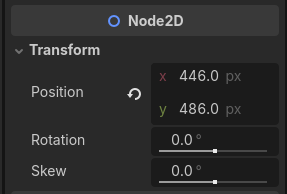
So i figured out the error is the enemy’s spawn positions are getting forced to a set location. However i don’t have any code that does this
Perhaps not in the script - but if you look at the Inspector I suspect you will find them.
The spawn positions. This screenshot is from a Character2D I manually placed in a scene tree.
I do see that but what does that have to do with their positions getting force reset every time i go to the main menu/leave the main menu?
You enter the scene. Godot says “Hey, where does this character go?”. First place it will look is in the scene tree. “Oh! That character’s transform says it goes here.”
If you do not override that position that will be where the character is every time you enter the scene.
It’s not a force reset as much as it is Godot putting something where you told it to.
ah, ok. so how would i fix this? I have tried to do some research and found nothing
Tell Godot to place it somewhere else 
You need to capture positions when you leave the scene, store them somewhere independent of the scene, then read the data store and set the positions when you enter the scene again.
You are on the right track - just need to work out the implementation details.
Is there any tips you can give on doing this? I am not able to figure out a way to do this
Static objects can be used for data persistence. Something like:
static class_name GameState
extends Resource

# Define static variables and methods to hold/manipulate data
Reading the position data can be done from _ready().
Setting the data when you exit the scene is trickier. You might be better off updating the character positions in the data store every time they move.
How would i do that? Sorry i keep asking so many questiuons, i am very new to godot and making my first game.
You have code that moves the characters right? After the character finishes moving, get their global position and write it to the data store.
And no need to apologize. Helping people is why I’m here.
would i put something along the lines of static enemy_1_position = position?
You surely could, and that is likely a good way to go until you get the underlying code correct. Once you get it working for one you can get it working for everyone.
Your syntax is incorrect though. The call will look something like this:
StaticClassName.variable_name = value
There is nothing wrong with the approach you originally posted - where you appear to be writing the locations to a dictionary. It is an approach I would consider if I had more than a handful of characters to track.
I got it to work. Thanks so much for the help!
1 Like