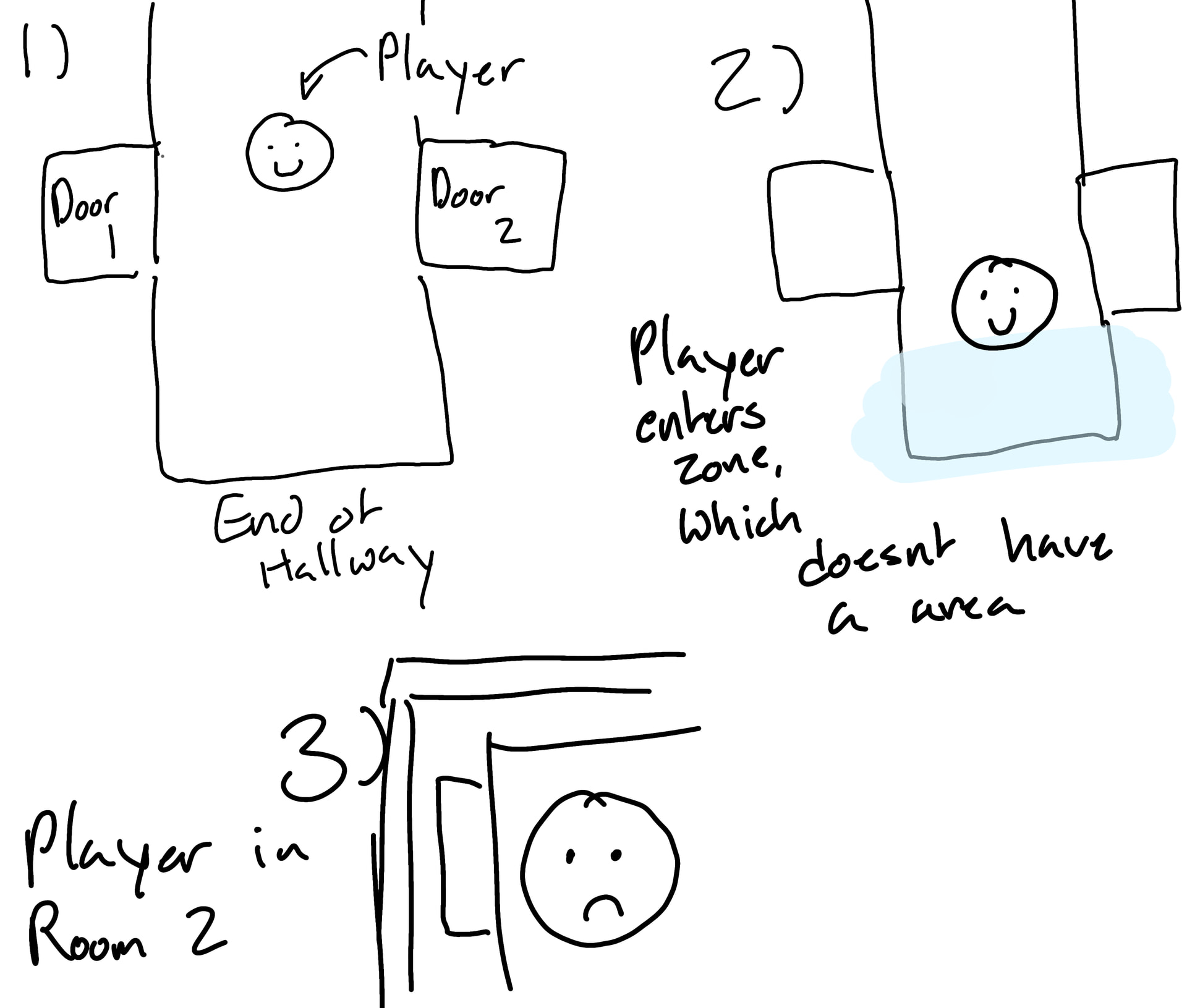
I have this weird problem with my entrances and exits to certain rooms in my game. For context, I’m using areas with signals to define where the player should teleport. But, for some reason, even when I know the player isnt in the area (because i see it on the debug, Visible collision) that supposed to trigger this code:
when you press the down arrow anywhere near it, it’ll teleport you to (in this case) the hallway. A few others had this problem as well, and I put an area where this glitch triggered which would deactivate a variable if you entered it, which didn’t allow you to enter the room when it was false (as so:
But thats both horrible for everything else (see: not being able to enter the room half the time because you accidentally collided with both) and caused so many other issues and I just am hoping to get to the root of it because everytime i fix one, theres always another that pops up in a different room.
Another quiestion though: would this issue be caused by copy and pasting area and collision shapes, and just attaching different scripts to them? Its just an odd glitch ive never encountered, ive been at this for hours lol, im just wondering if thats the issue. I had multiple entrances into rooms with the same size door right next to each other, so i copy and pasted them. Could that be the cause of the issue of teleporting to the room of the area youre around is supposed to take you, even if you didnt collide with the area at all? Its only if you press down as well near an entrance/exit, which i find extremely odd.
Copy-pasting doors can cause weirdness (duplicate signal connections, wrong node hooked up), but it usually isn’t “ghost collision.” The odd part is needing down near the door while Visible Collision says you’re outside. The code you pasted changes scene on area_entered with no input check, so there’s probably more going on than that function alone.
A few common roots:
Sticky “in door” flag - something sets a bool on enter and never clears it on exit, then down anywhere nearby (or globally) teleports. Connect area_exited / body_exited and clear the flag.
Wrong signal - if the player is a CharacterBody2D, doors usually use body_entered / body_exited, not area_entered (that’s Area<->Area). Check what the area arg actually is when it fires.
Copy-paste signals - select each door Area, look at Node → Signals. Make sure each door only connects to its script, once. Duplicate connections to another door’s handler will teleport you to the wrong room.
Don’t fight it with more Globals.allowedteleport2 zones. One door scene + @export var target_scene: String (or PackedScene) is cleaner than a stack of nearly identical scripts.
Also call scene changes deferred if you change scene straight from a physics/area callback: get_tree().change_scene_to_file.call_deferred("res://...")
Can you paste wherever you handle the down arrow for doors (player script / door script)? That’s likely the real trigger.
EEEEEE thank you ill try to implement those changes when its a little bit.. not in the dead of night lol
as for the down arrow thing, its actually weird because i dont really know why its doing that, because i never set the down arrow for anything except a player movement. Heres the code for that though:
func _physics_process(delta: float) -> void:
	if Globals.locked == false:
		var direction = Input.get_vector("left_arrow", "right_arrow", "up_arrow", "down_arrow")
		velocity = direction * max_speed
		if Input.is_action_just_pressed("menu_open"):
			menu.visible = true
		move_and_slide()
	if Globals.locked:
		idle = true
That explains the down part then. You’re not binding down to the door; down just moves the player (get_vector → move_and_slide), so you walk into the Area and area_entered fires. From your POV it feels like “press down near it,” but it’s really “move into the trigger.”
If Visible Collision still looks like you never overlapped, check:
you’re debugging the door shape and the player shape that actually triggers it (if the player has a child Area2D, area_entered can fire off that, not the body capsule you’re staring at)
still prefer body_entered on the door if the player is a CharacterBody2D
When you try the earlier fixes, add a quick print(area.name) (or body.name) inside the door callback so you can see what actually entered.
Okay so i tried all the fixes and heres what happened (of course in a timely manner because thats me /joking /lighthearted):
I already had that (sorry i didnt paste that code though!!). I have it clear on entry since some rooms have multiple entrances, so i needed it to detect if you were specifically coming from the hallway or not, and here that code is (in the main node of whatever room you’re going into):
func _ready() -> void:
	if Globals.room_one_enter:
		player.global_position = two
        Globals.room_one_enter = false
(please note that room one in this code is room two in the drawing, sorry about that!!)
For the wrong signal one, I have area nodes connected to the player that deal with the enter and exits of rooms, which is why I used the on_area_entered
Sorry i didnt make that clear
Thanks for the tip!! I went and checked all the scripts, they were each independent though.
I deleted all those zones now, and the teleporting problem is fully back. I have collision shapes on and visibly see that im not entering a teleport zone - i even turned my tilemap layer’s visibility to false to check for hidden teleport zones. Im not entering anything, so i cant really figure out what im doing wrong. But i have also realized i may not be explaining my problem very well so i have now also attached a drawing!
Well based on what you have shown so far, something is entering the Area2D that uses the same Collision Layer that the Area2D has set on it’s Collision Mask.
And since you’re not checking what that entity is, it’s triggering the code.
Here’s some code I use for a reusable component I have, I can then have another node connect to the signal and handle the logic. You should be checking to ensure that the owner is indeed the player before transporting etc.
Sorry i forgot about that last part; I have my players area name set as “player_area”, but whenever im teleporting when i shouldnt, the area.name is printing “Area2D”
Make sure the player’s Area2D has a Collision Layer of say 8 and then the door’s Area2D’s Collision Mask be 8 too, that’s one way to make sure that it only triggers when the player enters.
Which is weird, since my player doesnt have a control node attached to it in any scene let alone this one, or an area called area2d attached to my player?
Okay, so a little bit of new update: I tried to fix the collision shapes in a completely different area of the hallway, stretching it because it didnt fit the doorway, and then it made the place where you fall into the other room bigger (to the point it wouldnt let you leave because it covered the door). So somehow, its related to another door? On the other side of the hallway? That shares no script with the player or the doors you clip into, and is somehow running even when you shouldnt be in the hallway or be running hallway code, because its happening within the dining room as well, where its teleporting me to a room on the other side of the hallway?
This seems like one of the problems that can only really be solved in the editor as it’s likely a copy/duplication issue when making the doors. For example, if the doors are not a shared class but instead created as individual scenes then copying nodes from one to another could potentially be causing the issue.
If I was you, I would have a single door scene/class that is composed of a TeleportArea component whose only job is to detect when a specific Area2D has entered and emits a signal, then have a TeleportManager or something similar that is in charge of determining which scene to load and state to set.
Having individual entities affect global state directly can be difficult to debug.
You can create a simple scene for the door with the basics you need and its own script.
Then in the file system, right click it and create a new inherited scene.
That’s if you want specific scenes for different types of doors ofc, otherwise whenever a new door is added to the scene, change it’s internal variables to match what you need it to do.