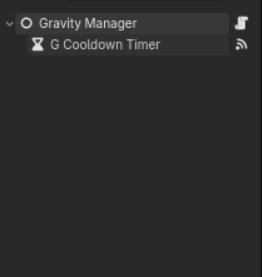
Trying to add a cooldown to changing the gravity. Whenever change_gravity() is run it causes the error; Cannot call method ‘start’ on a null value. I know that g_cooldown_timer’s value is ‘null’ but I’m not exactly sure what that means aside from that it has no value.
I have checked other similar questions, but while they may have had the solution to my problem I --quite honestly-- was not able to apply them to my own code.
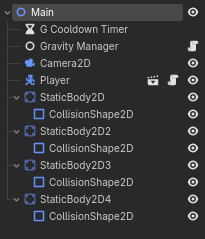
I have given the Scene Tree and the Script for Gravity Manager below. I apologize in advance if I did not give enough information, please ask if I need to give any more details.
gravity_manager.gd
extends Node
class_name Gravity_Manager


@onready var g_cooldown_timer: Timer = $"../G Cooldown Timer"


const GRAVITY = 3000.0
var g_dir : Vector2
var g_on := 1

var cooling_down := false

func _physics_process(delta: float) -> void:
	if Input.get_vector("g_left","g_right","g_up","g_down") and not cooling_down:
		change_gravity(Input.get_vector("g_left","g_right","g_up","g_down"))

	if Input.is_action_just_pressed("g_toggle"):
		toggle_gravity()


func change_gravity(dir : Vector2):
		g_dir = dir
		g_on = 1
		cooling_down = true
		g_cooldown_timer.start(-1)


func toggle_gravity():
		if g_on == 1:
			g_on = 0
			print(g_on)
		elif g_on == 0:
			g_on = 1
			print(g_on)
Where is the Gravity manager in your scene tree? Is it the Game Manager Node?
It is a bad practice to use parent-paths (starting with $"../"), I’d recommend making the timer a child of your manager or using an @export variable for sibling or parent nodes instead
really truly sorry for the late reply, i actually only just now tested what you said because when i first read your reply i only noticed you asking where gravity manager was and i was doing something else when i saw the notification so i just changed the screenshot and went back to what i was doing sorry about that.
but back on topic neither making the timer a child of Gravity Manager or making it an @export variable worked for me
If so, you should know that Godot creates a new instance of the given script/scene for an autoload, this is outside of any given scene so it will not have valid references to other nodes without some trickery. If you do want to use it as a global/autoload then you should add the timer as a child in a scene, and add the scene.tscn as your global, not the script .gd.
In your case, Godot is informing that can’t run the code block because is trying to do so before the reference to the timer has been assigned to the variable.
A quick fix is to just prevent the code block execution if the variable hasn’t been assigned yet.
func _physics_process(delta: float) → void:
  if not g_cooldown_timer:
     return

  if Input.get_vector("g_left","g_right","g_up","g_down") and not cooling_down:
	change_gravity(Input.get_vector("g_left","g_right","g_up","g_down"))

  if Input.is_action_just_pressed("g_toggle"):
	toggle_gravity()
Cannot call method ‘start’ on a null value. I know that g_cooldown_timer’s value is ‘null’ but I’m not exactly sure what that means aside from that it has no value.
It means that Godot is trying to run a piece of code containing a variable that still is empty (null, there is nothing there). This happens becuase of execution timing. There are some methods such as _physics_process() that start before other methods have finished, such as _ready() . This means that its going to use variables that are not ready yet. You see what I mean ?
@export annotations assign a value to a variable sooner than @readythat is why @gertkeno suggested it.
I never said it would be invoked before ready(), I said before ready() finishes execution . E.g. if you await an operation within ready() the process method will certainly start before ready() has finished, generating all sort of problems.
The early return is protecting against unexpected values, meaning the code is expecting a node reference and its receiving a null value. It is not dismissing an error but rather protecting the application from a runtime crash. It is a nullability checker.
The topic does not use await in _ready, such a delay wouldn’t affect @onready variables anyways. await does create all sorts of problems, but not in this topic.
But in this case they probably expect their physics to process, they always want the value so if the unexpected happens it’s good that the game editor enters a debugging state and points exactly what went wrong instead of silently keeping on. An exported game would not produce a runtime crash, it would log the error and continue on if possible, which is still better.
This is dismissing the error- the game is harder to debug and the errors are maybe in a different form, but still present. Treating the symptom not the problem.
Yes ofcourse, things in software are opinionated. There are always different good ways of going about things.
However, nullability checkers are considered a good practice in software development. I’ve seen these being used across production code in seven figure software products. So, it is reliable.
Now, for this specific case it could be not the best implementation. It is just a quick fix, a patch.
 . E.g. if you await an operation within ready() the process method will certainly start before ready() has finished, generating all sort of problems.