ERROR: Cannot instantiate C# script because the associated class could not be found

Godot Version

Godot 4.6.1

Question

c# GD.LOAD() Fails, but file exists at path?

ERROR: Cannot instantiate C# script because the associated class could not be found.

I have a godot .net project with this project structure (with irrelevant files omitted):

gamename.slnx
gamename.csproj ← Sdk=“Godot.NET.Sdk/4.6.1”

`gamename.Client` ← <Project Sdk="Microsoft.NET.Sdk">
    `ClientRoot.cs`
    `ClientRoot.tscn` ← this scene references the script
    `gamename.Client.csproj`

`gamename.Shared` ← <Project Sdk="Microsoft.NET.Sdk">
    `gamename.Shared.csproj`

`gamename.Server` ← <Project Sdk="Microsoft.NET.Sdk">
    `gamename.Server.csproj`

Inside gamename.Shared I call a GD.Load("res://Snowdrift.Client/ClientRoot.tscn") and its unable to find this path even though they do exist in the project structure (client root scene references the following script) :

ERROR: Cannot instantiate C# script because the associated class could not be found. Script: 'res://Snowdrift.Client/ClientRoot.cs'. Make sure the script exists and contains a class definition with a name that matches the filename of the script exactly (it's case-sensitive).


   at: can_instantiate (modules/mono/csharp_script.cpp:2360)
blah blah blah

why can GD.Load not find this file? it exists at the path.
Is it namespacing?

the root project is configured to ignore the sub projects files so they are not included into source twice while I can still load the dlls via project reference.

<ItemGroup> <Compile Remove="Snowdrift.Engine/**/*.cs" /> <Compile Remove="Snowdrift.Shared/**/*.cs" /> <Compile Remove="Snowdrift.Client/**/*.cs" /> <EmbeddedResource Remove="Snowdrift.Engine/**" /> <EmbeddedResource Remove="Snowdrift.Shared/**" /> <EmbeddedResource Remove="Snowdrift.Client/**" /> <None Remove="Snowdrift.Engine/**" /> <None Remove="Snowdrift.Shared/**" /> <None Remove="Snowdrift.Client/**" /> </ItemGroup>

does the Sdk=“Godot.NET.Sdk/4.6.1” project require that the files are compiled into its own assembly?
The ‘gamename.Client‘ and other folders with ‘.‘ in their name are being recognized by Windows as a folder but Godot might be recognising ‘.Client‘ as a file type. Also, check if the .csproj file has the correct SDK version listed. Make sure that your .NET SDK is not version 9 or 10, as Godot supports only .NET SDKs till version 8 and its sub-versions.

This shouldn’t matter. Both dotnet 9 and 10 will work with projects targeting 8.

@tibaverus @Parth_Satija regardless. all of these classlibs that I mentioned are net8.0 here is an example of what one of them looks like:

<Project Sdk="Microsoft.NET.Sdk">

<PropertyGroup>
    <TargetFramework>net8.0</TargetFramework>
    <ImplicitUsings>enable</ImplicitUsings>
    <Nullable>enable</Nullable>
  </PropertyGroup>

<ItemGroup>
    <ProjectReference Include="../Snowdrift.Shared/Snowdrift.Shared.csproj" />
    <ProjectReference Include="../Snowdrift.Engine/Snowdrift.Engine.csproj" />
  </ItemGroup>

<ItemGroup>
    <PackageReference Include="GodotSharp" Version="4.6.1" />
  </ItemGroup>
</Project>

the project compiles and runs all good. just GD.Load() cant access files that are definitely there

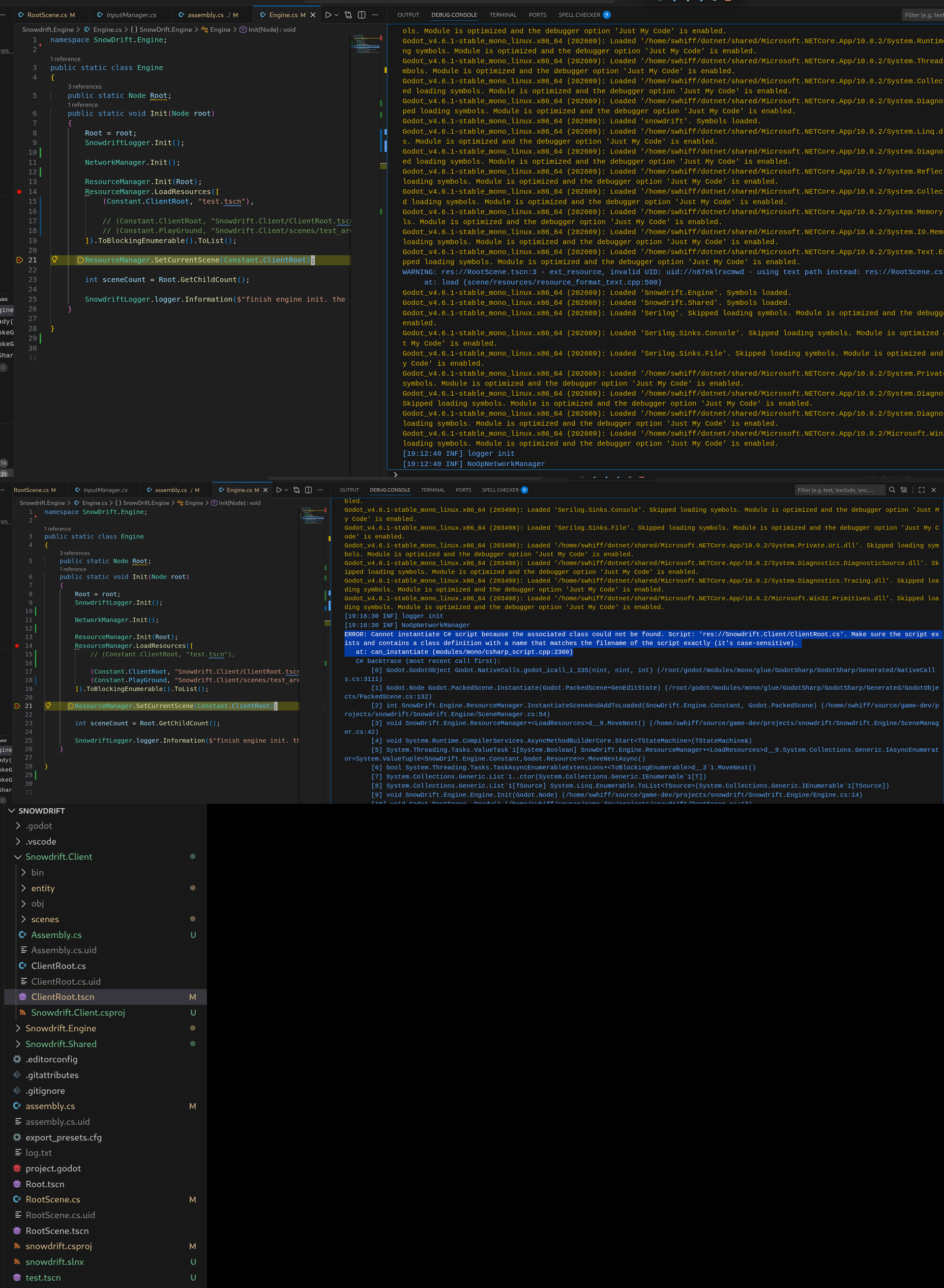
(Apologies for the single image, new users cant embed more than one image in a post)

I was however able to load a scene file using GD.Load() if the file was in the root of the project

Top image is me loading a test.tscn at res://test.tscn and I get no errors.

Middle image is loading files from res://Snowdrift.Client/ClientRoot.cs and throws an error

and on the bottom as you can see, the files exists

I think your problem is the way resource paths are handled by Godot.

Each assembly has it’s own resource path, and that resource path cannot be shared between assemblies.

So when you load a scene from one assembly using a different assembly the source path for the script will not be found by the loading assembly because it is relative to the assembly containing the scene.

If you want to load a scene from a client library, it cannot have a script attached, as the calling assembly will not be able to load the script as the script is not part of the calling assemblies resources.

In this case, the scene in the client project has it’s script path set to res://ClientRoot.cs
When loaded from the parent the path to the script is now res://Snowdrift.Client/ClientRoot.cs
however the scene expects the script to be res://ClientRoot.cs which does not exist and leads to your error.

so instead wrap your scene in an object with the logic that would have went into the script.

For example, your Client library: res://Snowdrift.Client/ClientRoot.tscn

Instead of attaching a script to the scene create a wrapper class.

public partial class ClientRoot : Control
{
    public ClientRoot()
    {
        //fill parent container - adjust for your needs
        SetAnchorsPreset(LayoutPreset.FullRect);
        SizeFlagsHorizontal = SizeFlags.ExpandFill;
        SizeFlagsVertical = SizeFlags.ExpandFill;	
        
        //load scene and instantiate
        PackedScene packedScene = GD.Load<PackedScene>("res://ClientRoot.tscn");
        AddChild(packedScene.Instantiate());
        
        //now hook up any nodes like you did in your original scene
        
    }
    
    // Called when the node enters the scene tree for the first time.
    public override void _Ready()
    {
		
    }
	
    // Called every frame. 'delta' is the elapsed time since the previous frame.
    public override void _Process(double delta)
    {
    }
}

Then in the calling assembly instead of loading a scene just create your object using the constructor.


ClientRoot clientRoot = new ClientRoot();

fantastic, I will try this after work and mark answer as solution if so!

thanks for your reply

Note in the example I posted it assumes a UI Control node so it extends Control, you’ll want your wrapper to extend the appropriate type for your use, like for a 2d game you might extend Node2d, or for a 3d game Node3d etc..

1 Like

@silenuznowan I got this working with one minor change related to the scene path,

(I think the path has to be relative to the calling assemblies res://)

I’m Instantiating the client root at the root of project

see that the path I’m passing to GD.load is relative to the calling assemblies res://

(in a real app you should probably pass that in instead of hardcoding)

one final thing is that that Node override functions do not get called like normal when the scene is attached to a script like this.

PackedScene scene = GD.Load<PackedScene>("res://Snowdrift.Client/ClientRoot.tscn");
AddChild(scene.Instantiate());

but why arent they being called? I added the ClientRoot node as a child of the root node?
and the root node is processing its own lifecycle methods correctly.
and I confirmed that it was added as a child of the root node by doing:

`foreach (var x in EngineRoot.GetChildren())
{ SnowdriftLogger.logger.Information(x.Name); }`

and get:

[11:42:36 INF] client root node (Manually set name hiiii)

see:

public ClientRoot() { this.Name = "client root node (Manually set name hiiii)"; PackedScene scene = GD.Load<PackedScene>("res://Snowdrift.Client/ClientRoot.tscn"); AddChild(scene.Instantiate()); }

If your using the wrapper class, you don’t want a script attached to the scene. You’ll just get the same errors if you attach a script because the relative paths to the script will change based on the executing assembly and the script will not be found in the calling assembly. For example inside the client library the path for the scene’s script when instantiated will be different than when it is used instantiated in the root project. This means that if you set the script path to the full relative path of the root project it will likely stop working when used locally in the client project.

Instead move the code from the script to the wrapper class. Just remember the wrapper itself is the root node. So if say the top level item in the scene is a sprite2d called sprite and it has a child area2d the path before was GetNode("Area2d") and in the wrapper class would be GetNode("sprite/Area2d")

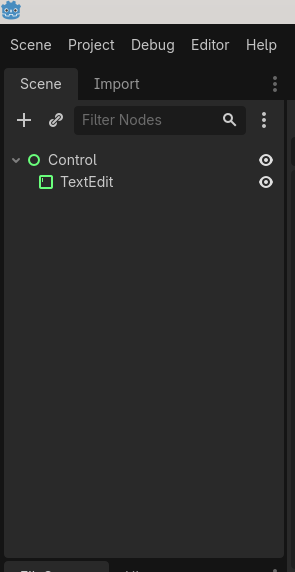
Here’s an example that will hopefully help explain things. In this case there are two assemblies, the executing assembly and a client library.

The client library has a simple scene. This scene is wrapped in an object.


using Godot;
using System;
using embeded_test;

public partial class EmbeddedMainControl : Control
{
	private TextEdit txtEdit;

	public EmbeddedMainControl()
	{
		SetAnchorsPreset(LayoutPreset.FullRect);
		SizeFlagsHorizontal = SizeFlags.ExpandFill;
		SizeFlagsVertical = SizeFlags.ExpandFill;
 // The scene path should be relative to the godot project that contains it
//, not the executing assembly
		PackedScene scene = GD.Load<PackedScene>("res://main_control.tscn");
		Control sceneNode = scene.Instantiate() as Control;
		AddChild(sceneNode);
		txtEdit = GetNode<TextEdit>("Control/TextEdit");
	}

	// Called when the node enters the scene tree for the first time.
	public override void _Ready()
	{
		
	}
	public void DoSomething(string something)
	{
		txtEdit.Text = something;
	}
	
	// Called every frame. 'delta' is the elapsed time since the previous frame.
	public override void _Process(double delta)
	{
	}

}

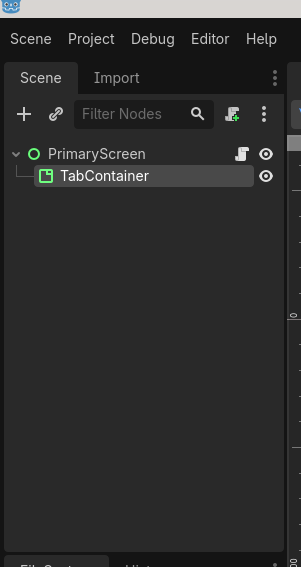
The executing assembly has a simple scene containing a tab container.

It simply loads the wrapper object from the client library and adds it to the tab container.

public partial class PrimaryScreen : Control
{
	TabContainer tabContainer;
	
	// Called when the node enters the scene tree for the first time.
	public override void _Ready()
	{
		tabContainer = GetNode<TabContainer>("TabContainer");
		EmbeddedMainControl embeddedScene = new EmbeddedMainControl();
		tabContainer.AddChild(embeddedScene);
		tabContainer.SetTabTitle(0,"Embedded Example");
		embeddedScene.DoSomething("Hello World");
	}

	// Called every frame. 'delta' is the elapsed time since the previous frame.
	public override void _Process(double delta)
	{
	}
}

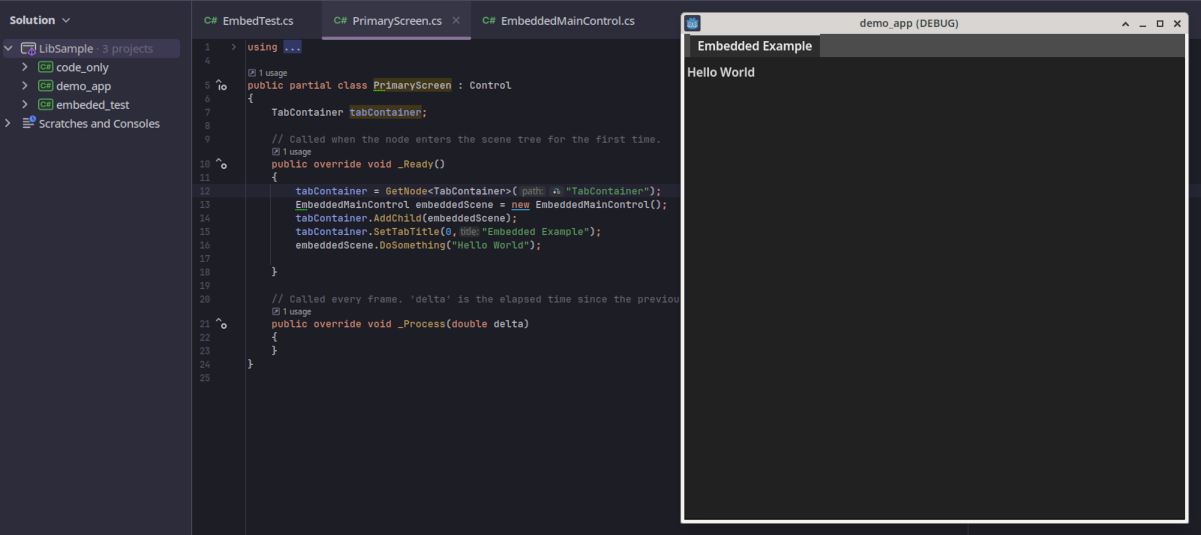
And here’s what it looks like running:

Another alternative if you don’t want to copy and paste the script content to wrappers, due to the way the paths are in your projects, you could probably attach the scripts after instantiating the scene. In this case whatever was instantiating the scene and assigning the script would the path relative to itself for the scene path and the script path. In this example the script for the control is SomeTest.cs

		PackedScene scene = GD.Load<PackedScene>("relative/path/to/scene/based/on/project.tscn");
		GodotObject obj = scene.Instantiate();
		ulong id = obj.GetInstanceId();
		obj.SetScript(ResourceLoader.Load("/relative/path/to/script/file.cs"));
		SomeTest someTest = SomeTest.InstanceFromId(id) as SomeTest;

Note in this use case you would set the script up as usual and test it, but then unattach the script, or when the scene is instantiated it may be unable to find the script leading to an error.