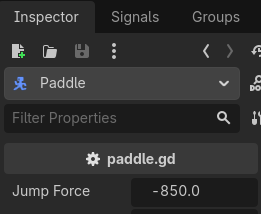
So I have been trying to make a jump mechanic, using a stripped movement script I had made along a tutorial for a game and this error pops up when I press space to jump, crashing the game in the process:
Invalid assignment of property or key ‘y’ with value of type ‘Nil’ on a base object of type ‘Vector2’.
I am baffled because it worked the day before but now it has a problem with my script.
func _physics_process(delta):

	# Handle jump.
	if Input.is_action_just_pressed("Jump"):
		if is_on_floor():
			velocity.y = jump_force
I’m almost a 100% sure that you either have another piece of code running that fails and not this one, OR this is a cache issue. In which case you should open up your project’s folder, find the hidden .godot folder and delete it, so the next time you open up your project, godot will re-generate the cache. (Make sure you close Godot before you delete the folder, then open it again)
Yes, any text editor will do. (You can do it inside Godot as well, in the script editor File > Open and then change the filter to “All Files” for the .tscn to show up.)
I tried to do what tibabersus said and I have now broken the entire game lol! Can’t open it anymore. Don’t matter, I had not gotten far into the project, I’ll just remake it. Sorry to waste your time.
WAIT, I got it working! I deleted the file and then just put it right back and now the code works!
I’m not sure how that’s possible? I assume you deleted your entire project, and NOT just the .godot folder. Do not blame me for your mistake of not reading instructions properly.
Wasn’t even going to blame you for my mistake, don’t worry! You were right, I deleted the file, but then I just ctrl+z in the folder, putting it right back and bam! it works for some reason now. Thank you very much!