Godot Version
4.4.1
Question
Hey y’all. Does anyone know of a way to export a tilemap layer with a format most tilemap editors understand?? I need to get the tilemap I made inside godot into an external editor (ldtk or Tiled) to do the visual pass. I already have a way to bring the data back into Godot using a plugin.
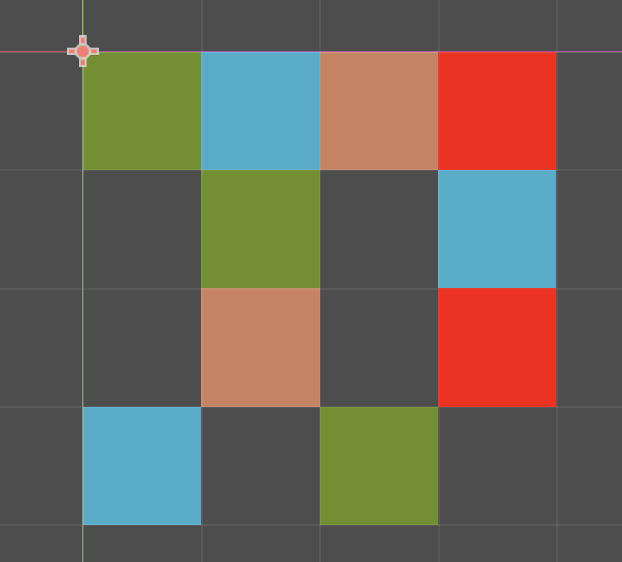
For simplicity sake, I made a 4x4 tilemap as example:
This is what the tilemap looks like inside godot:
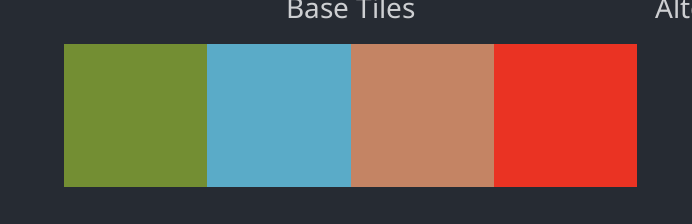
And this is the 4 tile tileset:
When I look at godot’s tilemap data, this is what I see:
tile_map_data = PackedByteArray("AAAAAAAAAAAAAAAAAAABAAAAAAABAAAAAAACAAAAAAACAAAAAAADAAAAAAADAAAAAAADAAIAAAADAAAAAAABAAIAAAACAAAAAAACAAMAAAAAAAAAAAABAAEAAAAAAAAAAAAAAAMAAAABAAAAAAADAAEAAAABAAAAAAA=")
Now, if I create the same exact tilemap in Tiled or ldtk I get something infinitely more readable (1,2,3 and 4 represent the tile id from the tileset and 0 is an empty tile):
 <layer id="1" name="Tile Layer 1" width="4" height="4">
  <data encoding="csv">
1,2,3,4,
0,1,0,2,
0,3,0,4,
2,0,1,0
</data>
Ideas?
** I am not a programmer so please try to be as accessible as possible with your answers 
Thank you!
Godot’s TileMapLayer has a single layer in it; are you using more than one?
If not, you ought to be able to export the data relatively easily. Something like:
# untested...

func export_tilemap(tm: TileMapLayer, layer_name: String, layer_id: int):
    var cells     = tm.get_used_cells()
    var min_bound = Vector2i.ZERO
    var max_bound = Vector2i.ZERO

    # Iterate over the cells, finding a bounding box.

    for c in cells:
        if min_bound.x > c.x: min_bound.x = c.x
        if min_bound.y > c.y: min_bound.y = c.y
        if max_bound.x < c.x: max_bound.x = c.x
        if max_bound.y < c.y: max_bound.y = c.y

    var map_size = max_bound - min_bound

    # Make a local copy of the full grid.

    var map = []
    map.resize(map_size.x * map_size.y)
    map.fill(0)

    # Iterate over the cells again, populating a complete grid.

    for c in cells:
        var tile = tm.get_cell_atlas_coords(c)

        # You'll need to write _atlas_to_index(), it takes altas coordinates and converts
        # them to a tile index; it's probably as simple as (coord.x + (coord.y * atlas.width))...

        map[c.x + (c.y * map_size.x)] = _atlas_to_index(tile)

    # Print it out.  You could write to a file instead.

    print("<layer id=\"%s\" name=\"%s\" width=\"%d\" height=\"%d\">" % [layer_id, layer_name, map_size.x, map_size.y])
    print(" <data encoding=\"csv\">")

    for y in map_size.y:
        var out = ""
        for x in map_size.x:
            if x != 0: out += ", "
            out += str(map[x + (map_size.x * y)])
        print(out)

    print(" </data>")
2 Likes
Hey hexgrid!
I REALLY appreciate you volunteering your time to help me with a potential solution. You even added the extra <> formatting there 
I only really need to export 1 tilemaplayer, so this looks perfect!
I will test this out and get back with my findings.
You might have to tweak the code a bit depending on your tilemap. if min_bound isn’t (0, 0), the cell coordinates will be off when filling map. You’d need to:
        var pos = c - min_bound
        map[pos.x + (pos.y * map_size.x)] = _atlas_to_index(tile)