Eyes can't correctly follow the mouse because of the AnimatedSprite2D

Godot Version

4,6

Question

Hello. I’m new to godot or even game development. I wanted to do that player’s character look at the mouse. I did it, here’s the code:

extends Node2D

@onready var Eye = get_children()[0]
@onready var Player = get_parent().get_parent()

const MAX_DISTANCE = 0.5

func _process(_delta: float) -> void:
	var Mouse_Position = get_global_mouse_position()
	var Direction = (Mouse_Position - Player.global_position).normalized()
	var Distance = Mouse_Position.length()
	Eye.position = Direction * min(Distance, MAX_DISTANCE)

The problem is that the sprite is animated and becomes smaller by 1 pixel so the eyes must be lower by 1px

You can just add this at the end of your script, it’ll lower the eye’s position by 1.

	Eye.position.y += 1

If this depends on the animation frame, you should include that movement in the animation itself.

On a side note, you’re mixing PascalCase with snake_case in your code. I suggest you look into the GDScript style guide, it’ll benefit you in the long run.

Thank you, but I don’t really know how to do so it will change with the animation. Is there a way to get the animation name and current frame of animation?

There is an animation and frame properties of AnimatedSprite2D respectively.

But what I meant is you can just bake this movement into the animation frame itself.

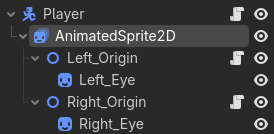
So there’s a way to change the position of eyes in the sprite animation? Because I’m doing that the character looks at the mouse, eyes are separated object
If yes, can you explain me how do I do that

Not through code, but in the graphics editor software. Just move it 1 pixel down.

The eyes are not the part of the sprite, so do I do that using code?

Just look at the hierarchy of the character:

Gotcha. Then yes, you can do it through code, using these:

Or alternatively you can use AnimationPlayer to animate everything together.

1 Like

Thank you so much! I managed to do it using these.

1 Like