Question
Hi this is a follow up of my earlier post with the same problem … basically i can’t find any information about how to create these uniforms or what could have gone wrong …
a couple of big differences … i am no longer trying to create the collision model entirely in the shader and am instead just writing to the vertex list for convenience. I have moved the data from storage buffers (SSBO) to textures in case a memory limit was the reason for the uniforms not being created. The textures are also used in the vertex shader, but I’m getting the images and reusing them in the compute shader - why would the Image resource have 2 RID()'s ?
One is invalid, the other appears to be valid …
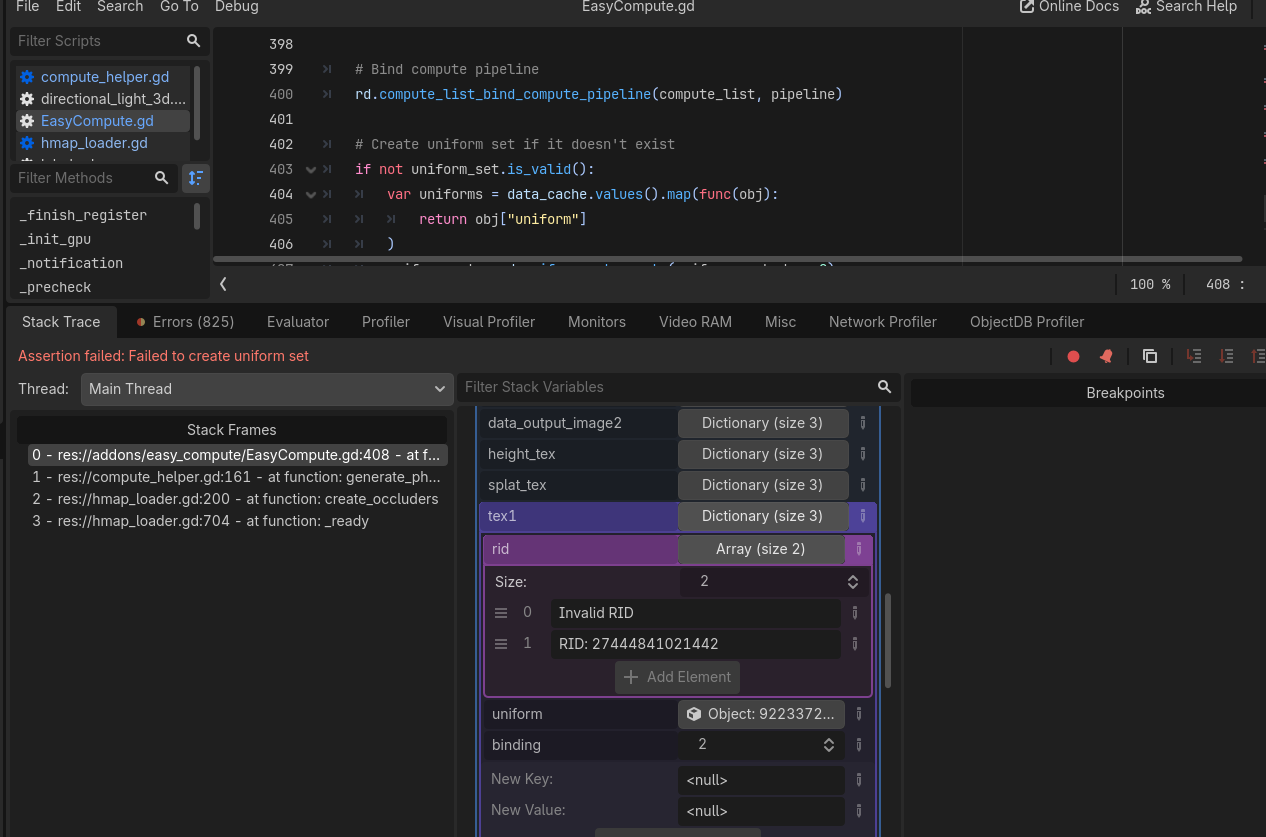
setup code …
	mesh_verts = get_mesh_vertices(plane__128.mesh)["vertices"]
	var vertex_image = Image.new()
	vertex_image.resize(128,128)
	vertex_image.convert(Image.FORMAT_RGBAF)
	for i in mesh_verts.size():
		var v:Vector3 = mesh_verts[i]
		vertex_image.set_pixel(int(v.x), int(v.z), Color(v.x, v.y, v.z, 1.0))

	# Launch the compute shader kernal to quickly compute the AABB's
	var computed_heights :PackedVector4Array= compute_helper.generate_AABB_and_occluders(hmap)

	var grid_coord = world_coords_to_grid_coords(player.global_position.x, player.global_position.z)
	compute_helper.generate_physics_shape( hmap,
							self.splat_map,
							self.alb1,
							self.alb3,
							Vector2(float(grid_coord.x),float(grid_coord.y)),
							UV_SCALE,
							float(channel_for_splat),
							HEIGHT_SCALE,
							vertex_image)
more compute initilialization
func generate_physics_shape(height_map:Image,
							splat_map:Image,
							tex1:Image,
							tex2:Image,
							grid_coord:Vector2,
							uv_scale:Vector4,
							splat_col:int,
							HEIGHT_SCALE:float,
							mesh_verts:Image):

	compute.load_shader("compute_height", "res://assets/compute/compute_physics_model.glsl")

	var image = height_map
	if image.is_compressed():
		image.decompress()
	image.convert(Image.FORMAT_RF)
	var height_texture = ImageTexture.create_from_image(image)
	var source_size = 4096

	var splat_image = splat_map
	if splat_image.is_compressed():
		splat_image.decompress()
	splat_image.convert(Image.FORMAT_RGBA8)

	var tex1_image = tex1
	if tex1_image.is_compressed():
		tex1_image.decompress()
	tex1_image.convert(Image.FORMAT_RGBA8)

	var tex2_image = tex2
	if tex2_image.is_compressed():
		tex2_image.decompress()
	tex2_image.convert(Image.FORMAT_RGBA8)


	compute.register_sampler("height_tex", 0, source_size, source_size, image.get_data(), RenderingDevice.DATA_FORMAT_R32_SFLOAT)
	compute.register_sampler("splat_tex", 1, source_size, source_size, splat_image.get_data(), RenderingDevice.DATA_FORMAT_R8G8B8A8_UNORM)
	compute.register_sampler("tex1", 2, 512, 512, tex1_image.get_data(), RenderingDevice.DATA_FORMAT_R8G8B8A8_UNORM)
	compute.register_sampler("tex3", 3, 512, 512, tex2_image.get_data(), RenderingDevice.DATA_FORMAT_R8G8B8A8_UNORM)

	if mesh_verts.is_compressed():
		mesh_verts.decompress()
	compute.register_texture("mesh_verts", 4, 128, 128, mesh_verts.get_data(), RenderingDevice.DATA_FORMAT_R32G32B32A32_SFLOAT)


	compute.register_texture("output_verts", 5, 128, 128,[], RenderingDevice.DATA_FORMAT_R32G32B32A32_SFLOAT)
	var params = PackedFloat32Array([grid_coord.x, grid_coord.y,
									uv_scale.x, uv_scale.y, uv_scale.z, uv_scale.w,
									splat_col,
									HEIGHT_SCALE])
	var params_byte_array = params.to_byte_array()
	compute.register_storage_buffer("Params", 6, params_byte_array.size(), params_byte_array)
	# FIRST PASS, Find min and max height values

	compute.execute("compute_height", 8, 8)
	compute.sync()

	var final_mesh_data = compute.fetch_buffer("output_verts")
	var float_data = final_mesh_data.to_vector3_array()
	print(float_data)
	compute.unload_shader("compute_height")
and the so-called shader
#[compute]
#version 450

layout(local_size_x = 16, local_size_y = 16, local_size_z = 1) in;


layout(set = 0, binding = 0) uniform sampler2D height_tex;
layout(set = 0, binding = 1) uniform sampler2D splat_tex;

layout(set = 0, binding = 2) uniform sampler2D tex1;
layout(set = 0, binding = 3) uniform sampler2D tex3;


layout(set = 0, binding = 4, rgba32f) uniform image2D mesh_verts;

layout(set = 0, binding = 5, rgba32f) uniform image2D output_verts;

layout(set = 0, binding = 6) restrict readonly buffer Params {
	vec2 grid_coord;
	vec4 uv_scale;
	float splat_col;
	float HEIGHT_SCALE;

}params;


void main() {


	uint index = gl_GlobalInvocationID.x  + gl_GlobalInvocationID.y * 128 ;
	if( index < (128 * 128 ) ) {

		ivec2 UV_IO = ivec2(gl_GlobalInvocationID.x, gl_GlobalInvocationID.y);
		vec4 vert = imageLoad(mesh_verts, UV_IO );
		vec3 VERTEX = vec3( vert.x, vert.y, vert.z);

		float world_pos_x = params.grid_coord.x + VERTEX.x;
		float world_pos_z = params.grid_coord.y + VERTEX.z;

		vec2 height_UV = vec2( world_pos_x / 4096.0, world_pos_z / 4096.0 );

		vec2 height_UV0 = vec2( (world_pos_x - 1.0) / 4096.0, (world_pos_z      ) / 4096.0 );
		vec2 height_UV1 = vec2( (world_pos_x + 1.0) / 4096.0, (world_pos_z      ) / 4096.0 );
		vec2 height_UV2 = vec2( (world_pos_x      ) / 4096.0, (world_pos_z - 1.0) / 4096.0 );
		vec2 height_UV3 = vec2( (world_pos_x      ) / 4096.0, (world_pos_z + 1.0) / 4096.0 );

		vec2 bump_UV = vec2( world_pos_x /127.0, world_pos_z /127.0 );


		float H0 = params.HEIGHT_SCALE*texture( height_tex, height_UV0 ).r;
		float H1 = params.HEIGHT_SCALE*texture( height_tex, height_UV1 ).r;
		float H2 = params.HEIGHT_SCALE*texture( height_tex, height_UV2 ).r;
		float H3 = params.HEIGHT_SCALE*texture( height_tex, height_UV3 ).r;

		vec3 NORMAL = -normalize(vec3(2.0*(H1 - H0), -4.0, 2.0*(H3-H2) ));

		VERTEX.y +=  params.HEIGHT_SCALE * texture( height_tex, height_UV ).r;


		float h1 =texture( tex1, bump_UV * params.uv_scale.x ).a;
		float h3 =texture( tex3, bump_UV * params.uv_scale.z ).a;


		vec4 splat_map = texture(splat_tex, height_UV );

		float splat_color = 0.0;
		if (params.splat_col == 0.0){
			splat_color = splat_map.r;
		}
		else if (params.splat_col == 1.0){
			splat_color = splat_map.g;
		}
		else if (params.splat_col == 2.0){
			splat_color = splat_map.b;
		}
		else {
			splat_color = splat_map.a;
		}

		float hval = (splat_color* h1 + (1.0-splat_color)* h3);

		VERTEX +=  5.0 * hval * NORMAL;// - 2.5 * NORMAL;

		vec4 output_vec = vec4( VERTEX.x, VERTEX.y, VERTEX.z, 1.0);
		imageStore(output_verts, UV_IO, output_vec);


	}
}