Godot Version
v4.7.2.stable.official
Question
I’m trying to write a function that generates a list of buttons for each character in the party. The function to generate a button looks like this:
func vboxAppendButton( character:Character ):
	if vbox == null: return false
	var newButton = Button.new()
	newButton.text = character.identity.familyName
	newButton.connect( "pressed", _selectButtonPressed )
	vbox.add_child( newButton )

func _selectButtonPressed( ):
	print( "pressed" )
The buttons are generated correctly, and the .text of each button is the .identity.familyName of the character, as expected. The buttons don’t work though, and the print(“pressed”) function is never executed. If I try using the newButton.pressed.connect syntax, it doesn’t work either. What am I doing wrong?
(keep in mind that I will eventually be passing the character as an argument to _selectButtonPressed. It’s just a placeholder for now.)
Some other control might be consuming the event. Post your scene tree structure.
You can also check the last clicked control in Debugger’s Misc tab.
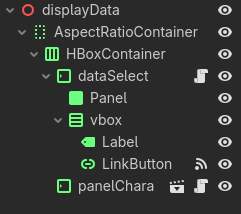
(the script is on dataSelect)
Debugger’s “clicked control” shows blank no matter what I click
What happens if you remove panelCharacter?
did you try having a look at the tree in the remote tab? or using the game windows options (2D, show list of selectable nodes at position)?
this usually points me to the right control that consumes the input or duplicate buttons/nodes
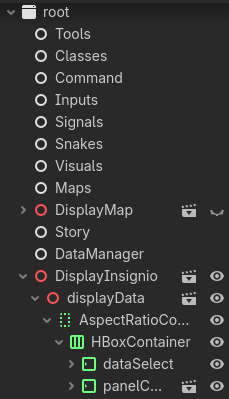
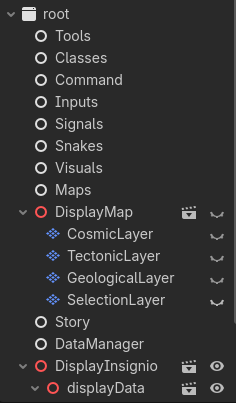
Post your complete remote tree at runtime.
Also don’t forget that pressed signal by default triggers on release.
Neither the remote tree nor the selectable-nodes-at-position show anything on top of the button.
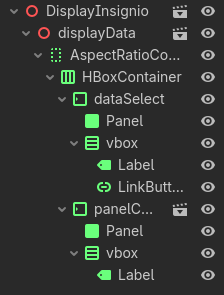
It looks like this. Seems like nothing is on top of dataSelect except panelContainer, which doesn’t overlap due to positioning in the hbox.
Expand all nodes so all children are visible in the tree.
Do buttons visually look like they are pressed when you press them?
Are you getting any errors in the debugger?
If you try printing something when generating the buttons, does that work? It seems like everything is correct here, so I kind of have no clue what’s going on…
Edit: Is your game in the “paused” state when you’re trying to press the buttons..?
Put a manually created button under vbox and connect it in the inspector. Does signal for that button work?
even if you click another button that works?
You’ve already stepped through with a debugger? _selectButtonPressed never gets called?
Any compile errors or other errors in the console?
Nope, still doesn’t work.
No errors whatsoever. I tried inserting breakpoints, but everything looks normal. I only know that _selectButtonPressed never gets called because the print statement is never printed.
At this point, I have 0 working buttons, so I don’t know what to compare it to.
Manually put a button somewhere else. Does that button work?
Did you check the pause / process mode for the button?
is get_tree().paused true?