Godot Version
4.6.2.stable
Question
I tried to update my game so the duplicated “animatedsprite2d” would become children of the grid_container. However, I would get an “_process: Invalid access to property or key ‘sprite_frames’ on a base object of type ‘previously freed’.” error and I’m not sure why. I would print the ‘placed_animated_sprites’ and they do show up in the output, so I know the array isn’t empty. The purpose of the _process() method is to animate rolling die, but by showing random die faces.
extends Node2D

var ghost_dice_bag
var placed_animated_sprites = []
var roll_balance: int
var total_balance: int

@onready var balance_amt_label: Label = $"../Main_CanvasLayer/VBoxContainer/HBoxContainer/Balance"
@onready var grid_container: GridContainer = $"../Main_CanvasLayer/VBoxContainer/GridContainer"
@onready var animated_sprite_2d: AnimatedSprite2D = $"../AnimatedSprite2D"
@onready var timer: Timer = $"../Timer"
var status: bool = false

@onready var upgrade_canvas_layer: CanvasLayer = $"../Upgrade_CanvasLayer"
@onready var upgrades: Control = $"../Upgrade_CanvasLayer/Upgrades"

# Called when the node enters the scene tree for the first time.
func _ready():
	places_dice()

func places_dice():
	ghost_dice_bag = Globals.dice_bag.duplicate()

	#Resets the array, so a new set of dice can be placed on the grid
	placed_animated_sprites.clear()

	if grid_container.get_child_count() != 0:
		grid_container.queue_free()

	for i in range(0, Globals.dice_bag.size()):
		#if statement runs only if the dice bag is not empty
		if ghost_dice_bag.is_empty() == false:
			var die_key = ghost_dice_bag.pick_random()
			var die_node = animated_sprite_2d.duplicate()
			die_node.animation = die_key
			die_node.visible = true

			#Needed for rolling mechanic
			placed_animated_sprites.append(die_node)

			#Nodes doesn't show
			grid_container.add_child(die_node)

			#Ensures the same die doesn't get choosen twice
			ghost_dice_bag.erase(die_key)

			#Places the die on a random frame
			var frame_count = die_node.sprite_frames.get_frame_count(die_key)
			die_node.frame = randi_range(0, frame_count)
	prints(placed_animated_sprites)

func _on_roll_dice_pressed():
	upgrade_canvas_layer.visible = false

	#Clears the dice from the screen. Without this, the dice sprite would be placed over each other
	for child in get_children():
		child.queue_free()

	#Places new dice
	places_dice()

	#Starts the dice 'rolling' animation
	status = true
	timer.start()

func _process(_delta: float):
	if status == true:
		for key in placed_animated_sprites:
			#for die in Globals.dice_bag:
				#Places the die on a random frame
			var frame_count = key.sprite_frames.get_frame_count(key) #<---doesn't work
			key.frame = randi_range(0, frame_count)
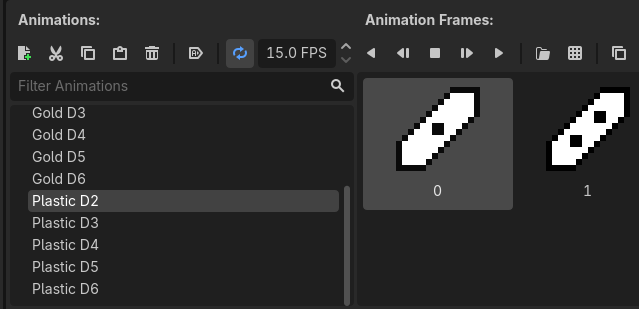
A screenshot of how I have the animation set up: