This is an intermittent issue that I've been experiencing in Godot for years. Sometimes after editing a file - especially if the editor has been open for a while - I save it, close Godot and reopen the editor only to find that the file is as it was before I edited it.
This will happen even if I make sure to save with Ctrl-S, the little * symbol goes away, and even if I run the code in question and see my changes in the game. The editor has given me every reason to believe that my file has been saved to disk. And yet if the editor crashes or I close it for some other reason and reopen it, all my changes are gone. It’s really frustrating, especially if it affects several files and sometimes because it leaves the project in a state where it is inconsistent, with some parts conforming to the state it was in before I made changes and other parts of it after. I’ve also had to rewrite my code more than once because my changes just vanish after the editor closes.
I don’t know what causes it, other than it seems to have something to do with having the editor open for a while. Often after this happens I can edit the files again and everything saves properly as it should. It would be really nice if somehow this could be avoided.
I have never experienced anything like it.
Do you use any version control system, like git?
If not - you should.
If yes - maybe try developing a habit of commiting frequently, right when you make a new feature work, to make sure your changes are saved there. You will inevitable catch any inconsistencies if they ever appear and you won’t lose any progress. I sometimes do 5-10 commits a day, some of which are literally 1-line changes.
Yes, I do use Git and check in frequently. Maybe the issue is that it does save to disk, but then undoes itself later? I recently edited my project, saved, committed to my repo, pulled on a different machine and then closed and reopened my project on the first machine. My second machine seems to have gotten my changes, but my primary machine seems to have reverted my changes without me telling it to do so.
Anyhow, this is something that only happens once in a while, and often after the editor has been acting up which is what prompts me to restart it.
I often have multiple editors open, but for different projects. The latest time this happened, I did pull a copy of the project onto a separate machine and open it there. But more commonly, Godot starts to act up, I restart the editor, and all my changes have vanished.
Either that or I close the project to go to bed, open it again the next day, and all my changes since the last session have vanished.
Are your project folders synched to Google Drive, Microsoft OneDrive or Apple Cloud? Because that’s what it sounds like to me - a backup program restoring files it thinks are corrupted when you’re having issues with the editor.
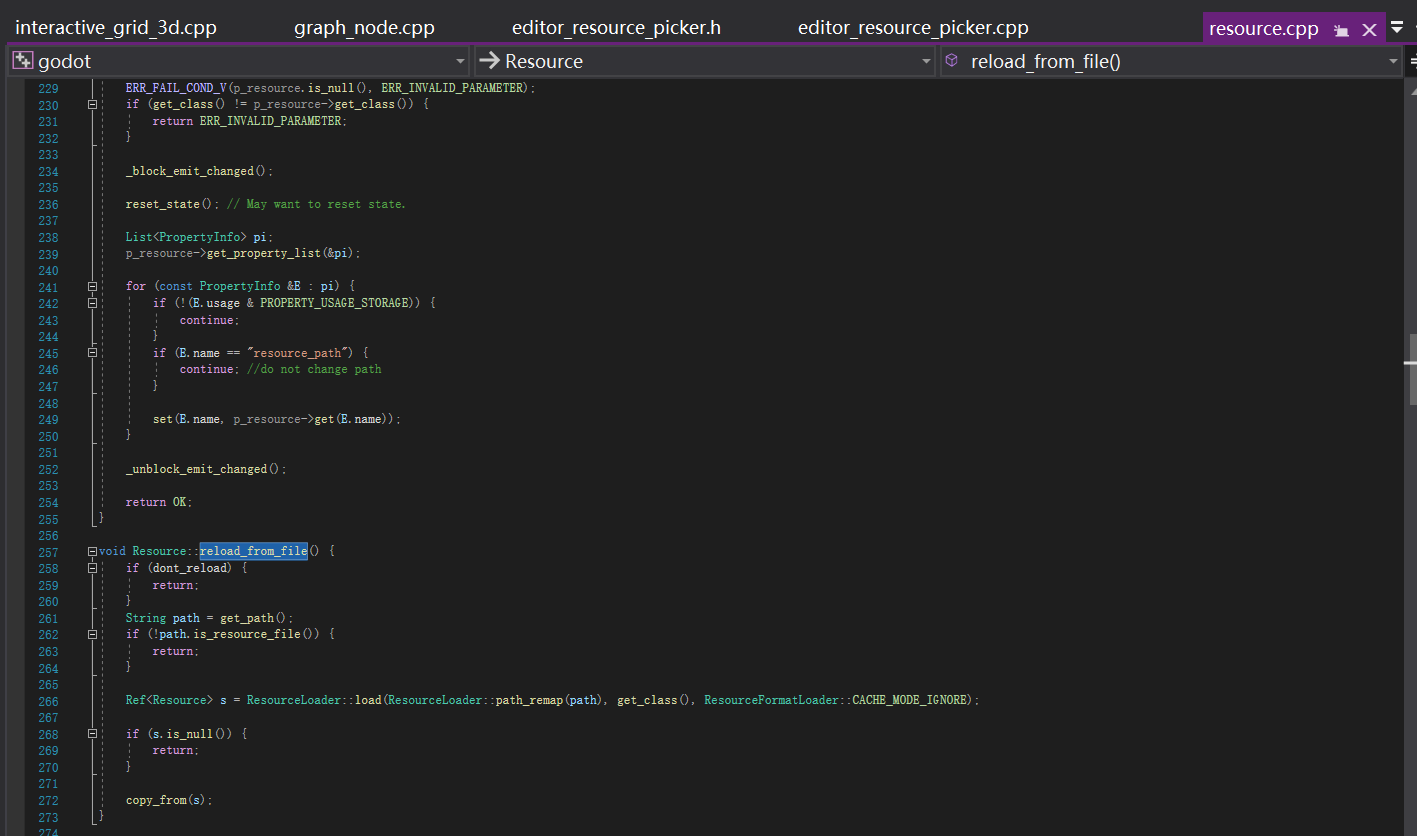
There’s a bug in godot: if your plugin edits a RefCounted or Resource object and holds a pointer to that object, switching focus triggers a scan and a reload, causing the resource’s child objects to be recreated. My solution is to add a check in Resource.reload_from_file to determine if the file is currently being edited and return immediately.
I discovered this issue while debugging the inventory system plugin locally. Because I was always failing to save locally, and each time I opened it, it showed the previous content, I traced the problem to find the cause. Strictly speaking, it’s not a bug, but rather a missing feature.
The engine should provide a file reloading mechanism for assets that rely entirely on tool modifications and do not require manual modification of saved files. However, implementing this universally would be cumbersome and prone to creating new problems if not handled properly. Therefore, I added a method directly to the Resource class to skip hot file updates to disk.
Describe it as best you can, and note that you don’t have a hard reproduction case. It’s still useful info; someone else may have the same problem, and may provide details that help nail it down.
TL;DR — Loaded resources in the editor don’t auto-save after modification.
You must explicitly call:
ResourceSaver.save(edited_res)
I ran into the same issue while working on a custom Resource editor plugin.
The problem was simply that I wasn’t calling ResourceSaver.save(edited_res) after modifying the resource’s properties.
The Inspector handles this automatically : that’s why the issue didn’t occur when I edited the resource in my custom GUI, then switched to the Inspector and changed a value or pressed Ctrl + S.
But if I stayed only in my custom editor interface, the changes were never saved.
@blackears — Are you using plugins or tool scripts ?
Not third party, but I do write my own. But this isn’t about resources unless you’re counting the script files themselves as resources.
Basically the issue is I spend a few hours editing files in the Godot editor, close the editor, and then reopen the project to find that all the changes I made are undone. This will happen even if I run the project before closing it and see my changes reflected in the running app.
Are you working directly inside a OneDrive/Google Drive/Dropbox etc. folder? Seems to me like something else is coming along and synchronizing old files over the top of your changes.
I’ve had Godot open for over 24 hours with hours changes to scenes and code and haven’t seen anything like this. The worst I’ve seen with Godot and long running processes is the window glitching after the screen has been turned off and that just requires resizing the window to fix.