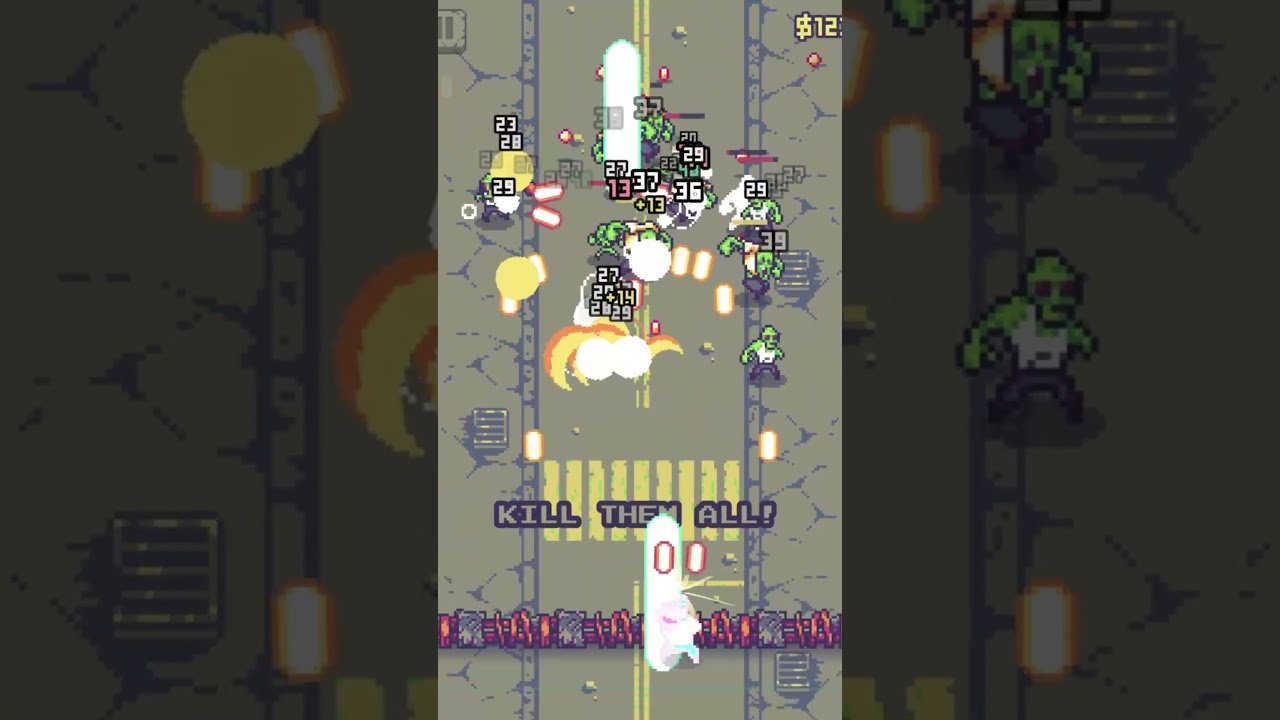
I wanted to share my first officially released project made with Godot: Grave Strikers. A one-finger rogue-lite action shooter inspired by 90’s action movies and classic arcade chaos.
About the game
You control a team of heroes, blasting through zombies, robots, and demons in a post-apocalyptic pixelated world. Gameplay is simple (one-finger movement + auto-fire), but designed with some roguelite elements: upgrades, unlockable relics, and different heroes to discover.
This project has been a huge learning experience for me, not just technically but also in publishing (App Store / Play Store, marketing, trailers, etc…).
I’m amazed at how smooth the process was with Godot – and how much I learned along the way.
Feedback from fellow devs is always welcome – whether it’s about gameplay or any question about the technical stack. And if anyone is going through their first release with Godot, I’d be happy to share tips if it can help
Thanks to this amazing community – I’ve learned so much here, and I’m excited to finally give back something finished!
I hadn’t really thought about doing a full postmortem, but I did take a look at the ones you shared on your site and they’re super insightful — definitely inspiring stuff!
For me, the biggest hurdles were:
Plugins for native features: I had to build my own plugins for authentication providers and in-app purchases. It was a nightmare at first since I’d never touched Swift or Kotlin before… but with experience in other languages (Python, Lua, C, JS, Dart), I eventually figured it out. Still, not the smoothest journey
The publishing grind: between Google and Apple, the amount of settings, paperwork, and differences is overwhelming. It took me multiple rejections before finally getting everything accepted.
Marketing (or lack of ): honestly my weakest point. I released the game without much communication beforehand, thought about marketing way too late, and even had to patch things right after launch. Let’s just say I learned by doing everything the wrong way at least once But it was still a huge learning curve, and at least now I know what not to do for next time.
I’m on Mac, so exporting to iOS was straightforward in my case
Thanks for the kind words! That was my first time trying out CapCut to make a trailer. I’m no video editor, but it turned out better than expected and wasn’t too hard to pick up.
Thanks. After I had done a half dozen and hidden them quite well, I noticed they were all getting at least 100 views, so I made them more prominent on my page. I’m glad they were helpful.
This is something I’m working on doing down the road. I though there were plugins I had seen for this? Perhaps I’m mis-remembering. Is the work you did shareable, perhaps in a plugin for the rest of us?
Yeah joining the developer side of both was a nightmare. How did you handle the beta testing requirements for Google? Don’t you have to have X number of people look at it before you can post it the first time? Did you have to recruit them?
Thankfully not my issue for what I’m working on now.
The plugins I built are super hardcoded for this project right now but for my next ones I’d really like to make things more generic and reusable. If I manage to clean them up properly, I’d be happy to share them as open source so it can help others too.
From what I experienced, there’s no requirement if you’re on a business developer account. I think the “X testers” thing applies more to personal accounts.
Feel free to drop a link here to showcase what you’re working on! I’d love to check it out, and I’m sure others would too
Thanks a lot
Exactly! You nailed it, Expandable with zombies was totally the inspiration behind the game
I used Xcode directly to build the game for iOS.
I’ve been tinkering with small unfinished games in Löve2D and random experiments from times to times but nothing very interesting. But lately, I’ve been obsessed with making video games.
This is my first finished game, so I’m quite still a baby with Godot and real game dev stuff
Your game looks great, very pretty. Although I was actually a bit nervous looking at it, since it’s very identical to one I’m making with similar mechanics, except you end up touching the zombies with your fingers, and the graphics are different. Yours is actually much prettier. I’m going to look for it on the Play Store right now.
Congratulations on shipping your first game, on setting Ads as optional only ().
Now, on Android 16, on a Pixel 9, the music really has only 3 levels, 80, 90, and 100. not audible below that and it drowns the SFX, on speaker or Bluetooth earbuds.
The music is excellent and totally in tune with the art direction
That said, I would redo the SFX, with more varied sounds, less prone to high frequency distortion.
Even with music shutoff, or listening to Spotify very low, can’t properly hear the SFX
Visually, I’d change the Victory screen as it’s got too much white…
Gameplay is well executed around a single, simple concept : at World 5 or 6, mostly playing during my subway and foot commute
Congratulations on your first pro Godot game, what a milestone. Will be giving you 4 stars for the time being and a similar review as this one.
Thanks a lot for playing and especially for taking the time to share such detailed feedback It really means a lot at this stage.
I’m glad the music/art direction combo worked for you! I’ve taken note of the issues you mentioned:
Music volume steps (too few, too loud): I’ll work on making that smoother.
SFX balance/distortion: definitely needs more variety and better mixing.
Victory screen: I see what you mean, I’ll explore a less “white-heavy” design.
Your review and support really help me improve Grave Strikers. I’ll keep polishing and your notes will guide some of the next updates. Thanks again for the encouragement, it keeps me motivated to push forward!
90% of the assets is by me, the rest is from free assets that I modified to fit the game style. The game icon (the skull with sunglasses) is AI generated, I was not good enough to get the result I wanted
Highly recommend going for a different icon. AI leaves a bad taste in users’ mouths, and if it’s the icon, it’s the first (and maybe only) thing they see. They might also suspect that other art in the game may be AI.
@ComicallyUnfunny
Totally agree with you on this. If I had the skills to make a polished icon myself, I’d absolutely do it. Right now it would take me too long to get something nice, and I can’t afford to hire an artist yet — so I had to “cheat” a bit just to keep moving forward. Hopefully in the future I can replace it with a 100% handmade one.
@shrek-does-game-dev
Thanks! I’m honestly not an artist either. But there are tons of great resources online (especially on YouTube) to learn the basics. It’s tough at the beginning, but with a bit of practice I’m sure you could end up doing something way better than mine.
Sure, but aim to get that done by your final launch/release. Luckily in your game trailer, everything looks good. Even just a picture of a gun from your game with a bit of effects in Photoshop would do the job. Loads of successful games have simple icons:
@ComicallyUnfunny
Thanks a lot for taking the time to explain this That’s actually a great idea, I hadn’t really thought about reusing in-game assets for the icon, but it makes total sense and would give me a strong result pretty quickly. I’ll definitely try that approach!
@shrek-does-game-dev
Of course, I’d be glad to check it out! Do you have a link to specific work that you want me to see?
 About the game
 – whether it’s about gameplay or any question about the technical stack. And if anyone is going through their first release with Godot, I’d be happy to share tips if it can help


 But it was still a huge learning curve, and at least now I know what not to do for next time.


 ).
).