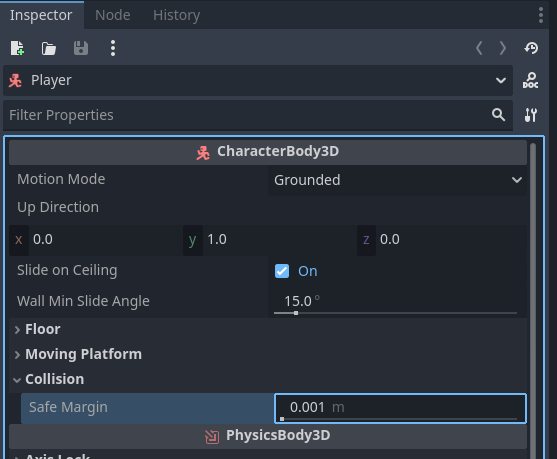
Hi, I’m new to Godot and I’ve been following a Youtube tutorial on how to make a “Smooth Horror FPS Controller“. There has been a persistant problem with the jump feature, and I cannot figure out what is wrong. Whenever I load the game, and press the “Jump“ button, I float up for a short period of time and then stop. This leaves me standing on nothing. I am then able to jump like in the video, but only after floating up.
extends CharacterBody3D

@onready var head: Node3D = $head
@onready var Eyes: Node3D = $CharacterBody3D/Head/Eyes
@onready var Camera_3d: Camera3D = $CharacterBody3D/Head/Eyes/Camera3D
@onready var camera_3d: Camera3D = $CharacterBody3D/Head/Eyes/Camera3D
@onready var standing_collision_shape: CollisionShape3D = $CharacterBody3D/StandingCollisionShape
@onready var crouching_collision_shape: CollisionShape3D = $CharacterBody3D/CrouchingCollisionShape
@onready var standup_check: RayCast3D = $CharacterBody3D/StandupCheck


# Movement Variables
const walking_speed: float = 3.0
const sprinting_speed: float = 5.0
const crouching_speed: float = 1.0
var current_speed: float = 0.0
var moving: bool = false
var input_dir: Vector2 = Vector2.ZERO
var direction: Vector3 = Vector3.ZERO
const crouching_depth: float = -0.65
const jump_velocity: float = 4.0

var mouse_sensitivity: float = 0.2


# State Machine
enum PlayerState {
	IDLE_STAND,
	IDLE_CROUCH,
	CROUCHING,
	WALKING,
	SPRINTING,
	AIR
	}
var player_state: PlayerState = PlayerState.IDLE_STAND

func _ready() -> void:
	Input.set_mouse_mode(Input.MOUSE_MODE_CAPTURED)

func _input(event: InputEvent) -> void:
	if Input.is_action_just_pressed("Pause"):
		get_tree().quit()

	if event is InputEventMouseMotion:
		rotate_y(deg_to_rad(-event.relative.x * mouse_sensitivity))
		head.rotate_x(deg_to_rad(-event.relative.y * mouse_sensitivity))
		head.rotation.x = clamp(head.rotation.x, deg_to_rad(-85), deg_to_rad(85))

func _physics_process(_delta: float) -> void:

	# updatePlayerState()
	# updateCamera()

	# falling(gravity)
	if not is_on_floor():
		if velocity.y >= 0: # jumping upwards
			velocity += get_gravity() * _delta
		else: # falling down
			velocity += get_gravity() * _delta * 2.0
	else: # jumping
		if Input.is_action_just_pressed("Jump"):
			velocity.y = jump_velocity

	move_and_slide()
If you underscore delta that tells the engine you aren’t going to use it so if you do use delta then remove the underscore. Also, never use delta with velocity. Velocity is already multiplied by delta in the engine so if you remove delta from your gravity that should fix some stuff. If that doesn’t work, can you link the tutorial so I can cross-refrence with what the code should be to see if there’s any small errors?
Unfortunately, removing delta did not fix the floating issue. Also, whenever I use delta without the underscore, it gives me an error, “Identifier “delta” not declared in the current scope.“ How do I use delta without getting the error?
This property should not be set to a value multiplied by delta, because this happens internally in move_and_slide(). Otherwise, the simulation will run at an incorrect speed.
This line in the Godot Documentation (I could only find it in engine) lead me to say that. If that’s an edge case where it’s better to use something like that then I’m glad I got to learn something new!
Well, he’s not setting the velocity to something multiplied by delta. He’s adding an acceleration multiplied by delta to the previous velocity value. It’s not an edge case, it’s math/physics.
Velocity is distance/time. Acceleration is distance/time^2. That’s why it’s correct to multiply the acceleration by delta.
Think of acceleration as the speed at which the speed increases. If he didn’t multiply gravity by delta, the velocity would increase by the gravity value (9.8 in the case of earth gravity) every single frame. Starting at zero velocity, by the end of 1 second (60 physics frames) the object would be already moving at 588 meters per second.
So yeah, when setting velocity like velocity = 10, you should not multiply by delta. But if you’re adding an acceleration to the velocity every frame, like velocity += gravity * delta, then yeah, you should multiply by delta.
Maybe typing it this way makes it clearer: velocity = velocity + (gravity * delta)