I wonder if someone can help me understand what I need to do here please. I’ve been fiddling back and forth with global positions, local positions, and rotated vectors - but I can’t seem to figure it out myself. I know it’s just a maths-y thing that I’m not understanding, so if someone could explain it to me that would be very helpful.
The game is Asteroids. Classic little triangle ship shooting floating space rocks. I want to add an element of destruction to the asteroids. I’ve followed various youtube tutorials and got a working approach using Geometry2D.clip_polygonsto take a bite out of an asteroid. All worked fine in a synthetic test scene, until I applied it to my actual asteroids - because they rotate. When testing I’ll quickly fire at the asteroid and the first ‘bite’ will look normal, but as the asteroid rotates away the bites will go out of the same place, or may not hit the asteroid at all. Like in the original game the asteroids have a constant drift and rotation. Here’s my code, and I’ll outline the scene setup below.
func take_hit(location):
	#Find the offset between the (global) asteroid origin position and the (global) hit marker
	var offset : Vector2 = location - global_position

	#Construct a new PackedVector2Array of the points offset
	var destruction_poly : PackedVector2Array = []
	for p in template_shape.size():
		var offset_point : Vector2 = template_shape[p] + offset
		destruction_poly.append(offset_point)

	var clipped_polygon = Geometry2D.clip_polygons(visual_poly_node.polygon, destruction_poly)
	visual_poly_node.polygon = clipped_polygon[0] #TODO: Handle multiple result polygons
	collision_node.polygon = clipped_polygon[0]
This is from asteroid.gdattached to an asteroid which in its physics_processhas a constant global_positionand rotationapplied to make it drift and spin slowly.
When a collision between the player projectile and the asteroid is signalled, this function is called and the global_position of the projectile is passed in as the location argument.
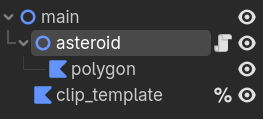
The asteroid scene comprises a visual shape node - a Polygon2D, and a collision shape - CollisionPolygon2D. In the script readyfunction both node polygonvalues are set to the same PackedVector2Arrayshape. There’s also a ‘template’ destruction shape, which for ease I’m keeping in code as a PackedVector2Arraynamedtemplate_shape.
The application of the rotation is to the whole scene via the rotationvariable. I did initially have it applied individually each frame to the visual and collision nodes, but I thought it was simpler to rotate the whole scene.
If someone could tell me what I’m missing to account for rotation, I’d appreciate the help.
Thank you. I have given that a go, adding a multiplication by `-global_transform.inverse()`. I tried doing that on each point when I construct it, or on the array as a whole afterwards.
I’ve added some marker sprites and another loop to position them where the game thinks the clipping / destruction polgyon should be. From this I can see that it’s moving around in a wide circle that looks to be centre on the world origin. So it’s rotating but I’m definitely missing a translation somewhere.
When I added the multiply by inverse transform, it appeared that the rotation switched direction.
My understanding was that the destruction polgyon I’m keeping in a PackedVector2Array was by default, local co-ordinates, since it is just a set of points centred around an arbitrary origin intended to be moved to the hit location.
The gist is to bring those two polygons into the same frame of reference.
Assuming that the asteroid polygon is at the asteroid scene origin, and the template clipping polygon points are also arranged around zero, you can just transform the (global) hit point into local space and then translate the clipping polygon to that position.
Alternatively, you can translate the clipping polygon to global hit point, and then transform it into local space as I described earlier.
The issue is that your polygon is in local space, while the hit position is in global space. Use to_local(location) instead of subtracting global_position:
var local_hit = to_local(location)
Then build the destruction polygon using local_hit. That automatically accounts for the asteroid’s rotation and position, so the bite should stay attached correctly as it spins.
Thanks to both of you. I don’t know why I’m struggling to get my head round this but clearly I need to ensure that all of my operations are in the same local/global context. I’ll keep fiddling with my code on that basis!
Maybe this helps: you can call Node2D.to_local on a point that is in global space to put it in the node’s local space.
You can do this with all the points in your polygons separately (which is slower than multiplying the entire PackedVector2Array with the correct transform, but at least this way you can test whether you’re going in the right direction).
I get the impression you may need to put your template polygon’s points:
in the correct global position first (the clipping target)
and then make that template polygon local to that target
Then apply clips
What if your template was actually attached to an invisible node in your game so you could more easily reposition it and attach it to targets you need to clip with it?
Thanks. I’ll give that a try. I’ve been messing around with to_local and to_global so much that I probably mixed them up. I did initially have the destruction shape on a node (that’s where I got the points for the PackedVector2Array) but I thought then I’d have another global/local difference to add to my confusion - it seemed cleaner to me to have pure local position data. But I see that if I had it back on a node I could easily visualise it in the space and check it’s where it should be.
Imho, early on in development, considerations like “clean” and “performance” are way less important than the considerations “it works” and “I understand why it works”.
You should also not wait too long to pick up this TODO here. It’s not just the case that you can get multiple polygons when the target is cut in half / pieces. You may even end up with a polygon with a hole in it, which is not supported natively.
It’s probably hard to prevent this latter case 100% of the time, but remember you can easily test whether a result polygon should be treated as a hole using Geometry2D.is_polygon_clockwise.
If you want to support holes at some point, you could look at my code here (from the Scalable Vector Shapes 2D plugin):
I suggest you verbatim reconstruct my example in a fresh scene. The solution to the problem boils down to literally two lines of code, implemented in hit()
I appreciate your assistance. I think I have just been consistently getting scopes muddled and all of my attempts have had at least one element in the wrong scope, sending me off down rabbit holes troubleshooting different things.
Sorted! I am pleased that I’ve got it working in my main game now with thanks to the help here and particularly the code from @normalized !
It is a very neat two-liner and I’m going to revisit a matrix mathematics course to wrap my head around the multiplication step. But it’s working for me now and my code is much leaner. Onwards to more asteroid destruction!
An alternative way is to compound two matrices and use the resulting matrix to transform the clip polygon. The first matrix would translate the clip polygon to global hitpoint, and the second one would then transform that into the local space of the asteroid polygon:
func hit(hitpoint: Vector2, clip_polygon: PackedVector2Array) -> void:
	var to_hitpoint: Transform2D = Transform2D().translated(hitpoint)
	var to_asteroid_local: Transform2D = $polygon.global_transform.affine_inverse()
	var clip_polygon_local := (to_asteroid_local * to_hitpoint) * clip_polygon
	$polygon.polygon = Geometry2D.clip_polygons($polygon.polygon, clip_polygon_local)[0]
Affine inverse is another thing for me to learn and understand. I have started rewatching the GameDev.tv ‘maths for game programming’ course to make sure I understand things as well as I can.
I have in the meantime continued playing and tinkering. I’ve got the destruction shape vectors being multiplied by a scaling variable so that I can increase the size of the ‘bites’, and I’ve implemented a random selection of a series of different destruction shapes that are stored in a dictionary in an autoload. Next step is tackling the handling of the clip operation returning multiple shapes.