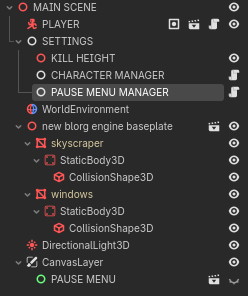
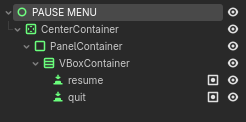
I am new to Godot. I’m trying to make a pause menu but connecting a signal of the “resume” button isn’t working. I press the button and it doesn’t work. I’m connecting the signal within the code because the pause menu is a scene itself.
extends Node

var mouselocked = true

@onready var pausemenu: Control = get_tree().current_scene.get_node("CanvasLayer/PAUSE MENU")
@onready var resumebutton: Button  = pausemenu.get_node("CenterContainer/PanelContainer/VBoxContainer/resume")
@onready var quitbutton: Button = pausemenu.get_node("CenterContainer/PanelContainer/VBoxContainer/quit")

func _onready():
	resumebutton.button_up.connect(Callable(self, "_resumed"))

func togglepause():
	if mouselocked == true:
		mouselocked = false
		Input.set_mouse_mode(Input.MOUSE_MODE_VISIBLE)
		get_tree().paused = true
		pausemenu.visible = true
	else:
		mouselocked = true
		Input.set_mouse_mode(Input.MOUSE_MODE_CAPTURED)
		get_tree().paused = false
		pausemenu.visible = false

func _input(event):
	if event.is_action_pressed("ui_cancel"):
		togglepause()

func _resumed():
	if mouselocked == false:
		togglepause()