Godot Version
4.6 Stable
Question
I’m prototyping a game that will include a minimap, the map works in all aspects, but I’m trying to streamline the minimap creation, instead of individually setting and sizing the items, which at the moment are just plane meshes set to a visibility layer only the minimap camera can see, I would like to make something that works more automatically, my roadblock in that quest brings me here.
Setting the minimap stuff for walls is just fine, but in terms of boxes I am running into issues, I could use just 1 plane mesh whose x and y size matches the x and z size of the csg box I’m using, but I would like it to be consistent with the minimap design I employ on walls, which is more of a thin line representing a point of collision. So to the minimap, a box would just look like an empty (green) square.
What I decided on doing was to make a scene with just a csg box and 4 plane meshes as children, I scripted it up so that the plane meshes size and position properties are set by the csg box root script. Below is the full code as of this post, with comments in to describe intentionality.
@tool
extends CSGBox3D

# I want to have an outlined mesh above the box, only the outline
# my limited experience lead me to use plane meshes for this, they are easily scalable (in theory)

# queue up meshes
@onready var top: MeshInstance3D = $top
@onready var left: MeshInstance3D = $left
@onready var down: MeshInstance3D = $down
@onready var right: MeshInstance3D = $right

# get the numbers, these work as intended for the most part
var offset : float = 0.07 # offset sizing to make it a proper box outline
var offset2 : float = offset / 2 # positional offset to make outline flush with edge of csgbox
var sizex : float = self.size.x:
	set(value): # my attempts at a live update (shared attempt with sizey var)
		sizex = value
		notify_property_list_changed()
	get:
		return sizex
var sizey : float = self.size.z: # plane mesh is 2d, its y is otherwise z in 3d
	set(value):
		sizey = value
		notify_property_list_changed()
	get:
		return sizey
# combine relevant numbers into a Vector2 for ease
var newsize : Vector2 = Vector2(offset, sizey)
var newhize : Vector2 = Vector2(sizex, offset) # don't ask why it's named like this lmao idk
# free vertical positional offset for camera visibility (when needed)
var height : float = self.size.y

# another attempt as live updating the children, failed
@export_tool_button("Build Minimap Square", "Callable")
var map_sort = setter_pos

# set the size of the meshes, top and down share a plane mesh resource, as does left and right
func setter_size():
	# algorithmically set the size of our children, a bit redundant bc of shared resources
	# but i'm not picky atm
	var flip : bool = false
	for i in self.get_children(): # always looking for an excuse to for loop something
		if flip == false:
			i.mesh.set_size(newhize)
			flip = true
		else:
			i.mesh.set_size(newsize)
			flip = false
		i.mesh.material.set_albedo(Color(0.0, 0.678, 0.322))

# set the position of the meshes, it "works" but will only update if i reload the scene, don't know how to
# do that when instantiating inside of another scene
func setter_pos():
	# sweet sweet algorithm
	var flip : bool = false
	var xflag : bool = false
	var yflag : bool = false
	# get the proper position ready + offsets
	var posx : Vector3 = Vector3((sizex / 2) - offset2, 0, 0)
	var posz : Vector3 = Vector3(0, 0, (sizey / 2) - offset2)
	for i in self.get_children():
		if flip == false:
			if xflag == false:
				i.position = -posz
				xflag = true
			else:
				i.position = posz
				xflag = false
			flip = true
		else:
			if yflag == false:
				i.position = -posx
				yflag = true
			else:
				i.position = posx
				yflag = false
			flip = false
		i.position.y = height + 5

# right now it's set to sort this every frame, might instead pack it in _ready and call it when size is updated
# but lets seek help for now :)
func _process(_delta: float) -> void:
	setter_size()
	setter_pos()
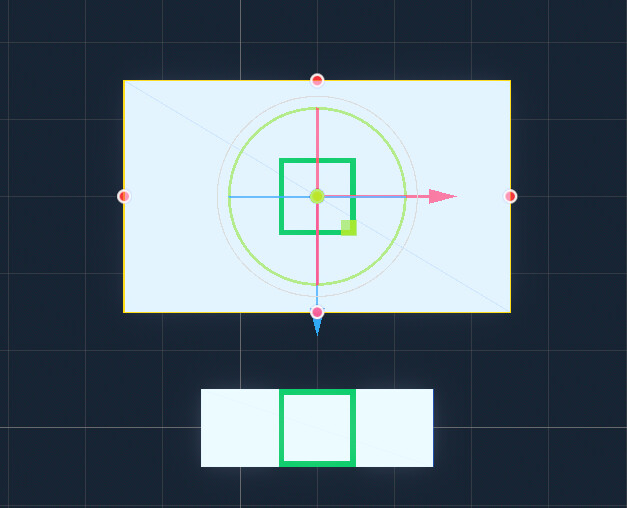
As shown in my comments, my issue is with having the plane mesh babies update in real time in the editor when I adjust the size of the csg box. Right now it does not when the csg box scene is instantiated. Only when I reload the box scene standalone does it ever.
It does not update during runtime either, what shows up in the editor reflects what will show up at runtime.
Fig A. Scene Tree
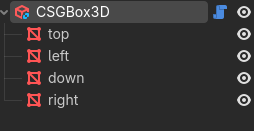
Fig B. How the plane meshes look at default size
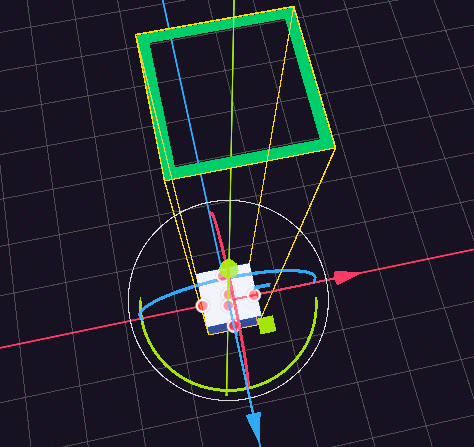
Fig C. Top Orthogonal View of Fig B
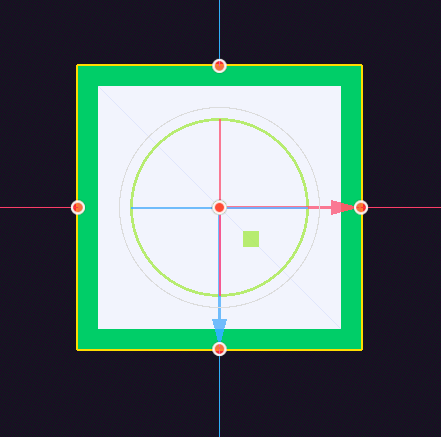
Fig D. Top Orthogonal View of my CSG Box Scene when Instantiated in a different scene, with the CSG Box size properties changed, notice how the plane meshes stay using the default size properties
The good news is that I’m sure the solution is simple, and that I’m still too inexperienced at gdscript to know exactly how to tackle this. I left previous attempts in the code just to document attempted fixes, but yeah.
I’m aware that it’s not exactly best practice to edit transform properties of a root node of a scene, I don’t know if that applies to my situation, but I struggled having a base root node3d and being able to edit the csg box that way, could be my inexperience again, but I’m just leaving it out there as I still consider myself to be a novice at gdscript and programming/game dev as a whole.
Thank your for your time and…..
Help?