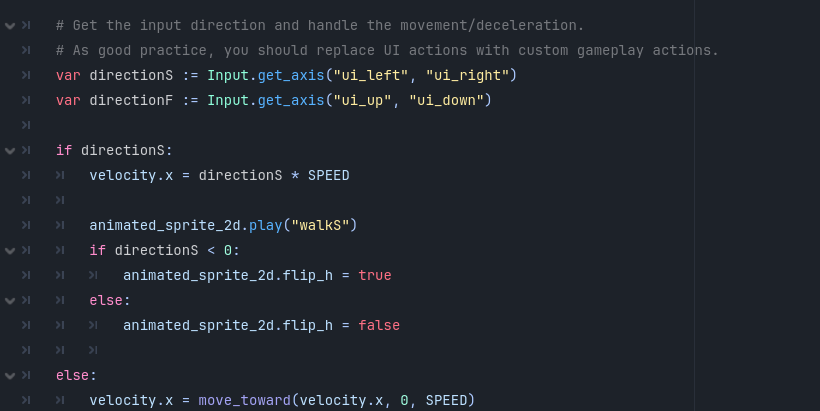
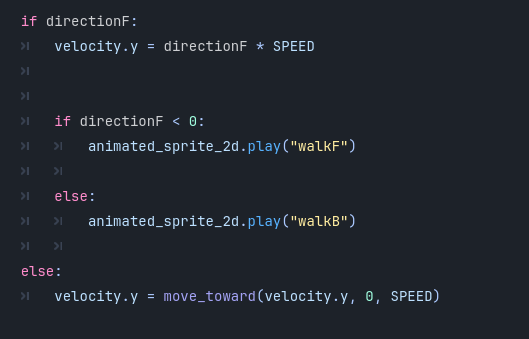
Hi, I'm a beginner developer trying to make a short story-based RPG game in Godot. I hope to be able to learn about game development from everyone here, and thank you for your help in advance! My main struggle at the moment is that I don't know how to make the player face the direction they were last at when they go to the Idle Animation.I have 6 different animations in my Animated Sprite 2D:
IdleB (Idle and facing the camera)
IdleS (Idle and facing left)
IdleF (Idle and facing away from the camera)
WalkB (Walking to the camera)
WalkS (Walking to the left)
WalkF (Walking away from the camera)
This is my code I have at the moment, it only has walking animations as I am not sure how to implement idle animations smoothly.
I apologize if this question seems a bit dumb, but I really am stuck here. Once again, I’d like to thank anyone in advance for helping, and I hope to learn much from trying to make this game (and asking more questions when I am stuck)!
And for getting the correct idle animation from the three you have, just use a separate variable to store the last directional input. Always set this variable depending on the directional input, unless it’s a zero vector.
Then use this variable to play the correct idle animation.