Is below the proper way to rotate a Character using quaterinions?
I’ve been reading through the documentation, trying to wrap my head around the system and I’ve made it work but it feels like I’m using it wrong.
I’ve got a top down view and I want to rotate the player based of the direction of the analog stick.
    float stickDirection = Mathf.Atan2(Controller.LeftStick.X, Controller.LeftStick.Y); // get the angle in rads
    var playerRotation = new Quaternion(Basis.FromEuler(new Vector3(0,stickDirection, 0)));
    Vector3 scale = playerObj.GetScale(); // otherwise the model ends up the wrong size.
    playerObj.Basis = new Basis(playerRotation).Scaled(scale);
So two questions.
Is this the correct way to rotate a player to a specific heading? The trouble I’m running into is most of the documentation assums I want to rotate the object by a certain amount instead of snapping to a target heading.
If the player is upside down, can I reference the basis so it inverts the rotation where needed?
The better question is, “Should I be using Quaternions to rotate a character?” And the answer is: No.
What documentation are you looking at?
If you do it right, it doesn’t matter because you are rotating in relation to the player itself and not the direction of gravity.
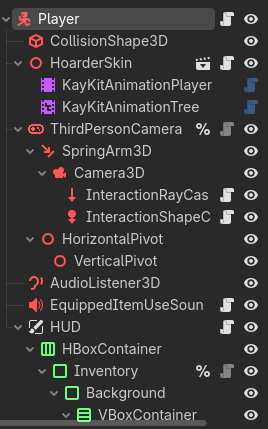
I recommend you back up and tell us what you’re trying to do here. Is this a 3rd person controller? 1st person controller? Is the Camera3D fixed in space, or attached to the player? Can you show us a screenshot of your scene tree?
For example, here’s one I’m working on now which is a 3rd person controller:
@icon("uid://cc7ajkbomorun")
class_name ThirdPersonCameraController extends Node3D

@export var spring_arm_3d: SpringArm3D
@export var camera_3d: Camera3D
## How far up the camera will rotate in degrees.
@export var upwards_rotation_limit: float = 0.0
## How far down the camera will rotate in degrees.
@export var downwards_rotation_limit: float = 0.0

@onready var horizontal_pivot: Node3D = $HorizontalPivot
@onready var vertical_pivot: Node3D = $HorizontalPivot/VerticalPivot


func _physics_process(_delta: float) -> void:
	_update_rotation()


func _update_rotation() -> void:
	horizontal_pivot.rotate_y(Controller.look.x)
	vertical_pivot.rotate_x(Controller.look.y)
	vertical_pivot.rotation.x = clampf(vertical_pivot.rotation.x,
		deg_to_rad(upwards_rotation_limit),
		deg_to_rad(downwards_rotation_limit)
	)
	_apply_rotation()

	if Controller.get_last_input_type() == Controller.LastInput.KEYBOARD_AND_MOUSE:
		Controller.look = Vector2.ZERO


func _apply_rotation() -> void:
	spring_arm_3d.rotation.y = horizontal_pivot.rotation.y
	camera_3d.rotation.x = vertical_pivot.rotation.x


func get_camera_basis() -> Basis:
	return horizontal_pivot.global_transform.basis
The issue I’m running into is there player can run through a loop-de-loop, and when they’re upside down the existing code using Euler angles causes the X axis to get inverted.
The bit of code you’ve posted there points me in the right direction. I’ll try adapting that approach.
My scene tree is largely the same as what you have, although at this point I’m just trying to nail down movement first.
I don’t think you need to calculate the stick direction in radians.
As I understand it, your problem is that the axes flip when you manipulate the rotation.
Since you’re rotating a player-controlled character—and it seems the character can end up upside down—I recommend not using quaternions; use Basis instead.
Let me explain how it works. In Godot, there’s a function called Cross().
If you do: Vector3.Right.Cross(Vector3.Up), then the result is Vector3.Forward.
If you do: Vector3.Forward.Cross(Vector3.Up), then the result is Vector3.Right.
Be careful—here, the order of the factors does affect the result.
So, knowing at least two directions, you can construct the rest of the axes using Cross().
That said, I should warn you that you need to have backup vectors. Because if you happen to perform a cross product when the vectors are parallel, the system breaks down.
To construct the final basis, use: Basis(right, up, forward).Orthonormalized()
You should also normalize the directions you calculate with the cross product, just to be safe.