@tool
extends EditorScript


func _run() -> void:
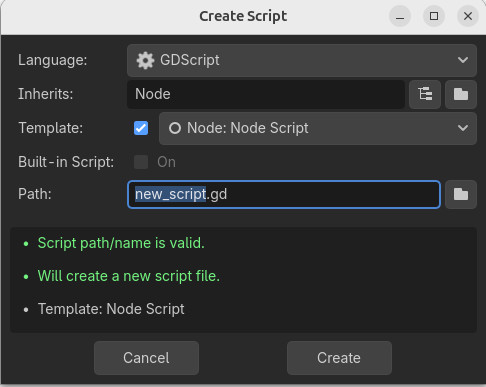
	var dialog = ScriptCreateDialog.new()
	# Configure the dialog
	dialog.title = "Create Script"
	dialog.config("Node", "res://new_node.gd", false, false)

	# Add a custom button
	dialog.add_button("My button", true, "my_button")
	# And connect to the custom_action signal to process that button
	dialog.custom_action.connect(func(action: String):
		print("Action %s pressed" % action)
	)
	# Connect to the script_created signal and edit the created script directly
	dialog.script_created.connect(func(script: Script):
		EditorInterface.edit_script(script)
	)

	# Show the popup
	EditorInterface.popup_dialog_centered(dialog)
Seems like the File menu in the script editor uses a different instance of ScriptCreateDialog object than what is returned by get_script_create_dialog(). I couldn’t find a way to intercept it. This may even be worth reporting as one would expect that the instance returned by get_script_create_dialog() is used everywhere in the editor.
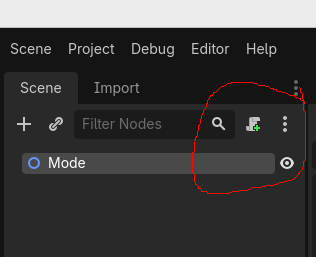
That is how to create an instance of it but I was wanting to capture the user opening one from the menu.
Normalized is most likely correct that it cannot be done. That is what google ai eventually came up with after a bunch of searches.
Ah, my bad, I misunderstood what you wanted to do.
In that case you can find the ScriptCreateDialog that the editor uses and do it there. For example in a plugin:
@tool
extends EditorPlugin


var custom_buttons: Dictionary[ScriptCreateDialog, Button]


func _enter_tree() -> void:
	var script_editor = EditorInterface.get_script_editor()
	var create_dialogs = script_editor.find_children("*", "ScriptCreateDialog", false, false)
	for dialog: ScriptCreateDialog in create_dialogs:
		# Add a custom button
		var custom_button = dialog.add_button("My button", true, "my_button")
		custom_buttons.set(dialog, custom_button)
		# And connect to the custom_action signal to process that button
		if not dialog.custom_action.is_connected(_on_script_dialog_custom_action):
			dialog.custom_action.connect(_on_script_dialog_custom_action)


func _exit_tree() -> void:
	var script_editor = EditorInterface.get_script_editor()
	var create_dialogs = script_editor.find_children("*", "ScriptCreateDialog", false, false)
	for dialog: ScriptCreateDialog in create_dialogs:
		# remove the custom button
		var button = custom_buttons.get(dialog, null)
		if button:
			dialog.remove_button(button)
			button.queue_free()
		# And disconnect the custom_action signal
		if dialog.custom_action.is_connected(_on_script_dialog_custom_action):
			dialog.custom_action.disconnect(_on_script_dialog_custom_action)


func _on_script_dialog_custom_action(action: String):
	print("Action %s pressed" % action)
I don’t think the script editor can have more than one ScriptCreateDialog but just in case.
Edit: I forgot to remove the button from the dialog before freeing it
At the risk of being off topic, I wanted to say that I love how in the video, when you want to end it, you go to the bottom right to click stop recording, then you panic when you don’t see it there, only to then go to Godot’s movie maker button, which is also not the thing that’s currently recording the screen.
Then you sorta just give up and try to remember the shortcut for the overlay. What a roller coaster.
Nice hack. I was assuming it’s created on the fly, but apparently it just sits there hidden it the tree. @sancho2, time to re-assign the solution to @mrcdk’s post.