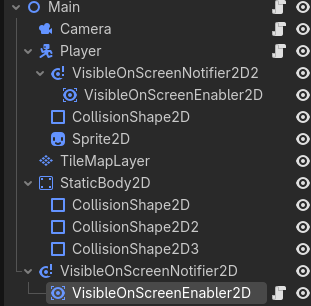
I made this camera system for my first big coding project. The problem is I want it to lock in certain scenarios. Question is, how do I do that? Also, improvements to the camera system would also be a huge help.
extends Camera2D
var locked: bool
var lock_position = Vector2(0,0)
func _ready():
	locked = false

func lock(x,y):
	lock_position = Vector2(x,y)
	locked = true
func unlock():
	locked = false
func _physics_process(delta: float):
	if (locked == false):
		position_smoothing_enabled
		var player = get_node("/root/Main/Player")
		var player_position = player.position
		position = player_position
	else:
		position = lock_position
Ok, this code isn’t the problem, the problem is the locking mechanism relies on a position from another node, which I can’t get here because I can’t find a way to have the player interact with it the node.
To get the root node you have to have the leading slash, like your player code did
Has /root/...
missing the starting /root
But using /root/... paths for nodes is really bad form, makes your game brittle, it will break at the slightly scene tree change. You could use @export properties to select the camera, player, or any node that exists in the editor scene tree at the same time.
Click Access as unique Name, you will see % symbol after the name of the Camera node.
Now in the script Instead of using var camera = get_node("root/Main/Camera") use `var camera = %Camera. (if you want to use the path instead, use/root/Main/Camera)
Your code should be something like this:
extends VisibleOnScreenNotifier2D

var camera = %Camera

func _ready() -> void:
	# Nothing needed here for this case

func _physics_process(delta: float) -> void:
	camera.lock(0,0,.7,.7)
Or you can use @export var like this:
extends VisibleOnScreenNotifier2D

@export var camera: Camera2D

func _ready() -> void:
	# Nothing needed here for this case

func _physics_process(delta: float) -> void:
	camera.lock(0,0,.7,.7)
Now when you select the node on which the script is attached, you will see an option to select select the Camera node from a drop down menu.
Here if you press the Assign then a drop down will appear which will have all the nodes in the scene tree. Just Select the Camera from the list.
get_node does not require a unique name to function, even in this thread getting player did not require a unique name. The issue with using get_node is the missing first forward slash, get_node("/root/Main/Camera") works fine, and if you were using a unique name var camera = %Camera alone would work without the preceding root path or get_node.
Yes Buddy you are correct. I totally forgot about it. If camera = %Camera is used in the script, then there is no need of the path. I totally misunderstood whats written in the docs.
The docs suggests to use var camera = %Camera instead of var camera = get_node(“/root/Main/Camera”) to avoid hard coded reference.